

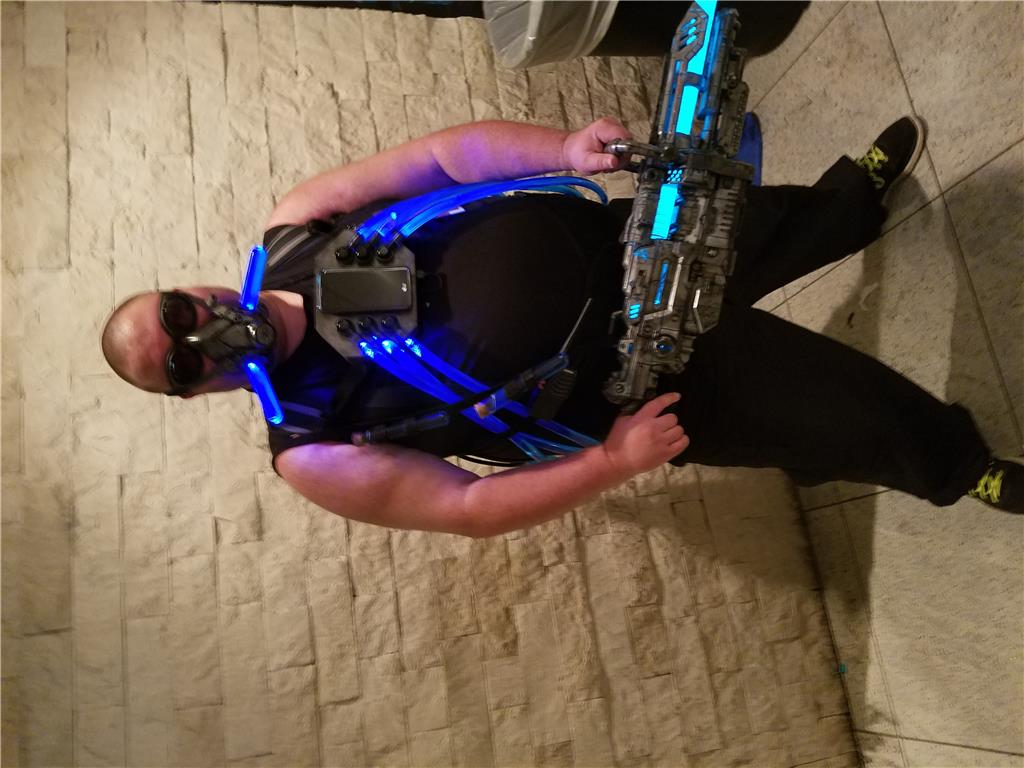
Hey guys I made it to dragoncon and last minute I finished up the App controlled Mt Freeze suite gear. I have hoses filled with blue coolant , leds on each hose. Filled with PC coolant. El wire in the gun wrapped around a piexe of pvc pip and also leds and fluid in the mask that all lights up on command. Here is a quick picture of the suite all together ,I will snap some of the back as well. The phone is on the chest of the suite.

Costume test when first wired up!
Finished gun glowing
Gun has been weathered and assembled with Turnigy 3s 5000 mah battery to pass through a circuit to power the RF inverter for the EL wire. Black paint and hodge podge spray makes everything look rugged. I recommend it for any robot to make it look more realistic!
You should get some ointment for that poison ivy. I bet it itches.
Seriously though, Looks like great fun. I'm not surprised at what you cooked up here. I would have expected nothing less from such a talented guy. You look great and very ominus. eek
realy ince jstarne i like the phone in your chest it look like iron man
but i know your project frezze
That's friggin cool josh