




Community Robot Questions Tuttorial About Talk Servo For Leds PRO Nomad 6R Belgium Asked Aug 2017 — Edited Aug 2018 Resolved by Redzone! 7 Participants EzAng Bobsheaux Redzone JustinRatliff Toyhackrobotics Dave Schulpius Jeremie Tuttorial About Talk Servo For Leds ARC Skip to comments Jump to end hi is there a window for talk servo with led?insteadt of inmoove mouth opens, while talking,but with a led then. Quote Jump to end Upgrade to ARC Pro Stay on the cutting edge of robotics with ARC Pro, guaranteeing that your robot is always ahead of the game. Compare Pro Features View Subscription Plans EzAng PRO USA #89 Aug 2020 Nomad where is his project? Reply Quote Share Nomad 6R PRO Belgium #90 Aug 2020 ezang post #84 see pic. Reply Quote Share EzAng PRO USA #91 Aug 2020 Bobsheaux, in EZ script: when you first open the script, just put a letter in there then delete it, now you are in EZ script and add Or a simple script to turn on and off: code: set the servo speed to 2 or whatever, I use 0 ServoSpeed(d0, 0) :loop Set LED On pwm(d0, 0) wait some time for the pwm to do its ramping thing sleep(1000) #set LED Off pwm(d0, 100) wait some time for the pwm to do its ramping thing sleep(1000) goto(loop) Edit Comment Reply Quote Share EzAng PRO USA #92 Aug 2020 — Edited Aug 2020 I see you have sound servo mic - you need sound servo (PC) EzAng Reply Quote Share Nomad 6R PRO Belgium #93 Aug 2020 ezang you got somethin here. bolt saying sound servo pc ,one says sound servo speakers. Reply Quote Share EzAng PRO USA #94 Aug 2020 — Edited Aug 2020 Here is mine under servo not audio sound servo (PC) Reply Quote Share Nomad 6R PRO Belgium #95 Aug 2020 ezang do you have the latest version ARC ? Reply Quote Share Nomad 6R PRO Belgium #96 Aug 2020 ezang yours is correct . bobsheaux ezang is correct. see sound servo pc in his pic ,post 94 . it chould work now .me bad sorry about that. Reply Quote Share «« « 9 10 11 12 13 14 15 » »» Login to post a comment

PRO Nomad 6R Belgium Asked Aug 2017 — Edited Aug 2018 Resolved by Redzone! 7 Participants EzAng Bobsheaux Redzone JustinRatliff Toyhackrobotics Dave Schulpius Jeremie Tuttorial About Talk Servo For Leds ARC Skip to comments Jump to end hi is there a window for talk servo with led?insteadt of inmoove mouth opens, while talking,but with a led then. Quote Jump to end

EzAng PRO USA #91 Aug 2020 Bobsheaux, in EZ script: when you first open the script, just put a letter in there then delete it, now you are in EZ script and add Or a simple script to turn on and off: code: set the servo speed to 2 or whatever, I use 0 ServoSpeed(d0, 0) :loop Set LED On pwm(d0, 0) wait some time for the pwm to do its ramping thing sleep(1000) #set LED Off pwm(d0, 100) wait some time for the pwm to do its ramping thing sleep(1000) goto(loop) Edit Comment Reply Quote Share
Bobsheaux, in EZ script: when you first open the script, just put a letter in there then delete it, now you are in EZ script and add Or a simple script to turn on and off: code: set the servo speed to 2 or whatever, I use 0 ServoSpeed(d0, 0) :loop Set LED On pwm(d0, 0) wait some time for the pwm to do its ramping thing sleep(1000) #set LED Off pwm(d0, 100) wait some time for the pwm to do its ramping thing sleep(1000) goto(loop) Edit Comment
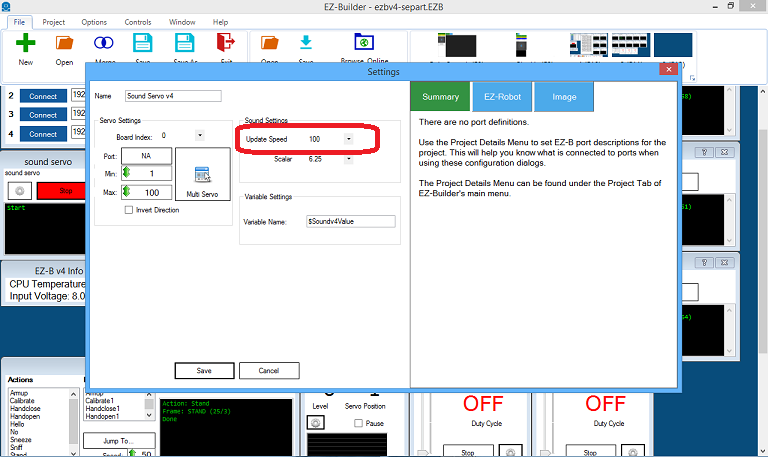
EzAng PRO USA #92 Aug 2020 — Edited Aug 2020 I see you have sound servo mic - you need sound servo (PC) EzAng Reply Quote Share
Nomad 6R PRO Belgium #93 Aug 2020 ezang you got somethin here. bolt saying sound servo pc ,one says sound servo speakers. Reply Quote Share
EzAng PRO USA #94 Aug 2020 — Edited Aug 2020 Here is mine under servo not audio sound servo (PC) Reply Quote Share
Nomad 6R PRO Belgium #96 Aug 2020 ezang yours is correct . bobsheaux ezang is correct. see sound servo pc in his pic ,post 94 . it chould work now .me bad sorry about that. Reply Quote Share
ezang yours is correct . bobsheaux ezang is correct. see sound servo pc in his pic ,post 94 . it chould work now .me bad sorry about that.
Nomad where is his project?
ezang
post #84 see pic.
Bobsheaux, in EZ script: when you first open the script, just put a letter in there then delete it, now you are in EZ script
and add
Or a simple script to turn on and off:
code:
set the servo speed to 2 or whatever, I use 0
ServoSpeed(d0, 0)
:loop
Set LED On
pwm(d0, 0)
wait some time for the pwm to do its ramping thing
sleep(1000)
#set LED Off pwm(d0, 100)
wait some time for the pwm to do its ramping thing
sleep(1000)
goto(loop) Edit Comment
I see you have sound servo mic -
you need sound servo (PC)
EzAng
ezang
you got somethin here. bolt saying sound servo pc ,one says sound servo speakers.
Here is mine under servo not audio
sound servo (PC)
ezang
do you have the latest version ARC ?
ezang
yours is correct .
bobsheaux
ezang is correct. see sound servo pc in his pic ,post 94 . it chould work now .me bad sorry about that.