Community Robot Questions Ez Controller Circuit pranav India Asked Jul 2013 — Edited Jul 2013 9 Participants robotmaker Niek Robot Doc MovieMaker Rich irobot58 Rural Geek DJ Sures Wolfie Ez Controller Circuit ARC Skip to comments Jump to end Hi @DJ, I'm having fun making EZ-Robots... But I was wondering if we can get a circuit diagram of EZ-Board? Quote Jump to end Upgrade to ARC Pro Discover the limitless potential of robot programming with Synthiam ARC Pro – where innovation and creativity meet seamlessly. Compare Pro Features View Subscription Plans DJ Sures PRO Synthiam #17 Jul 2013 You figured out that much, the last one pin is easy you'll get it! Keep trying Reply Quote Share pranav India #18 Jul 2013 Yeah... Thanks for your encouragement @DJ... I'll try to figure it out... Reply Quote Share Niek Netherlands #19 Jul 2013 Pin 13 and 14 are both for the crystal oscillator. This makes sure the EZ-B works at the correct operating frequency. I'm leaving pin 6 to you Reply Quote Share Wolfie Canada #20 Jul 2013 The only pin i cant see listed on that photo is a ground :S but it has been many many years sints ive looked at any chips at all lol Reply Quote Share Robot Doc USA #21 Jul 2013 You have to look close: Reply Quote Share pranav India #22 Jul 2013 Pin 6 ain't Ground... I still couldn't figure it out... @DJ help please... Reply Quote Share Robot Doc USA #23 Jul 2013 No one actually said that pin 6 was ground. The discussion was where was the gnd pin identified. Reply Quote Share Niek Netherlands #24 Jul 2013 @pranav Pin 6 is probably used as T0ckl, now you find out what that is. Reply Quote Share «« « 1 2 3 4 » »» Login to post a comment
pranav India Asked Jul 2013 — Edited Jul 2013 9 Participants robotmaker Niek Robot Doc MovieMaker Rich irobot58 Rural Geek DJ Sures Wolfie Ez Controller Circuit ARC Skip to comments Jump to end Hi @DJ, I'm having fun making EZ-Robots... But I was wondering if we can get a circuit diagram of EZ-Board? Quote Jump to end
DJ Sures PRO Synthiam #17 Jul 2013 You figured out that much, the last one pin is easy you'll get it! Keep trying Reply Quote Share
pranav India #18 Jul 2013 Yeah... Thanks for your encouragement @DJ... I'll try to figure it out... Reply Quote Share
Niek Netherlands #19 Jul 2013 Pin 13 and 14 are both for the crystal oscillator. This makes sure the EZ-B works at the correct operating frequency. I'm leaving pin 6 to you Reply Quote Share
Pin 13 and 14 are both for the crystal oscillator. This makes sure the EZ-B works at the correct operating frequency. I'm leaving pin 6 to you
Wolfie Canada #20 Jul 2013 The only pin i cant see listed on that photo is a ground :S but it has been many many years sints ive looked at any chips at all lol Reply Quote Share
The only pin i cant see listed on that photo is a ground :S but it has been many many years sints ive looked at any chips at all lol
pranav India #22 Jul 2013 Pin 6 ain't Ground... I still couldn't figure it out... @DJ help please... Reply Quote Share
Robot Doc USA #23 Jul 2013 No one actually said that pin 6 was ground. The discussion was where was the gnd pin identified. Reply Quote Share
Niek Netherlands #24 Jul 2013 @pranav Pin 6 is probably used as T0ckl, now you find out what that is. Reply Quote Share











You figured out that much, the last one pin is easy you'll get it! Keep trying
Yeah... Thanks for your encouragement @DJ... I'll try to figure it out...
Pin 13 and 14 are both for the crystal oscillator. This makes sure the EZ-B works at the correct operating frequency.
I'm leaving pin 6 to you
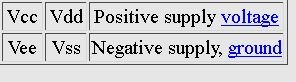
The only pin i cant see listed on that photo is a ground :S but it has been many many years sints ive looked at any chips at all lol
You have to look close:
Pin 6 ain't Ground... I still couldn't figure it out... @DJ help please...
No one actually said that pin 6 was ground. The discussion was where was the gnd pin identified.
@pranav
Pin 6 is probably used as T0ckl, now you find out what that is.