





EZ-B V3 Configuration icon EZ-B V3 Configuration Manage EZ-B hardware settings: edit Bluetooth name and apply updates to restore altered configurations. Try it →
Tutorial
Published — Updated

Control More Than One Robot

Step 6 of 6
Control!

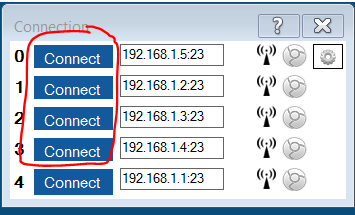
Hey, you're done. All you have to do is press CONNECT on each EZ-B index of the Connection Control. Use the Custom Movement Panel and the robots will all respond to the commands.
User-inserted image

If you want an example of this project, here it is: MultiRobotExample.EZB


ARC Pro

Upgrade to ARC Pro

Synthiam ARC Pro is a new tool that will help unleash your creativity with programming robots in just seconds!