













I believe I know how to do this but I want to confirm. Using an adc port, I would connect the positive to the in on the button and the ground to the signal/receive? yes or no?
Asked
— Edited
 Resolved by Rich!
9 Participants

Hey guys! Sorry to dig up an older post, but I could do with some assistance wiring in a switch too and this one seems totally relevant.
I'm looking to wire in a push-to-make switch on D0 and am having the floating phenomena too. As @DJ points out, if I put my hand anywhere near the wires it sets D0 to "on" in ARC. Am I right in thinking that I should be looking at a pull-up resistor that is wired up like this? confused
By my understanding, this will mean the signal is in a high-state when the switch is open, and low-state when the switch is closed (as the current now flows to ground).
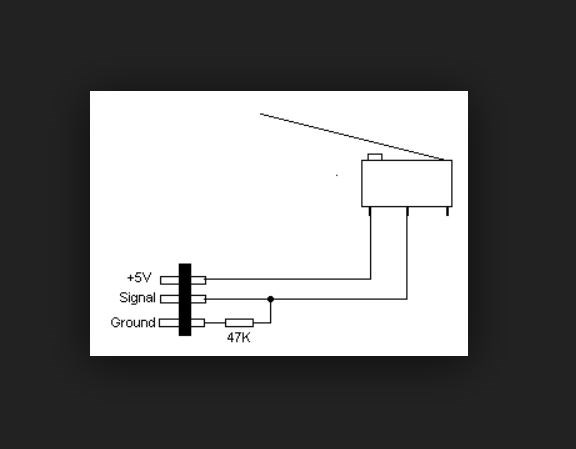
Here's how I wire bump switches to the EZB(4)
Thanks @Robot-Doc. Maybe I need to re-research pull-up and pull-down resistors then! blush Am I right to say the "+5V" on your diagram relates to the middle pin on the EZB? Also, I calculated a 5k ohm resistor so I'm assuming my maths is totally bogus? Cheers
Edit: ... I've just realised you stated EZB v4, sorry I should have mentioned I'm on EZB v3
I wire mine like @Robot-Doc too. Only I tend to use a 1K resister.
If you use an ADC port you could use multiple switches I believe, sort of like this.
V3 same, in fact definitely +5 on the vcc pin. On the v4 it is unregulated pass through from the input voltage.
Alan
Thanks @thetechguru and @JustinRatliff, I think I've cracked it with a 5k resistor
What do you use to see the value and how do you use that to control the robot?
Judging by your question, perhaps you should start by Googling... "what is a robot" and go from there...