




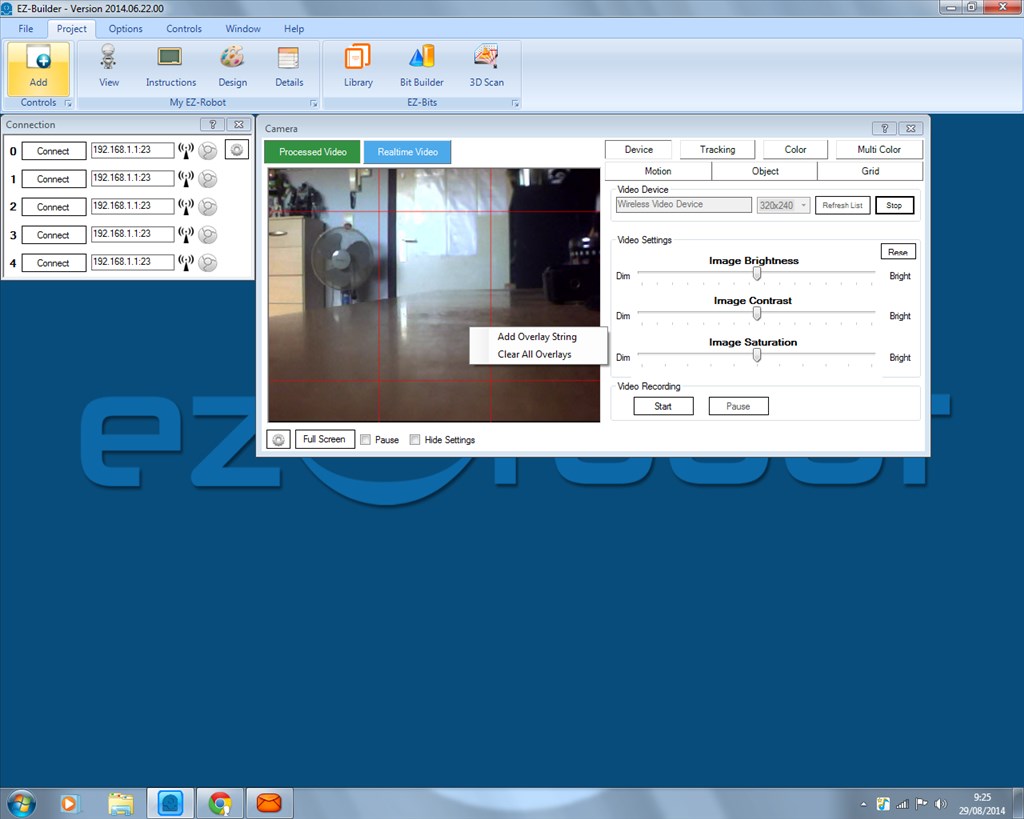
Has anyone else discovered the video overlays in the camera control? I just discovered this and I haven't seen a topic on it so I thought I would post.... While the camera is on, right click on the video image and you can embed a text overlay on the video image itself... Sort of like a HUD... I have in one of my projects a ping distance sensor displayed on the video image...
Dunning-Kruger
Canada
Asked
— Edited
8 Participants

I've had overlays, Melvin has his battery voltage and the time/date overlaid. But you are right, it isn't something which is documented and rarely mentioned.
thats good
Thanks for that. It was something I did not know. It is a neat feature to have.
Neato Burrito! Good find Richard
Can someone provide an example of the code you put into the window so you can for example; overlay real time data, such as the battery voltage of the EZB v4, date and time, ping sensor data?
The overlay uses variables. Your variables may change depending on what scripts you have and if you have changed any settings. To see all variable names add the variable watcher (this is the simplest method, there are others).
Then, for the overlay simply use the variable name i.e. $Hour
Cool love it It also works on v3
One line of code will do that... Here is an example to display the voltage level.... You can add more than one overlay, by the way....