





Morning All
Today I upgraded to the latest software but now all my servos have stopped working. I rebooted both EZ and my laptop and rebuilt my servo controls but I get no response from any of my boards.
Has anyone encountered something similar?
Thanks,
- Scott

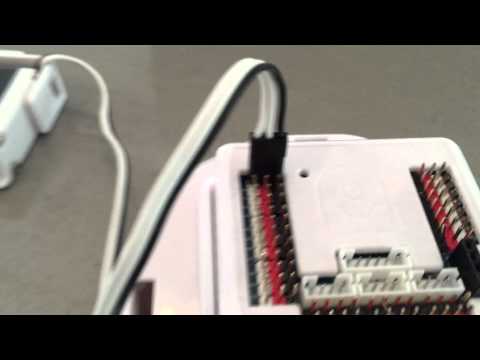
@TechnoPro, there's no issues with ARC. From the image it appears the servo is connected backward.
Maybe @Mulberry changed board #s, so maybe that's why the servo isn't working? Just a guess...
Or, the servo is plugged in backward as the photo shows
@DJ, I agree it does really look like it from the pic... But he does claim he never unplugged the servo between tests..... I was thinking he may of connected from another board # than he did the night before.... ?
Part of my problem has been resolved. I was using two, 3 foot long servo cables to connect my claws to the board. I tried playing with the connections but no signal. So then I decided to try a direct connection without them and voila it worked. These were EBay purchases so lesson learned. Now I just need to find extended cables that are compatible because I need about 3 feet to accommodate my actuator arm movement.
My heavy duty servo still isn't working. I've tried turning the connector as well as different ports but nada. Could be I've damaged this one as well (3 and counting).
mulberry
can you use these,they come from chop here.
extention cable
If you had it plugged in backwards, very likely the servo circuit board is fried. Most do not have diodes to protect from reverse polarity.
Alan
alan
i did one time same fault and indeed the servo was fried. good thing they dont cost much.better a servo then a ezbv4.