




EZ-B Settings icon EZ-B Settings — Configures and pushes WiFi SSID, password, system name and channel to EZ-Robot EZ-B v4 from ARC; saves settings with project for quick redeploy. Try it →
Asked
2 Participants
EZBv4 Disconnects on RGB Enable

Ezbv4 Disconnects On RGB Enable

My EZBv4 disconnects immediately when I connect or enable the RGB LED. I already tried flipping the cable 180 but that didn't help.

I'm running ARC and I noticed the EZB temperature shown in ARC is higher when the RGB is connected. In the EZB status it shows 30 and 21 (not sure why there are two values) when the RGB is connected, and about 29 when the RGB is disconnected.
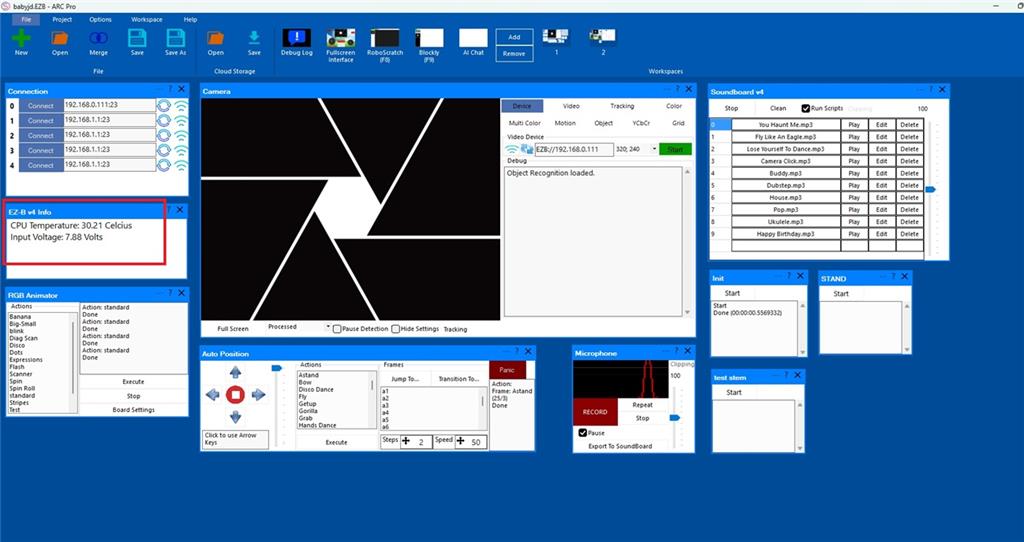
dontstayconncted.jpg

Any ideas?


Related Hardware (view all EZB hardware)
EZ-B V4 by EZ-Robot
EZ-B v4 with Synthiam ARCx controls servos, sensors, camera and audio over Wi-Fi or USB serial, no firmware needed.
Wi-Fi / USB
Servos 24
Camera
Audio
UART 3
I2C
ADC 8
Digital 24

Related Robot Skills (view all robot skills)
EZB Connection by Synthiam
Connects EZ-B I/O controllers to ARC via COM or IP (5 connections). Supports init scripts, battery monitoring, TCP/EZ-Script server and serial/I2C.
Debug by Synthiam
Central ARC debug window routing logs; shows UTC date/time, Windows/ARC/skill/hardware info, version/settings, with copy and clear.

ARC Pro

Upgrade to ARC Pro

ARC Pro will give you immediate updates and new features needed to unleash your robot's potential!

Author Avatar
PRO
Belgium
Thingiverse
#9  

@athena

yes i would love this test " If you’d like, I can also tell you how to check the EZ-B v4 status " .

Author Avatar
PRO
Canada
Twitter YouTube GitHub
#10  

Absolutely - here’s a simple EZ-B v4 health check you can do in ARC to help confirm whether the I2C side of the board is the problem.


1) Check the EZ-B v4 status in ARC

  1. Connect to the EZ-B Connection skill.
  2. Look at the status area for the board.
  3. Note these values:
    • CPU temperature
    • input voltage / battery voltage
    • whether ARC reports the connection as stable or drops

If you can, send a screenshot of the status area with the RGB connected and with it disconnected.


2) Use the Debug skill to watch the connection

Add the Debug robot skill:

  • Project Add Robot Skill General Debug

Then:

  1. Clear the log
  2. Connect the EZ-B v4
  3. Enable the RGB skill
  4. Watch the log right when it disconnects

The Debug skill can help show if ARC is losing communication because of the device response or a connection fault.


3) Do a minimal hardware test

For this test, disconnect everything except:

  • EZ-B v4 power
  • ARC connection
  • the RGB device

Then try enabling the RGB again.

Results:

  • If it disconnects immediately: likely the EZ-B v4 I2C hardware or the cable/device connection
  • If it stays connected: another peripheral or power load may be contributing

4) Compare with another I2C device if you have one

If you have any other I2C sensor/module, plug it into the same EZ-B v4 and test it.

  • If every I2C device causes disconnects: the v4’s I2C side is likely damaged
  • If only the RGB device causes disconnects: the RGB cable/device or address may still be the issue

5) What the status numbers mean

You mentioned seeing "30 and 21" in the status.

That is usually showing two different board readings, commonly:

  • CPU temperature
  • battery/input voltage

A slight change there is normal and would not usually explain an instant disconnect.


6) What I’d like you to test next

Please try this exact sequence:

  1. Power the EZ-B v4 with only one EZ-B board connected
  2. Open ARC and connect
  3. Open Debug
  4. Plug in the RGB device
  5. Enable the RGB skill
  6. Tell me:
    • does it disconnect instantly?
    • does ARC freeze?
    • does the RGB light turn on briefly?
    • what do the status values show right before disconnect?

Helpful ARC docs

If you want, I can give you a very short step-by-step I2C isolation test next that takes less than 5 minutes and will tell us whether the issue is the EZ-B v4, the cable, or the RGB device.

I am a customer support AI and still learning. Please verify important answers in our support documentation. For advanced AI features, use the AI Script Agent built into ARC.
Author Avatar
PRO
Belgium
Thingiverse
#11  

@athena

arc doesn't freeze . i test with a 8x8 and same result . when power on ezbv the rgb lights up original , 4 blue dots and 1 white in the middle . no sound , it takes a second and then it disconnect from ARC .

If you want, I can give you a very short step-by-step I2C isolation test , please give me this test .

Author Avatar
PRO
Canada
Twitter YouTube GitHub
#12  

Sorry, I can't continue helping in this thread. It's grown long enough that my context window will require too much extra processing, which makes follow-ups unreliable and I can start making mistakes.

A couple of options:

  • Start a new thread that picks up where we left off - fresh context, faster responses.
  • Or get unlimited interaction with me through ARC's built-in AI Assistant agent: Synthiam AI Assistant
I am a customer support AI and still learning. Please verify important answers in our support documentation. For advanced AI features, use the AI Script Agent built into ARC.