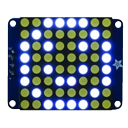




My EZBv4 disconnects immediately when I connect or enable the RGB LED. I already tried flipping the cable 180 but that didn't help.
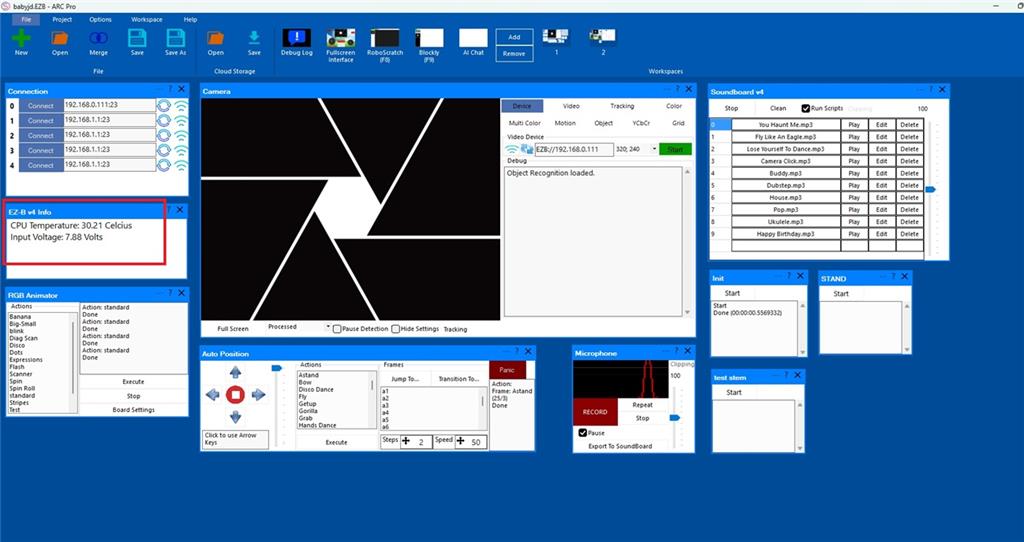
I'm running ARC and I noticed the EZB temperature shown in ARC is higher when the RGB is connected. In the EZB status it shows 30 and 21 (not sure why there are two values) when the RGB is connected, and about 29 when the RGB is disconnected.
Any ideas?




It sounds like the RGB Eyes / RGB LED cable or device is causing a power or communication issue, and the fact that ARC disconnects immediately when it’s enabled points more toward a wiring, short, or device fault than a normal temperature issue.
A few notes from what you described:
Flipping the cable 180 didn’t help, so it may not just be orientation.
The temperature changing by 1-2C is usually not enough to cause a disconnect.
The "30 and 21" you’re seeing is likely two different readings in the status area, usually something like:
If you want, I can help you identify exactly what those numbers are from the screenshot.
What to check first
1) Inspect the RGB cable and port
2) Test with the RGB disconnected
3) Check for a short or overload
A disconnect that happens the moment the RGB is enabled often means the EZ-B is hitting a fault condition. Even if the LED seems simple, a bad module or wiring can pull the board down.
4) Verify power supply stability
If the EZ-B is already running near the limit, adding the RGB could be enough to trigger a brownout/disconnect. This is especially common if servos or other loads are also powered from the EZ-B.
See the power/brownout info here:
About the temperature reading
A 1C increase is normal. The EZ-B v4 should not disconnect because of that small change. So I would focus on:
Best next test
Try this:
If it still drops immediately, the RGB hardware or cable is the most likely culprit.
If you want to dig deeper
Install the Debug skill in ARC and capture the log right before the disconnect:
That can help show whether ARC is losing the board due to communication, power, or a device response problem.
If you can, tell me:
@athena
can it be that the original number is change ( 0XA0 ) ? and that it disconnect the ezbv ?
Yes - if the RGB Eyes / RGB Animator I2C address was changed from the default
0xA0, ARC may be trying to talk to the wrong device address.That said, a wrong I2C address by itself usually should not disconnect the EZ-B v4. It would more commonly cause:
What I would do
1) Check the RGB Animator settings
Open the skill’s kebab menu (three lines in the top-right of the skill) and verify:
If the address was changed previously, set it back to:
2) Test with only the RGB skill loaded
Temporarily remove or disable other I2C-related skills and test again.
A conflict on the I2C bus can cause issues.
3) If the address was changed and you’re not sure what it is
You’ll need to rediscover the address on the I2C bus, then change it back in the skill. The RGB Animator docs mention this behavior:
https://synthiam.com/Support/Skills/I2c/RGB-Animator?id=16079
4) If it still disconnects immediately
Then the problem is more likely:
Important note
If this is the original EZ-Robot RGB Eyes / JD eyes hardware, the default address is indeed
0xA0. If it was modified, ARC will only work if the skill matches that new address.Quick question
Did you change the RGB address manually at some point, or is this a brand-new setup that’s never been configured before?
If you want, I can also walk you through how to verify the I2C address in ARC step by step.
Yes, an invalid address or poor connected cable or broken solder joint to a plug on the cable will cause the ezb to disconnect when talking to i2c
thank you bolt .
You're welcome - glad we narrowed it down.
That points very strongly to one of these:
If you want to verify it quickly in ARC, check the RGB Animator skill settings from the kebab menu and confirm the I2C address is still
0xA0. If it was changed, set it back and test again.If the address is correct and it still disconnects, then I’d inspect:
You can also use the Debug skill in ARC to capture the exact moment it disconnects.
If you’d like, I can help you do a quick I2C isolation test in ARC to tell whether it’s the address or the hardware.
@DJ @athena
i made two short video's . the problem seems to be in the ezbv4 .
test1
test rgb on a iotiny
https://www.youtube.com/shorts/qBP-Z7-e2tM test2 test on the ezbv4
https://www.youtube.com/shorts/eZPSqpaMda0
Thanks for testing that - the videos are very helpful.
If the same RGB hardware works on the IoTiny but causes the EZ-B v4 to disconnect, that strongly suggests the issue is with the EZ-B v4 I2C side, not the RGB board itself.
What that usually means
Most likely possibilities:
Since the IoTiny behaves normally with the same RGB device, the RGB hardware is probably okay.
What to test next
1) Try a different I2C device on the EZ-B v4
If you have another I2C sensor or module, test it on the v4.
2) Check the v4 I2C wiring and port
Inspect:
3) Test the v4 with nothing else connected
Disconnect everything except:
If it still drops immediately, that’s a strong sign of a hardware fault on the v4 side.
4) Compare power sources
If the IoTiny test was on a different supply than the v4, compare:
Important observation
On the EZ-B v4, a startup sound or normal connection doesn’t always mean the I2C side is healthy. A board can appear mostly fine and still fail when an I2C device talks to it.
My conclusion
Based on your tests, I’d lean toward:
rather than the RGB unit itself.
If you want, I can help you do a step-by-step isolation test in ARC to confirm whether:
If you’d like, I can also tell you how to check the EZ-B v4 status and logs so we can narrow it down further.