
Change Release Notes
- BLOCKLY and SYNTAX script edit modes (read below)
- added GetServo for blockly
- fix for camera tracking in blockly
- fix for Blockly power() function in math function
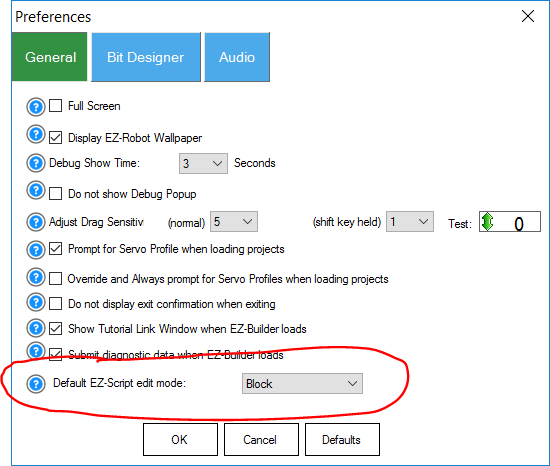
- allow selecting the default editor mode (block or syntax programming when editing scripts)
- all camera rotation options supported (mobileapp rotation is limited to what is specified in the blue question mark help)
- fixed RoboScratch Say and SayWait
- added RoboScratch WaitForSpeech
- blockly loop forever function
- bug fixes for the Blockly EZ-Script editor
- WaitForSpeech() displays the Confidence value when detected before closing
- WaitForSpeech() uses a mininum Confidence value that can be selected in the TOP MENU -> OPTIONS -> PREFERENCES
- Blockly fix for Repeat X Times
- Blockly has a longer WaitForSpeech timeout (10 seconds vs 5 seconds)
All script edits now default to Blockly mode, if there is not already a script. You can change the default behavior in the TOP MENU -> OPTIONS -> PREFERENCES -> DEFAULT EDITOR.
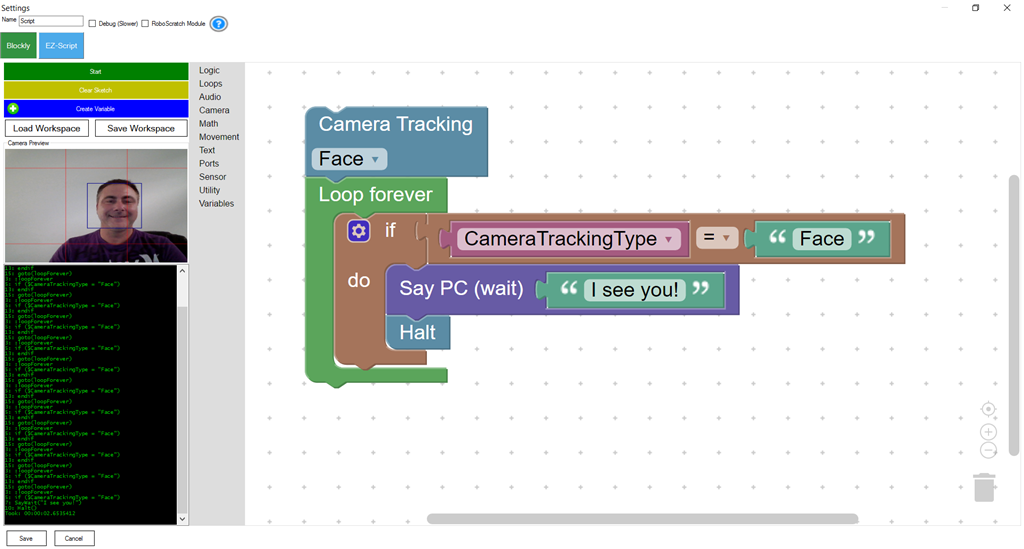
Code is generated for the new Blockly script edit forms as well...
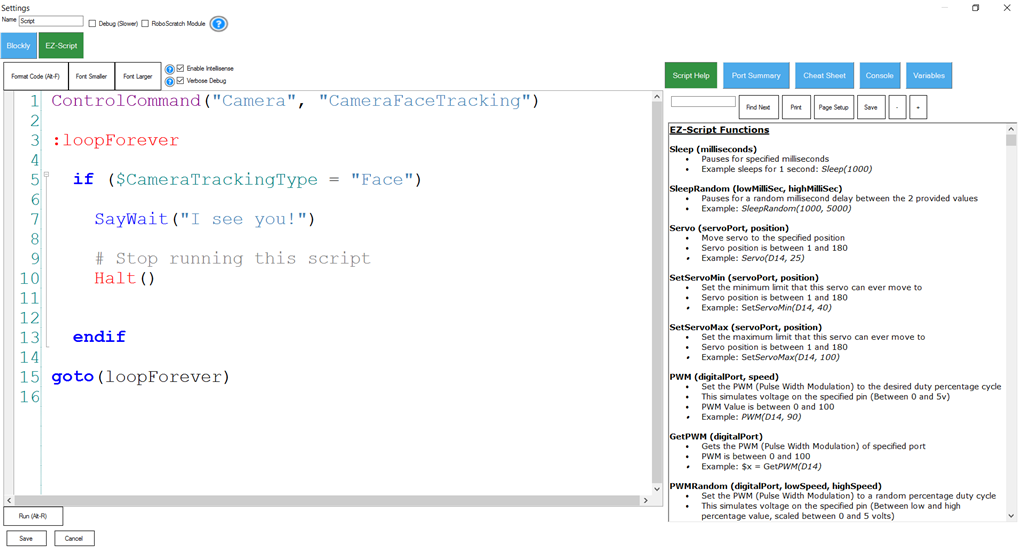
You can change the default behavior in the TOP MENU -> OPTIONS -> PREFERENCES -> DEFAULT EDITOR.
The last edited mode will be restored when editing the script in the future.
ARC Downloads
ARC
FREE- 1 third-party plugin skill per project
- Trial cloud services
- Personal, DIY & education use
- Updated every 6–12 months
 Download
ARC
PRO- Includes ARCx for Windows, Linux & Pi — built for enterprise & industry
- Use on 2+ PCs simultaneously
- Unlimited robot skills
- Cloud backup & revision history
- Weekly features & bug fixes
- Business use permitted
ARC
RUNTIME- Load & run any ARC project
- Read-only mode
- Unlimited robot skills
- Includes early access fixes & features
- Minimum requirements: Windows 10 or higher, 2 GB RAM, 500 MB free disk space.
- Recommended: Windows 10 or higher, 8 GB RAM, 1 GB free disk space.
- Prices are in USD.
- More about each edition: Download & install guide.
- Latest changes: Release notes.
Compare Editions
| Feature |
ARC
FREE
|
ARC
PRO
|
|---|---|---|
| Get ARC Free | View Plans | |
| Usage | Personal · DIY · Education | Personal · DIY · Education · Business |
| Early access to new features & fixes | — | ✓ |
| Simultaneous microcontroller connections * | 1 | 255 |
| Robot skills * | 20 | Unlimited |
| Skill Store plugins * | 1 | Unlimited |
| Cognitive services usage ** | 10 / day | 6,000 / day |
| Auto-positions gait actions * | 40 | Unlimited |
| Speech recognition phrases * | 10 | Unlimited |
| Camera devices * | 1 | Unlimited |
| Vision resolution | max 320×240 | Unlimited |
| Interface builder * | 2 | Unlimited |
| Cloud project size | — | 128 MB |
| Cloud project revision history | — | ✓ |
| Create Exosphere requests | — | 50 / month |
| Exosphere API access | — | Contact Us |
| Volume license discounts | — | Contact Us |
| Get ARC Free | View Plans |
* Per robot project
** 1,000 per cognitive type: vision recognition, speech recognition, face detection, sentiment, text recognition, emotion detection, azure text to speech

Upgrade to ARC Pro
Experience early access to the latest features and updates. You'll have everything that is needed to unleash your robot's potential.
last button is wait for glyph
version shown when opening is 2017.01.16.01
running windows 10 -downloaded your new down file ran the update, it only wanted to update/repair. SO, I deleted the ARC program, and then downloaded/ran the new update file. Got result above.
I am out of ideas?
@DJ... I am getting the same as Eagle218... Current version of ARC (16.01)... went to the cloud downloaded current JD.EZB file... last button is wait for glyph. Nothing afterwards. However, I don't use RoboScratch so I could be missing a step here...
That's super strange. The project has nothing to do with the wait for speech bubble, and it displays on my pcs. I'll reupload a new build and maybe it's a corrupt file in the installer. Something like this has happened in the past once or twice we have experienced.
I'll upload a new build later this afternoon.
I re-compiled and uploaded a new build. This thread title has been renamed with the new build to reflect version. There are no changes to this build, other than a recompile.
OK, got the "wait for speech" button on the bottom of the list, thx
Confirmed....