Change Release Notes
This release introduces two new features which have been occasionally popping up in the community.
New EZ-Script command: WaitForChange()
New EZ-Script command: Pause()
New ControlCommand: Resume
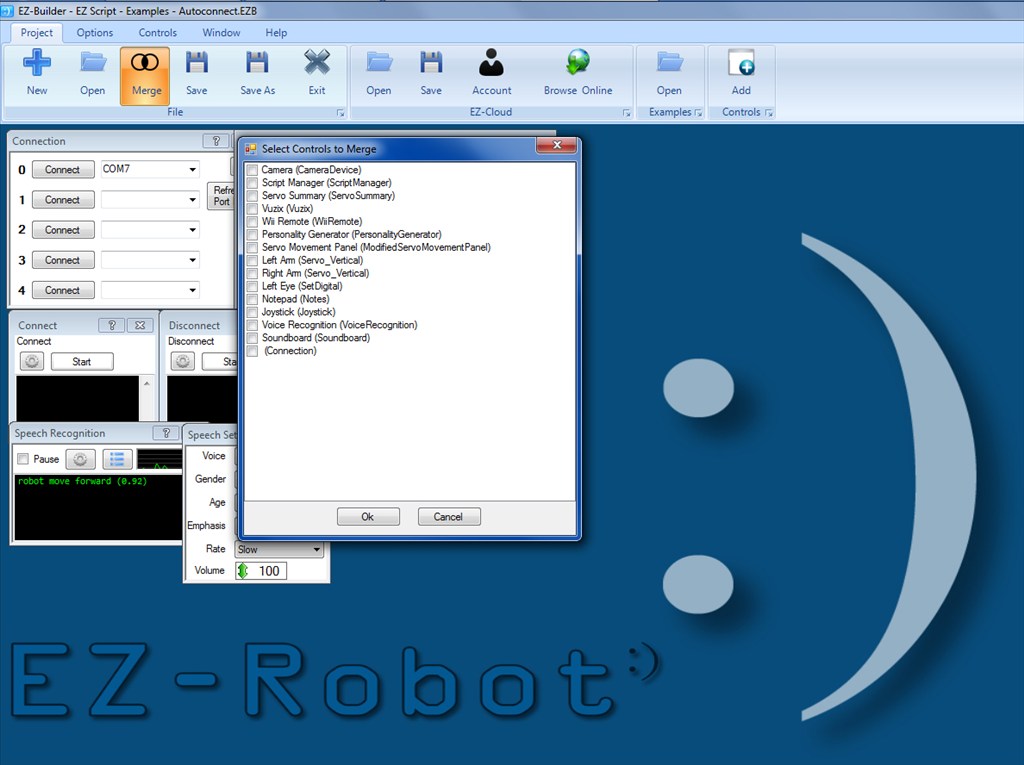
New feature "Merge" to merge two projects together
New project examples for WaitForChange and Pause/Resume
ARC Downloads
ARC
FREE
$0
always free
- 1 third-party plugin skill per project
- Trial cloud services
- Personal, DIY & education use
- Updated every 6–12 months
 Download
Recommended
ARC
PRO
$8.99
per month
- Use on 2+ PCs simultaneously
- Unlimited robot skills
- Cloud backup & revision history
- Weekly features & bug fixes
- Business use permitted
ARC
RUNTIME
$0
always free
- Load & run any ARC project
- Read-only mode
- Unlimited robot skills
- Includes early access fixes & features
- Minimum requirements: Windows 10 or higher, 2 GB RAM, 500 MB free disk space.
- Recommended: Windows 10 or higher, 8 GB RAM, 1 GB free disk space.
- Prices are in USD.
- More about each edition: Download & install guide.
- Latest changes: Release notes.
Compare Editions
| Feature |
ARC
FREE
|
ARC
PRO
|
|---|---|---|
| Get ARC Free | View Plans | |
| Usage | Personal · DIY · Education | Personal · DIY · Education · Business |
| Early access to new features & fixes | — | ✓ |
| Simultaneous microcontroller connections * | 1 | 255 |
| Robot skills * | 20 | Unlimited |
| Skill Store plugins * | 1 | Unlimited |
| Cognitive services usage ** | 10 / day | 6,000 / day |
| Auto-positions gait actions * | 40 | Unlimited |
| Speech recognition phrases * | 10 | Unlimited |
| Camera devices * | 1 | Unlimited |
| Vision resolution | max 320×240 | Unlimited |
| Interface builder * | 2 | Unlimited |
| Cloud project size | — | 128 MB |
| Cloud project revision history | — | ✓ |
| Create Exosphere requests | — | 50 / month |
| Exosphere API access | — | Contact Us |
| Volume license discounts | — | Contact Us |
| Get ARC Free | View Plans |
* Per robot project
** 1,000 per cognitive type: vision recognition, speech recognition, face detection, sentiment, text recognition, emotion detection, azure text to speech

Upgrade to ARC Pro
Harnessing the power of ARC Pro, your robot can be more than just a simple automated machine.
I was getting ready to suggest an "import" function for EZ-Scripts but merge is one better I can see it being used a lot for EZ-Scripts. Awesome addition.
And the pause and WaitForChange commands give a new way for scripting, one which makes it easier in some cases.
Brilliant work!
As always awesome Dj, yesterday dreamed something to import controls from one project to another and now I find that it's done, great. Mmmmm, I like to pause and resume command again, thanks!
i got update now, but when open my ex project its not loading everything. all my boxs are gone but it does shows everything at the top page wierd eek @dj
Try clicking auto arrange, you may be suffering from the scrolling problem that happens to some people on occasion.
Csa459,
Make sure ARC is opening your project and not it's default (starting) and empty project. This happened to me a couple times when I moved my .EZB project to a different folder location. Then when I updated I just let the installer install the new update to it's default location. The result was a new .EZB file in one location and my .EZB project file in the other. When ARC opens it starts the new EZB file it made at the update.
no try all those thing its not load , i roll back to last update it works just fine ,now try auto most things are gone
can you increase the servo accuracy
@csa459 Or try starting a new project, using merge to bring in all old controls from the project that's playing up - assuming they are shown in the merge dialogue.