


 Resolved by
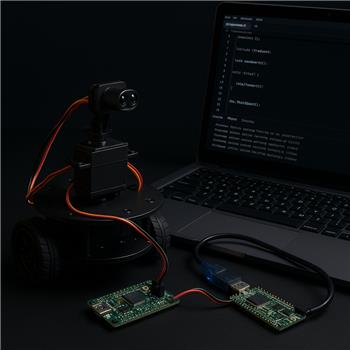
Hi @Athena,
Below are the files IR_TRACKERv4.1.ino, IR_TRACKERv4.1.h, and IR_TRACKERv4.1.cpp, plus the compilation warning I get when attempting to compile. Also included is the ARC UART script I use on the PC side (ARC Script robot skill + COM Connection Robot Skill).
For context: this is a Teensy 4.1 firmware sketch that uses Serial8 (TX8 = pin 35, RX8 = pin 34) to communicate over a PC COM port (e.g., COM3) with ARC. The Teensy is connected directly to the PC via USB serial (COM port), and ARC on the PC opens that COM port with a Script robot skill (not via an EZB). I’m asking two things:
- Can you rewrite the Teensy code to correct the compilation warning shown below?
- Can you make a v4.2 that cleans things up by splitting the parser into a dedicated packet handler and providing a proper ARC project setup (Script skill + COM Connection Robot Skill)? If possible, please include the Script skill code and a description of the ARC Robot Skills configuration.
IR_TRACKERv4.1.ino
#include "IR_TRACKERv4.1.h"

void setup() {
  setupTracker();
}

void loop() {
  loopTracker();
}
IR_TRACKERv4.1.h
#pragma once

#include <Arduino.h>
#include <Servo.h>

enum TrackerState {
  NEG_SEARCH_INIT,
  NEG_SEARCH_FINAL,
  POS_SEARCH_INIT,
  POS_SEARCH_FINAL,
  TRACKER_STOPPED
};

// -------------------- PINS --------------------
static const uint8_t SERVO_PIN = 29;
static const uint8_t IR_PIN = A14;

// Teensy 4.1 UART8 pins:
// TX8 = pin 35
// RX8 = pin 34

// -------------------- servo CALIBRATION --------------------
static const int SERVO_MIN_ANGLE = 5;
static const int SERVO_MAX_ANGLE = 175;
static const int SERVO_MIN_PULSE = 500;
static const int SERVO_MAX_PULSE = 2500;

// -------------------- BEHAVIOR --------------------
static const int DESIRED_BEARING = 90;
static const int STEP_DELTA = 1;
static const int RUNAWAY_MARGIN = 20;
static const int RESET_DELAY_MS = 20;
static const int SETTLE_DELAY_MS = 30;

// -------------------- IR --------------------
static const int IR_THRESHOLD = 15;
static const int IR_SMOOTH_SAMPLES = 8;
static const int ADC_MAX_RAW = 4095;

// -------------------- LIMITS --------------------
static const long NEG_OBS_MAX = 2000;
static const long POS_OBS_MAX = 2000;

// -------------------- UART --------------------
static const unsigned long EZB_BAUD = 115200;

// Packet format:
// $BEARING,123*hh
// $COUNT,18*hh
// $STOP*hh

extern servo trackingServo;

extern TrackerState state;
extern int desiredBearing;
extern int roundedBearing;
extern int actualBearing;
extern int bearing;
extern int negInit;
extern int negFinal;
extern int posInit;
extern int posFinal;
extern long negObsTot;
extern long posObsTot;
extern int bearingCount;
extern int runawayCount;
extern int negAbortLimit;
extern int posAbortLimit;
extern bool stopRequested;
extern bool startRequested;

void setupTracker();
void loopTracker();

void beginNegSweep();
void beginPosSweep();

void doNegSearchInit();
void doNegSearchFinal();
void doPosSearchInit();
void doPosSearchFinal();

void handleSerialCommand(const String& cmd);
void pollSerial();

void sendToEZB(const String& msg);
void sendBearingUpdate();
void sendBearingCount();

void stopNow(const char* reason);

int normalizeIRTo255(int raw);
int readIRSmooth();
int clampServoAngle(int angle);
void setServoBearing(int angle);
int readServo();

void publishBearing(int candidate);
void updateBearingFromInitEdges();
void updateBearingFromFinalEdges();
void handleRunaway();
void processTrackerState();
IR_TRACKERv4.1.cpp
#include "IR_TRACKERv4.1.h"

Servo trackingServo;

TrackerState state = NEG_SEARCH_INIT;
int desiredBearing = DESIRED_BEARING;
int roundedBearing = DESIRED_BEARING;
int actualBearing = DESIRED_BEARING;
int bearing = DESIRED_BEARING;
int negInit = -1;
int negFinal = -1;
int posInit = -1;
int posFinal = -1;
long negObsTot = 0;
long posObsTot = 0;
int bearingCount = 0;
int runawayCount = 0;
int negAbortLimit = 0;
int posAbortLimit = 0;
bool stopRequested = false;
bool startRequested = false;

static int irSamples[IR_SMOOTH_SAMPLES];
static int irSampleIndex = 0;
static bool irInitialized = false;
static String serialLine;
static unsigned long lastDebugMs = 0;

static int lastActualBearing = -1;
static int lastPublishedBearing = -1;
static int prevLastPublishedBearing = -1;

static int clampAngle(int angle) {
  return constrain(angle, SERVO_MIN_ANGLE, SERVO_MAX_ANGLE);
}

int clampServoAngle(int angle) {
  return clampAngle(angle);
}

void setServoBearing(int angle) {
  bearing = clampAngle(angle);
  trackingServo.write(bearing);
}

int readServo() {
  return bearing;
}

int normalizeIRTo255(int raw) {
  raw = constrain(raw, 0, ADC_MAX_RAW);
  return map(raw, 0, ADC_MAX_RAW, 0, 255);
}

int readIRSmooth() {
  int raw = analogRead(IR_PIN);

  if (!irInitialized) {
    for (int i = 0; i < IR_SMOOTH_SAMPLES; i++) {
      irSamples[i] = raw;
    }
    irInitialized = true;
  }

  irSamples[irSampleIndex] = raw;
  irSampleIndex = (irSampleIndex + 1) % IR_SMOOTH_SAMPLES;

  long sum = 0;
  for (int i = 0; i < IR_SMOOTH_SAMPLES; i++) {
    sum += irSamples[i];
  }

  return (int)(sum / IR_SMOOTH_SAMPLES);
}

static uint8_t simpleChecksum(const String& payload) {
  uint8_t sum = 0;
  for (unsigned int i = 0; i < payload.length(); i++) {
    sum ^= (uint8_t)payload[i];
  }
  return sum;
}

static String toHex2(uint8_t value) {
  const char* hex = "0123456789ABCDEF";
  String out;
  out += hex[(value >> 4) & 0x0F];
  out += hex[value & 0x0F];
  return out;
}

static bool validatePacket(const String& packet, String& payloadOut) {
  if (packet.length() < 5) return false;
  if (packet.charAt(0) != '$') return false;

  int star = packet.lastIndexOf('*');
  if (star < 0 || star + 2 >= packet.length()) return false;

  String payload = packet.substring(1, star);
  String checksumText = packet.substring(star + 1, star + 3);

  uint8_t received = (uint8_t)strtol(checksumText.c_str(), nullptr, 16);
  uint8_t computed = simpleChecksum(payload);

  if (received != computed) return false;

  payloadOut = payload;
  return true;
}

void sendToEZB(const String& msg) {
  uint8_t chk = simpleChecksum(msg);
  Serial8.print('$');
  Serial8.print(msg);
  Serial8.print('*');
  Serial8.print(toHex2(chk));
  Serial8.print('\n');
}

void sendBearingUpdate() {
  sendToEZB("BEARING," + String(actualBearing));
}

void sendBearingCount() {
  sendToEZB("COUNT," + String(bearingCount));
}

void publishBearing(int candidate) {
  roundedBearing = candidate;

  if (roundedBearing == lastActualBearing) {
    if (roundedBearing != lastPublishedBearing && roundedBearing != prevLastPublishedBearing) {
      prevLastPublishedBearing = lastPublishedBearing;
      lastPublishedBearing = roundedBearing;
      actualBearing = roundedBearing;
      Serial.print("actualBearing: ");
      Serial.println(actualBearing);
      sendBearingUpdate();
    }
  } else {
    lastActualBearing = roundedBearing;
  }
}

void updateBearingFromInitEdges() {
  if (negInit >= 0 && posInit >= 0) {
    int candidate = (negInit + posInit) / 2;
    bearingCount++;
    publishBearing(candidate);
    Serial.print("bearingCount: ");
    Serial.println(bearingCount);
  }
}

void updateBearingFromFinalEdges() {
  if (negFinal >= 0 && posFinal >= 0) {
    int candidate = (negFinal + posFinal) / 2;
    bearingCount++;
    publishBearing(candidate);
    Serial.print("bearingCount: ");
    Serial.println(bearingCount);
  }
}

void stopNow(const char* reason) {
  Serial.print("STOP: ");
  Serial.println(reason);
  setServoBearing(roundedBearing);
  delay(RESET_DELAY_MS);
  sendToEZB("STOP");
  sendBearingCount();
  stopRequested = true;
  state = TRACKER_STOPPED;
}

void beginNegSweep() {
  delay(SETTLE_DELAY_MS);
  setServoBearing(roundedBearing);
  delay(RESET_DELAY_MS);

  if (negObsTot > NEG_OBS_MAX) {
    Serial.print("NEG OBS total exceeded max: ");
    Serial.println(negObsTot);
    stopNow("NEG OBS total exceeded max");
    return;
  }

  if (posObsTot > POS_OBS_MAX) {
    Serial.print("POS OBS total exceeded max: ");
    Serial.println(posObsTot);
    stopNow("POS OBS total exceeded max");
    return;
  }

  negObsTot = 0;
  posObsTot = 0;
  negInit = -1;
  negFinal = -1;
  negAbortLimit = roundedBearing - RUNAWAY_MARGIN;
  state = NEG_SEARCH_INIT;
}

void beginPosSweep() {
  delay(SETTLE_DELAY_MS);
  setServoBearing(roundedBearing);
  delay(RESET_DELAY_MS);

  posInit = -1;
  posFinal = -1;
  posAbortLimit = roundedBearing + RUNAWAY_MARGIN;
  state = POS_SEARCH_INIT;
}

void handleRunaway() {
  runawayCount++;
  Serial.print("runawayCount: ");
  Serial.println(runawayCount);

  delay(SETTLE_DELAY_MS);
  setServoBearing(roundedBearing);
  delay(RESET_DELAY_MS);

  if (state == NEG_SEARCH_INIT) {
    beginPosSweep();
    Serial.println("POS SWEEP");
  } else {
    beginNegSweep();
    Serial.println("NEG SWEEP");
  }

  if (runawayCount >= 3) {
    stopNow("Runaway limit reached");
    return;
  }
}

void doNegSearchInit() {
  int current = readServo();
  int irRaw = readIRSmooth();
  int irNorm = normalizeIRTo255(irRaw);

  bool reflectorDetected = (irNorm >= IR_THRESHOLD);

  if (current < 0) {
    handleRunaway();
    return;
  }

  if (reflectorDetected) {
    negFinal = current;
    updateBearingFromFinalEdges();
    state = POS_SEARCH_INIT;
  } else {
    int next = current - STEP_DELTA;
    setServoBearing(next);
    delay(SETTLE_DELAY_MS);
  }
}

void doNegSearchFinal() {
  int current = readServo();
  int irRaw = readIRSmooth();
  int irNorm = normalizeIRTo255(irRaw);

  bool reflectorDetected = (irNorm >= IR_THRESHOLD);

  if (reflectorDetected) {
    negFinal = current;
    updateBearingFromFinalEdges();
    state = NEG_SEARCH_INIT;
  } else {
    int next = current - STEP_DELTA;
    setServoBearing(next);
    delay(SETTLE_DELAY_MS);
  }
}

void doPosSearchInit() {
  int current = readServo();
  int irRaw = readIRSmooth();
  int irNorm = normalizeIRTo255(irRaw);

  bool reflectorDetected = (irNorm >= IR_THRESHOLD);

  if (current > posAbortLimit) {
    handleRunaway();
    return;
  }

  if (reflectorDetected) {
    posInit = current;
    updateBearingFromInitEdges();
    state = POS_SEARCH_FINAL;
  } else {
    int next = current + STEP_DELTA;
    setServoBearing(next);
    delay(SETTLE_DELAY_MS);
  }
}

void doPosSearchFinal() {
  int current = readServo();
  int irRaw = readIRSmooth();
  int irNorm = normalizeIRTo255(irRaw);

  bool reflectorDetected = (irNorm >= IR_THRESHOLD);

  if (current > posAbortLimit) {
    handleRunaway();
    return;
  }

  if (reflectorDetected) {
    posFinal = current;
    updateBearingFromFinalEdges();
    state = NEG_SEARCH_INIT;
  } else {
    int next = current + STEP_DELTA;
    setServoBearing(next);
    delay(SETTLE_DELAY_MS);
  }
}

void handleSerialCommand(const String& cmd) {
  String s = cmd;
  s.trim();
  s.toUpperCase();

  if (s == "START") {
    startRequested = true;
    stopRequested = false;
    Serial.println("START OK");
    return;
  }

  if (s == "STOP") {
    stopNow("Serial STOP");
    return;
  }

  if (s.startsWith("BEARING,")) {
    int value = s.substring(8).toInt();
    roundedBearing = clampServoAngle(value);
    setServoBearing(roundedBearing);
    Serial.print("BEARING SET ");
    Serial.println(roundedBearing);
    return;
  }

  if (s.startsWith("COUNT,")) {
    int value = s.substring(6).toInt();
    bearingCount = value;
    Serial.print("COUNT SET ");
    Serial.println(bearingCount);
    return;
  }

  if (s == "BEARING?") {
    sendBearingUpdate();
    return;
  }

  if (s == "COUNT?") {
    sendBearingCount();
    return;
  }

  Serial.print("Unknown cmd: ");
  Serial.println(s);
}

void pollSerial() {
  static bool inPacket = false;
  static String packet;
  static unsigned long packetStartMs = 0;

  while (Serial8.available() > 0) {
    char c = (char)Serial8.read();

    if (!inPacket) {
      if (c == '$') {
        inPacket = true;
        packet = "$";
        packetStartMs = millis();
      }
      continue;
    }

    if (millis() - packetStartMs > 200) {
      inPacket = false;
      packet = "";
      Serial.println("Packet timeout/reset");
      continue;
    }

    packet += c;

    if (c == '\n') {
      String payload;
      if (validatePacket(packet, payload)) {
        handleSerialCommand(payload);
      } else {
        Serial.print("Bad packet: ");
        Serial.println(packet);
      }
      packet = "";
      inPacket = false;
    }

    if (packet.length() > 100) {
      packet = "";
      inPacket = false;
      Serial.println("Packet overflow/reset");
    }
  }
}

void processTrackerState() {
  if (stopRequested || !startRequested) {
    return;
  }

  switch (state) {
    case NEG_SEARCH_INIT: doNegSearchInit(); break;
    case NEG_SEARCH_FINAL: doNegSearchFinal(); break;
    case POS_SEARCH_INIT: doPosSearchInit(); break;
    case POS_SEARCH_FINAL: doPosSearchFinal(); break;
    case TRACKER_STOPPED:
    default:
      return;
  }

  if (millis() - lastDebugMs >= 1000) {
    lastDebugMs = millis();
    Serial.print("state=");
    Serial.print((int)state);
    Serial.print(" bearing=");
    Serial.print(bearing);
    Serial.print(" actualBearing=");
    Serial.print(actualBearing);
    Serial.print(" negObsTot=");
    Serial.print(negObsTot);
    Serial.print(" posObsTot=");
    Serial.println(posObsTot);
  }
}

void setupTracker() {
  Serial.begin(EZB_BAUD);
  Serial8.begin(EZB_BAUD);
  delay(1000);

  analogReadResolution(12);
  pinMode(IR_PIN, INPUT);

  trackingServo.attach(SERVO_PIN, SERVO_MIN_PULSE, SERVO_MAX_PULSE);

  actualBearing = DESIRED_BEARING;
  roundedBearing = DESIRED_BEARING;
  bearing = DESIRED_BEARING;
  setServoBearing(roundedBearing);

  startRequested = true;
  beginNegSweep();

  Serial.println("IR_TRACKERv4 READY");
  Serial.println("Teensy Serial8 active on TX8=pin 35, RX8=pin 34");
}

void loopTracker() {
  pollSerial();
  processTrackerState();
}
Compilation warning
C:\Users\jackl\OneDrive\Documents\Arduino\IR_TRACKERv4.1\IR_TRACKERv4.1.cpp: In function 'bool validatePacket(const String&, String&)':
C:\Users\jackl\OneDrive\Documents\Arduino\IR_TRACKERv4.1\IR_TRACKERv4.1.cpp:97:28: warning: comparison of integer expressions of different signedness: 'int' and 'unsigned int' [-Wsign-compare]
   97 |   if (star < 0 || star + 2 >= packet.length()) return false;
      |                   ~~~~~~~~~^~~~~~~~~~~~~~~~~~
ARC-side example (ARC Script skill, COM connection on COM3)
// Here’s a simple ARC JavaScript example for sending and reading packets.
var port = "COM3"; // change to your Teensy COM port
COM.open(port, 115200);

function checksumXor(payload) {
  var sum = 0;
  for (var i = 0; i < payload.length; i++) {
    sum ^= payload.charCodeAt(i);
  }
  return sum;
}

function hex2(value) {
  var s = value.toString(16).toUpperCase();
  if (s.length < 2) s = "0" + s;
  return s;
}

function sendPacket(payload) {
  var chk = hex2(checksumXor(payload));
  var packet = "$" + payload + "*" + chk + "\n";
  COM.writeString(port, packet);
  print("TX: " + packet);
}

function readPackets() {
  while (COM.available(port) > 0) {
    var line = COM.readLine(port);
    if (line == null || line == "") continue;

    line = line.trim();
    print("RX: " + line);

    if (line.charAt(0) != "$") continue;

    var star = line.indexOf("*");
    if (star < 0) continue;

    var payload = line.substring(1, star);
    var parts = payload.split(",");

    if (parts[0] == "BEARING") {
      print("Bearing: " + parts[1]);
    } else if (parts[0] == "COUNT") {
      print("Count: " + parts[1]);
    } else if (parts[0] == "STOP") {
      print("Tracker stopped");
    }
  }
}

sendPacket("START");
sendPacket("BEARING,123");
sendPacket("COUNT,18");

while (true) {
  readPackets();
  sleep(50);
}
Questions / requests
- Can you rewrite the Teensy code to correct the compilation warning shown above?
- Can you create v4.2 that further cleans up the code by splitting the parser into a dedicated packet handler and providing a proper ARC project setup (Script skill + COM Connection Robot Skill) so ARC can send/receive the packet format ($PAYLOAD*hh)? If possible, please include the Script skill code and a description of the ARC Robot Skills configuration.
Thanks for v4.1 - I think we're getting closer to a final product.
Thank you, Jack



Absolutely, Jack - this is a good place to tidy it up and make the protocol more ARC-friendly.
You’ve already got the right architecture for a COM-port Teensy + ARC Script workflow. Since you’re not using an EZB, the cleanest setup is:
1) Fixing the compilation warning
Your warning is coming from this kind of check:
That’s an assignment bug in the real code path, plus it can also trigger signed/unsigned comparison warnings if you compare
intagainstString::length().The clean fix is:
size_tfor string lengths==for comparison2) Recommended v4.2 cleanup approach
For v4.2, I’d split the firmware into:
setup()loop()That separation makes the code easier to debug and extend.
IR_TRACKERv4.2 firmware
IR_TRACKERv4.2.inoIR_TRACKERv4.2.hPacketHandler.hPacketHandler.cppIR_TRACKERv4.2.cppARC side setup
Since you’re using a Teensy USB serial COM port, the best ARC arrangement is:
Option A - simplest
COM3directly withCOM.open()This is usually enough.
Option B - managed project setup
If you want ARC to manage the connection more cleanly, use Option B.
ARC Robot Skills configuration
1. Add COM Connection Robot Skill
In ARC:
0COM3115200If you want ARC scripts to reference the connection by name, keep it on the default connection index.
2. Add Script Robot Skill
3. Script skill code
Here’s a clean ARC JavaScript example.
Notes on ARC scripting with COM
A couple of important details:
COM.open(port, baud)must match the Teensy baud rateprint()in ARC JavaScriptCOM.readLine()works well because your packet ends with\nCOM.open(), tell me and I can rewrite the script to use the connection index workflow insteadWhat changed in v4.2
Fixed
Improved
PacketHandlerOne thing I’d like to confirm
Do you want the ARC side to use:
COM.open("COM3", 115200)in Script, orIf you want, I can give you a v4.2.1 version next that also adds:
START/STOP/STATUScommands@Athena. Thank you for v4.2. When an attempt to compile, it produces the following error:
There seems to be two errors, one relating to PacketHandler.cpp and one related to multiple libraries found for Servo.h. Can you rewrite v4.2 to address these errors? In v4.2 can you incorporate the COM Connection Robot Skill as the managed connection layer? Thanks. Jack
Yes - both items are addressable.
1) Why the
String::nposerror happensString::nposis a C++std::stringconcept, not ArduinoString, so Teensy/Arduino will fail on that line. The fix is to compare against-1becauseString::indexOf()returns anint.So this:
should become:
or use a
int star = ...and check< 0.2) The
Servo.h"multiple libraries found" messageThat message by itself is often not the actual compile error. It usually means Arduino found more than one servo library and selected the Teensy one.
In your log, it selected:
That is the correct one for Teensy, so this is typically just an informational notice, not a failure.
If compilation still fails, it’s usually from the
String::nposissue or another code error.If you want to reduce confusion, you can:
Documents\Arduino\libraries\Servov4.2 rewrite with fixes
Below is a cleaned-up v4.2 that:
String::npos$PAYLOAD*HHframingFile layout
IR_TRACKERv4.2.inoIR_TRACKERv4.2.hIR_TRACKERv4.2.cppPacketHandler.hPacketHandler.cppPacketHandler.hPacketHandler.cppIR_TRACKERv4.2.hIR_TRACKERv4.2.cppARC setup with COM Connection Robot Skill
Recommended ARC project layout
Add COM Connection Robot Skill
ProjectAdd Robot SkillCOM3115200Add Script Robot Skill
ProjectAdd Robot SkillScript skill code using the managed connection
If you want ARC to use the COM Connection robot skill as the managed layer, the Script can reference the COM port directly or you can keep the connection skill in place as the project’s connection manager.
Here’s a clean JavaScript example for ARC:
Important ARC note
If you truly want the COM Connection Robot Skill to be the managed layer, tell me how you want the Script to reference it:
COM.open("COM3", 115200)The first is the most straightforward for a Teensy USB serial device.
Why this version should compile
This version avoids:
String::nposindexOf()comparisonsAnd the
Servo.hnotice should remain harmless as long as Teensy’s servo library is selected, which it is in your log.If you want, I can do one more pass and give you a fully polished v4.2.1 with:
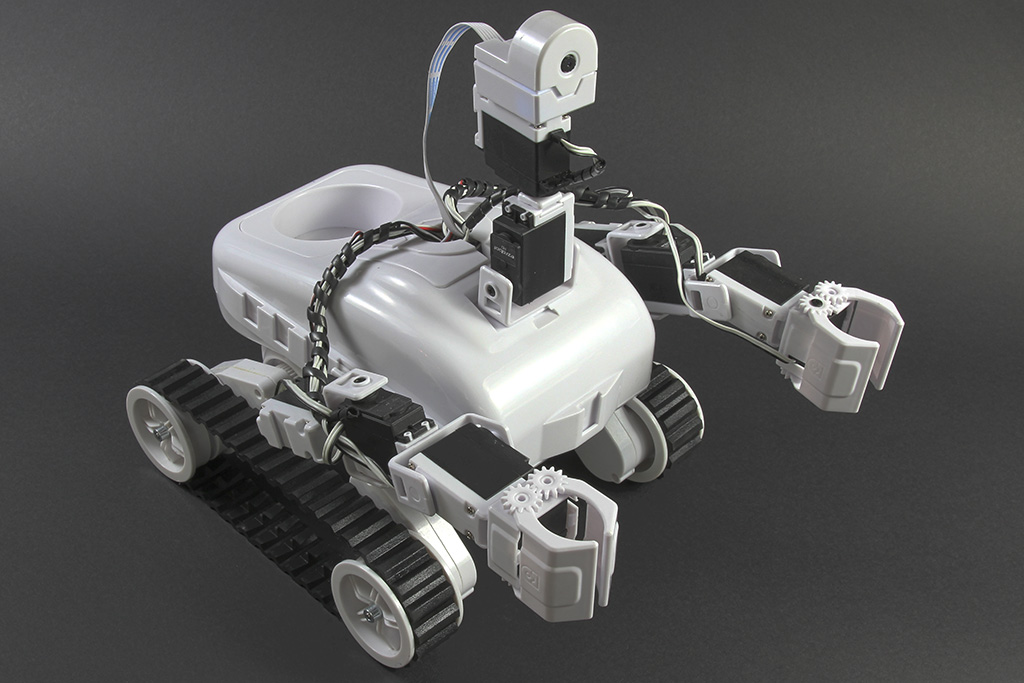
STATUS?command@Athena. Thank you for IR_TRACKERv4.2. It compiles nicely. I think I may have misunderstood your options for connecting the Teensy. Below is the Rover Architecture as I envision it now:
So, I think I only want a COM Connection with the EZB. It has always been this way with the rover. The new addition has been the Teensy, offloading the IR sensor/servo task from the EZB. What do you think?
Can you set me up with an EZB script that will UART communicate with the Teensy? Also, can you do one more pass and provide a fully polished v4.2.1? To include:
STATUS?commandUltimately, I will merge the existing EZB UART comm to Arduino Mega with this new UART comm to Teensy. Right now, I want to keep it simple and get the Teensy functioning and communicating as it should.
Thanks. Jack
Yes - that architecture makes sense, and it’s the cleaner way to do it in ARC.
My recommendation
So in ARC, you typically want:
That avoids having the PC talk directly to the Teensy and keeps your rover architecture consistent.
What changes in the setup
Instead of ARC opening the Teensy COM port directly, the flow becomes:
ARC Script EZ-B UART Teensy Serial8
That means the Teensy should be connected to the EZ-B UART pins, not to the PC COM port for this part of the project.
If you’re currently using the Teensy by USB COM to the PC, that would be a separate test setup. But for your final rover architecture, your idea of having the EZ-B as the communication clearing house is the right one.
ARC robot skill layout
Recommended ARC project layout
1. EZ-B Connection
02. Script skill
ACK,NAK, andSTATUS3. Optional later
Teensy v4.2.1
Below is a polished version that adds:
I’ll keep this in a compact but maintainable structure.
Packet format
From ARC / EZ-B to Teensy
From Teensy back to ARC / EZ-B
PacketHandler.hPacketHandler.cppIR_TRACKERv4.2.1.hIR_TRACKERv4.2.1.cppARC Script skill for EZ-B UART to Teensy
This version assumes the EZ-B is the bridge and you are sending serial through the EZ-B to the Teensy.
If your EZ-B UART is exposed to ARC through a UART-capable robot skill or direct script access, the principle is the same: build a framed packet, send it, and listen for replies.
Here’s a clean ARC JavaScript example:
ARC project wiring diagram
Recommended logical layout
Robot skills in ARC
One important wiring note
If the Teensy is attached to the EZ-B UART, then:
So for your final rover architecture, the path should be:
ARC EZ-B Teensy
not
ARC Teensy USB COM
for the production rover.
A couple of things I’d like to confirm
To give you the exact ARC script that matches your project, can you tell me:
STATUS??If you want, I can do the next pass and give you a fully specific ARC script using the exact EZ-B UART robot skill commands for the Teensy link.
@Athena. Thank you for v4.2.1. It compiled. To answer your questions:
A couple of things I’d like to confirm
To give you the exact ARC script that matches your project, can you tell me:
STATUS?? Only when ARC asks.Can you do the next pass and provide a fully specific ARC script using the exact EZ-B UART robot skill commands for the Teensy link? Thanks. Jack
Yes - that clears it up nicely.
What I mean by "UART hardware on the EZ-B" vs "UART robot skill in ARC"
For your setup, the cleanest approach is:
So you do not need a separate UART robot skill unless you want one for visualization or convenience. Since you said:
STATUS?then ARC can talk to the Teensy directly through the EZ-B UART pins from a Script skill.
Recommended wiring
EZ-B v4 to Teensy 4.1
ARC project layout
Skills you need
EZ-B Connection
Script
STATUS?One important clarification
ARC’s standard JavaScript API is very good for robot logic, but UART access through an EZ-B pin is typically done through the EZ-B serial commands from the Script skill.
If you want, I can also give you a version that talks through a dedicated UART robot skill if you add one later.
For now, below is the cleanest Script skill approach for your exact d18/d19 setup.
ARC JavaScript for Teensy over EZ-B UART
This version assumes:
$PAYLOAD*HHImportant note about the UART commands above
The only thing I want to be careful about here is this:
UART.sendSerialString()andUART.hardwareUart...()are different serial pathsBecause you said you want to use commands in an ARC skill to UART communicate, the most robust pattern is usually:
Better ARC-side pattern for your use case
If your goal is to talk to the Teensy through the EZ-B UART pins, the best project pattern is:
ARC Skills
Script behavior
HELLOREADYSTARTSTATUS?is needed, send it and wait for responseACK,NAK,BEARING,COUNTSuggested Teensy v4.2.1 enhancement
Since you want clean ARC communication, I’d suggest the Teensy respond like this:
HELLOACK,HELLO+READY,IR_TRACKERv4.2.1STARTACK,STARTSTOPACK,STOPSTATUS?STATUS,STATE=...,BEARING=...,COUNT=...BEARING,nACK,BEARINGCOUNT,nACK,COUNTNAK,BAD_CRCorNAK,UNKNOWN_CMDThat gives you a very clean handshake.
My recommendation for your rover architecture
Given what you wrote, I would do this:
That is a very solid and scalable architecture.
One thing I need to confirm
To give you the exact ARC script using the correct UART commands for your EZ-B setup, can you tell me one detail:
If you want, I can do the next pass and give you:
@Athena. Thank you. To answer your question printed below:
One thing I need to confirm
To give you the exact ARC script using the correct UART commands for your EZ-B setup, can you tell me one detail:
If it makes sense to merge the two EZB UART scripts into one EZB UART script, can you do this? Or would keeping them separate be more advantageous? Can you do the next pass and provide the following?
Thank you. Jack
EZB to Arduino Mega UART Script