






Friends, how can I control the windows media Player (or the Itunes) from ARC ? I want my robot (that has an PC inside) to play my sound library, and of course I can not put 3000 songs into an SoundBoard command... Can I ? thanks! tevans
tevans
Brazil
Asked
— Edited
7 Participants

@justin.
The way you started post #13 sure looked like you were replying to my post. Anyway it's deleted now as its now not relevant.
Yes, it would be nice to see how you did it just using Windows.
By the looks it's been figured out, but would this have any relevance? support.microsoft.com/en-us/kb/241422
Please justin! A tutorial would be great!
@Technopro I shared that same info from a Microsoft kb article in post #6. That article is correct for direct control of Media Player application. But there are other control methods as you'll see in the tutorial.
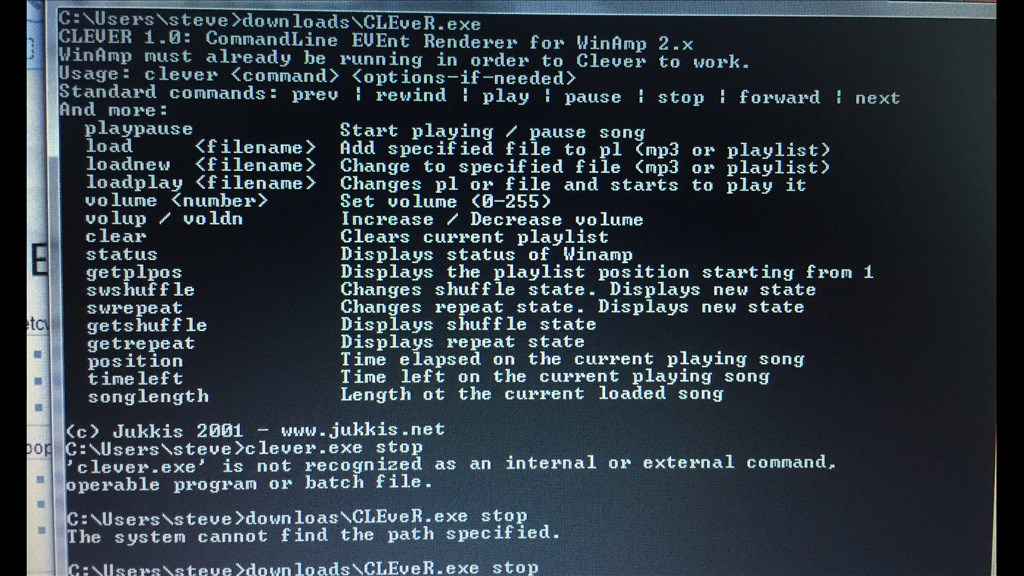
@Steve G, your post was fine, you didn't need to delete it. I kinda thought you thought my post was a thank you for your method rather than announcement of a new method I found - which is fine, all methods are good. Your method will still provide more granular options like position and time left.
@Justin.
No worries bud. It wasn't until I re-read the post then I saw what you meant with the mention of "no third party apps". My bad, lol. I do like your idea though. Looks a lot simpler.
I could use the method in Post #10 It works... now, how to command "next Music, Shuffle, stop, etc ?" thanks guys!
That part is coming tevans, I have to edit the video and upload it so everyone can understand what I did.