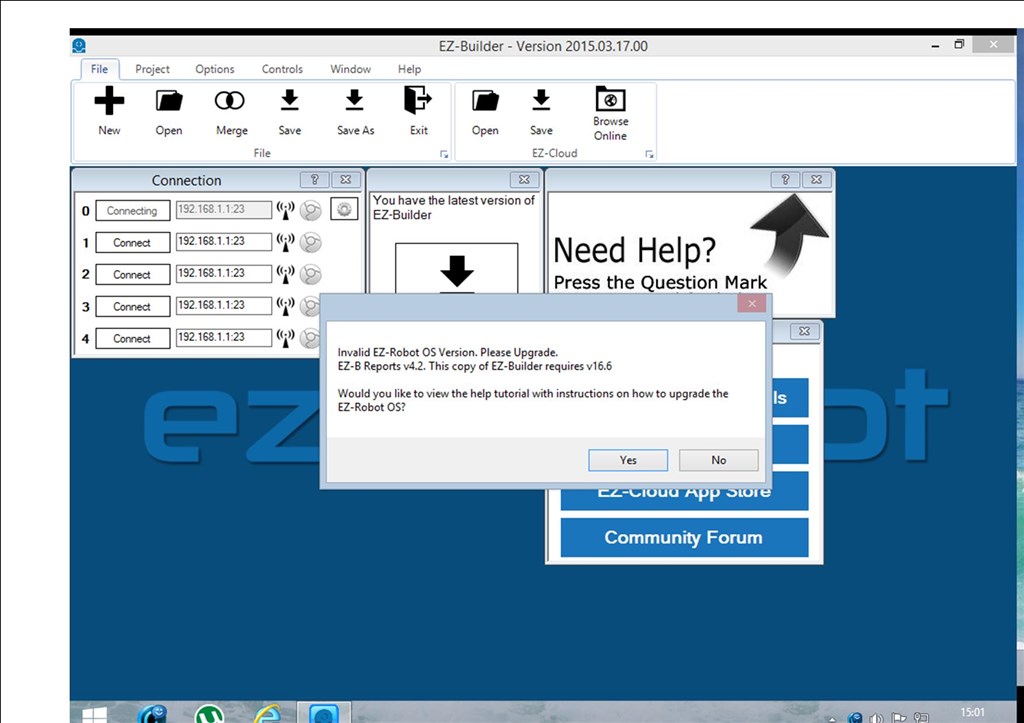
am having problems connecting to v4 keep getting this report
Quote:
21/03/2015 15:22 - Attempting connection on 192.168.1.1:23
21/03/2015 15:22 - Connected to 192.168.1.1:23
21/03/2015 15:22 - EZ-B reports EZ-Robot OS v25.5
21/03/2015 15:22 - Connection Failed: System.Exception: This device is not an EZ-B. Please follow the online tutorials on the EZ-Robot website.
at EZ_B.EZB.Connect(String hostname, Int32 baudRate)
21/03/2015 15:22 - Disconnected
I've had no trouble getting connected in the past I've had the v4 since December
tried resetting v4 still no luck
any help would be appreciated thanks


 Resolved by




@Richard R yes it does appear in the wifi list and yes I can connect to it just not in ARC
You can change the address on the router probably. What is the brand and model of the router. I will do some looking.
D-Link DSL 2680 and thanks in advance
Ok, now I am up to speed...
Before we start playing with router settings, go back to basics.
If your computer has a wired and wireless lan connection, unplug the wired. That is where an IP address conflict would originate.
Reset the EZ-B (press the reset button while powered on). This will make sure it is in AP mode.
Follow the tutorial for connecting in AP mode. Basics below:
Open wireless settings on PC and find access point starting with EZ followed by some letters and numbers.
Connect to it.
Start ARC and connect to the default (192.168.1.1:23)
Once that is working, we can get the EZ-B talking to the router so you don't need to be disconnected from the internet when using the EZ-B.
Alan
yay you da man Mr Techguru
thank you @Steve G @Richard R @d.cochran for your time wish I could credit you all for your help but something as simple as unplugging a hardwire has to take the biscuit again thank you all
@bborastero.
Sometimes it's the simplest things that are easily overlooked. Glad your back up and running.