




Morning All
Today I upgraded to the latest software but now all my servos have stopped working. I rebooted both EZ and my laptop and rebuilt my servo controls but I get no response from any of my boards.
Has anyone encountered something similar?
Thanks,
- Scott

We'll get you running Answer these q's for me..
What robot is it? A Revolution robot or custom?
How long has it been since you last used the robot? Could it be a wiring or power issue?
Are you connecting to the robot adhoc or client mode?
There are no issues connecting to the EZ-B?
Does the EZ-B make a chime when it boots up?
Is your robot using a custom project? If so, can you share it using the ATTACH FILE option on this forum.
The servo modules of ARC's code hasn't been touched in a year - we'll figure out the issue with the robot.
We'll get you running Smile Answer these q's for me..
What robot is it? A Revolution robot or custom? Custom. The system is only running servos. One to lift a bubble head via 1 EZ. One to activate two claws.
How long has it been since you last used the robot? Could it be a wiring or power issue? Last evening.
Are you connecting to the robot adhoc or client mode? Via the EZ network.
There are no issues connecting to the EZ-B? No. I get the chime and can connect. Blue light.
Does the EZ-B make a chime when it boots up? Yes
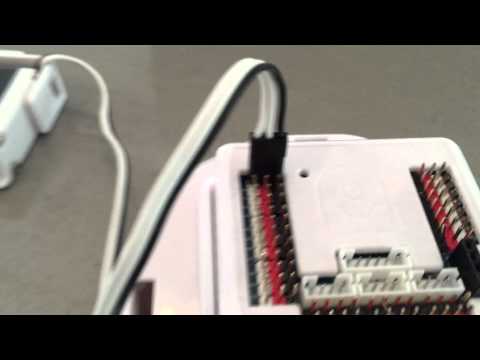
Is your robot using a custom project? If so, can you share it using the ATTACH FILE option on this forum. Currently its scattered across my work table but the attached image is the servo that was working last night. None of the settings were changed and again it was working last evening. I tested all my EZs (I have 4) and none will activate a servo. Either an EZ supplied one or other make.
The servo modules of ARC's code hasn't been touched in a year - we'll figure out the issue with the robot.
It's hard to tell but is your servo plugged in backward to the ez-b? Can you send a closer image of it connected to the ez-b please
dj looks like it. also not a good idea to strap wires whithout isolation straight on to , the spacers.
Here's a video on connecting the servos. The darkest wire is GND - on the revolution servos, it's black. On your servos, it may be brown. The brown or black would connect to the black on the ez-b.
Hope this solves the issue
Sorry for the delay.
The servo connection was never broken (the same as when it was working last night). I think I'm going to delete the application and re-install.
Thanks for catching the anchor strap Nomad eek
Let us know what you find
Sounds like an ARC issue if you haven't changed the robot at all.