

Script Monitor icon Script Monitor — Monitor and diagnose running ARC scripts: view active script labels, statuses, and stop long-running or background scripts easily. Try it →
Asked
Resolved Resolved by RoboHappy!
Arc Cefsharp Launch Error

Arc Cefsharp Launch Error

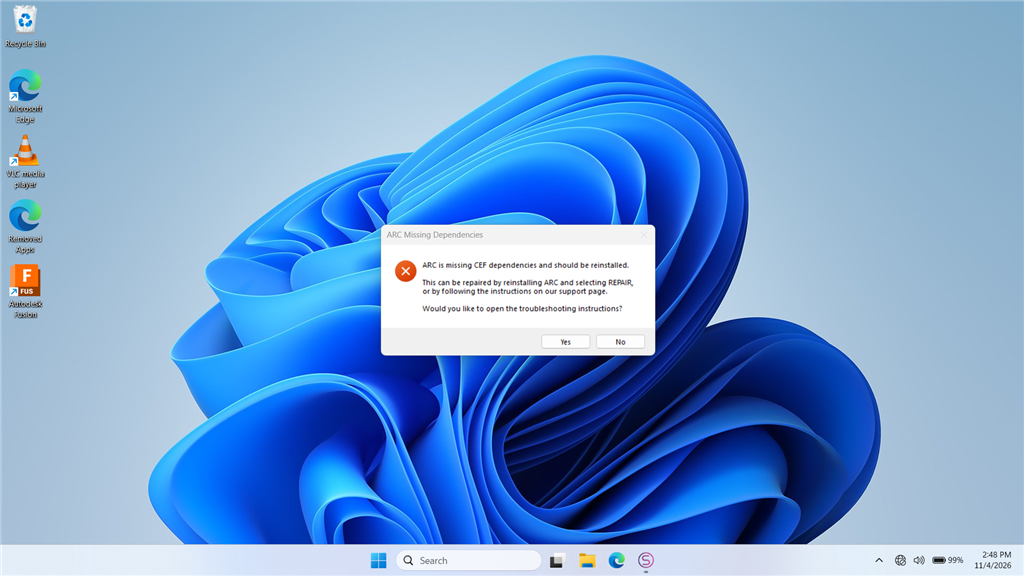
The latest install of ARC errors when opening the app. On launch I first get a Google/Chromium error screen, then a CEF error message. I attempted to re-run the ARC installer and use the REPAIR option, but the installer reports I already have the latest copy of ARC and exits. I also tried installing the "Latest VC Redist x86" with limited success, and I am unable to install any of the "Latest Supported Visual C++ Redistributable Downloads" from Microsoft.

ARC still runs, but the CEF (Chromium Embedded Framework / CefSharp) error appears every time I open the program. I'm running ARC on a Windows PC (no EZB or other hardware activity involved when the error occurs). How can I properly fix this?

CEF / Chromium Embedded Browser details included below (for reference):

ARC uses a Chromium Embedded Browser (WebView) for rich media content, including Blockly. If you see an error similar to the example below, the installer can be run again, or a required redistributable library may be missing from your system.

=== Exception Information ===
Type: System.InvalidOperationException
Message: Cef.IsInitialized was false!. Check the log file for errors. See https://github.com/cefsharp/CefSharp/wiki/Trouble-Shooting#log-file for details.
HResult: -2146233079
Source: CefSharp.WinForms
TargetSite: Void InitializeCefInternal()

Steps I've already tried (from the ARC documentation):

  1. Re-run the installer and select REPAIR.
  2. Install the required runtime(s):

image.png


Related Hardware (view all EZB hardware)
EZ-B V4 by EZ-Robot
EZ-B v4 with Synthiam ARCx controls servos, sensors, camera and audio over Wi-Fi or USB serial, no firmware needed.
Wi-Fi / USB
Servos 24
Camera
Audio
UART 3
I2C
ADC 8
Digital 24

Related Robot Skill (view all robot skills)
Debug by Synthiam
Central ARC debug window routing logs; shows UTC date/time, Windows/ARC/skill/hardware info, version/settings, with copy and clear.

ARC Pro

Upgrade to ARC Pro

Subscribe to ARC Pro, and your robot will become a canvas for your imagination, limited only by your creativity.

Author Avatar
PRO
Synthiam
LinkedIn Thingiverse Twitter YouTube GitHub
#9  

All browsers except Firefox use chromium. Google owns the web.

#10  

Ok, So my latest error message.....

Timestamp: 2026-11-10 00:56:12 UTC
ARC Version: 2026.10.26.00
OS Version: Microsoft Windows NT 10.0.26200.0
Base Directory: C:\\Program Files (x86)\\Synthiam Inc\\ARC by Synthiam\\
=== Exception Information ===
Type: System.InvalidOperationException
Message: There is an error in XML document (1, 15856).
HResult: -2146233079
Source: System.Xml
TargetSite: System.Object Deserialize(System.Xml.XmlReader, System.String, System.Xml.Serialization.XmlDeserializationEvents)
StackTrace:
 at System.Xml.Serialization.XmlSerializer.Deserialize(XmlReader xmlReader, String encodingStyle, XmlDeserializationEvents events)
 at System.Web.Services.Protocols.SoapHttpClientProtocol.ReadResponse(SoapClientMessage message, WebResponse response, Stream responseStream, Boolean asyncCall)
 at System.Web.Services.Protocols.SoapHttpClientProtocol.Invoke(String methodName, Object[] parameters)
 at ARC.com.ezrobot.www.apps.WebService.GetPlugins(String[] GUIDsToIgnore)
 at lELeMFXU5ojcsnqmmpt.jws7vrX22Pbiri6mKVD.t9HXEdT6um()
\-\-\- Inner Exception Level 1 \-\-\-
Type: System.Net.WebException
Message: The operation has timed out.
HResult: -2146233079
Source: System
TargetSite: Int32 Read(Byte[], Int32, Int32)
StackTrace:
 at System.Net.ConnectStream.Read(Byte[] buffer, Int32 offset, Int32 size)
 at System.IO.StreamReader.ReadBuffer(Char[] userBuffer, Int32 userOffset, Int32 desiredChars, Boolean& readToUserBuffer)
 at System.IO.StreamReader.Read(Char[] buffer, Int32 index, Int32 count)
 at System.Xml.XmlTextReaderImpl.ReadData()
 at System.Xml.XmlTextReaderImpl.ParseText(Int32& startPos, Int32& endPos, Int32& outOrChars)
 at System.Xml.XmlTextReaderImpl.ParseText()
 at System.Xml.XmlTextReaderImpl.ParseElementContent()
 at System.Xml.XmlTextReaderImpl.Read()
 at System.Xml.XmlTextReader.Read()
 at System.Xml.XmlTextReaderImpl.InitReadElementContentAsBinary()
 at System.Xml.XmlTextReaderImpl.ReadElementContentAsBase64(Byte[] buffer, Int32 index, Int32 count)
 at System.Xml.XmlTextReader.ReadElementContentAsBase64(Byte[] buffer, Int32 index, Int32 count)
 at System.Xml.Serialization.XmlSerializationReader.ReadByteArray(Boolean isBase64)
 at Microsoft.Xml.Serialization.GeneratedAssembly.XmlSerializationReaderApps.Read10\_ARCAvailablePluginResponse(Boolean isNullable, Boolean checkType)
 at Microsoft.Xml.Serialization.GeneratedAssembly.XmlSerializationReaderApps.Read141\_GetPluginsResponse()
 at Microsoft.Xml.Serialization.GeneratedAssembly.ArrayOfObjectSerializer223.Deserialize(XmlSerializationReader reader)
 at System.Xml.Serialization.XmlSerializer.Deserialize(XmlReader xmlReader, String encodingStyle, XmlDeserializationEvents events)
Author Avatar
PRO
Synthiam
LinkedIn Thingiverse Twitter YouTube GitHub
#11  

That's an interesting error because it's a timeout from the network. I'd say there is surely something on your computer that is intercepting or causing communication and loading issues. For a fix for your error, you could increase the timeout - whether that solves other issues or not is to be determined.

but you could run this command as administrator...

reg add "HKCU\Software\ARC by Synthiam" /v WebServiceTimeoutMS /t REG_SZ /d 60000 /f

Essentially, that increases the timeout to a minute. it's default is 10 seconds but that could be too low for whatever is causing your internet to be slow.