

Neopixel Ring icon Neopixel Ring — ARC UI for onboard computers to control NeoPixel rings via serial: test/run patterns, preview and copy Arduino serial commands, includes sample code. Try it →
Asked
Resolved Resolved by RoboHappy!
Arc Cefsharp Launch Error

Arc Cefsharp Launch Error

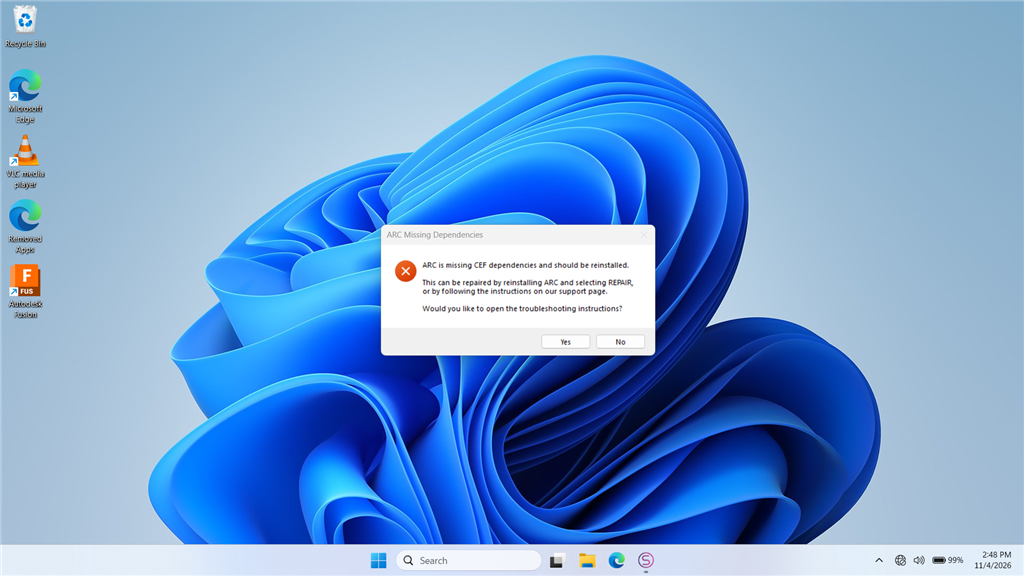
The latest install of ARC errors when opening the app. On launch I first get a Google/Chromium error screen, then a CEF error message. I attempted to re-run the ARC installer and use the REPAIR option, but the installer reports I already have the latest copy of ARC and exits. I also tried installing the "Latest VC Redist x86" with limited success, and I am unable to install any of the "Latest Supported Visual C++ Redistributable Downloads" from Microsoft.

ARC still runs, but the CEF (Chromium Embedded Framework / CefSharp) error appears every time I open the program. I'm running ARC on a Windows PC (no EZB or other hardware activity involved when the error occurs). How can I properly fix this?

CEF / Chromium Embedded Browser details included below (for reference):

ARC uses a Chromium Embedded Browser (WebView) for rich media content, including Blockly. If you see an error similar to the example below, the installer can be run again, or a required redistributable library may be missing from your system.

=== Exception Information ===
Type: System.InvalidOperationException
Message: Cef.IsInitialized was false!. Check the log file for errors. See https://github.com/cefsharp/CefSharp/wiki/Trouble-Shooting#log-file for details.
HResult: -2146233079
Source: CefSharp.WinForms
TargetSite: Void InitializeCefInternal()

Steps I've already tried (from the ARC documentation):

  1. Re-run the installer and select REPAIR.
  2. Install the required runtime(s):

image.png


Related Hardware (view all EZB hardware)
EZ-B V4 by EZ-Robot
EZ-B v4 with Synthiam ARCx controls servos, sensors, camera and audio over Wi-Fi or USB serial, no firmware needed.
Wi-Fi / USB
Servos 24
Camera
Audio
UART 3
I2C
ADC 8
Digital 24

Related Robot Skill (view all robot skills)
Debug by Synthiam
Central ARC debug window routing logs; shows UTC date/time, Windows/ARC/skill/hardware info, version/settings, with copy and clear.

ARC Pro

Upgrade to ARC Pro

Unleash your creativity with the power of easy robot programming using Synthiam ARC Pro

Author Avatar
PRO
Synthiam
LinkedIn Thingiverse Twitter YouTube GitHub
#9  

All browsers except Firefox use chromium. Google owns the web.

#10  

Ok, So my latest error message.....

Timestamp: 2026-11-10 00:56:12 UTC
ARC Version: 2026.10.26.00
OS Version: Microsoft Windows NT 10.0.26200.0
Base Directory: C:\\Program Files (x86)\\Synthiam Inc\\ARC by Synthiam\\
=== Exception Information ===
Type: System.InvalidOperationException
Message: There is an error in XML document (1, 15856).
HResult: -2146233079
Source: System.Xml
TargetSite: System.Object Deserialize(System.Xml.XmlReader, System.String, System.Xml.Serialization.XmlDeserializationEvents)
StackTrace:
 at System.Xml.Serialization.XmlSerializer.Deserialize(XmlReader xmlReader, String encodingStyle, XmlDeserializationEvents events)
 at System.Web.Services.Protocols.SoapHttpClientProtocol.ReadResponse(SoapClientMessage message, WebResponse response, Stream responseStream, Boolean asyncCall)
 at System.Web.Services.Protocols.SoapHttpClientProtocol.Invoke(String methodName, Object[] parameters)
 at ARC.com.ezrobot.www.apps.WebService.GetPlugins(String[] GUIDsToIgnore)
 at lELeMFXU5ojcsnqmmpt.jws7vrX22Pbiri6mKVD.t9HXEdT6um()
\-\-\- Inner Exception Level 1 \-\-\-
Type: System.Net.WebException
Message: The operation has timed out.
HResult: -2146233079
Source: System
TargetSite: Int32 Read(Byte[], Int32, Int32)
StackTrace:
 at System.Net.ConnectStream.Read(Byte[] buffer, Int32 offset, Int32 size)
 at System.IO.StreamReader.ReadBuffer(Char[] userBuffer, Int32 userOffset, Int32 desiredChars, Boolean& readToUserBuffer)
 at System.IO.StreamReader.Read(Char[] buffer, Int32 index, Int32 count)
 at System.Xml.XmlTextReaderImpl.ReadData()
 at System.Xml.XmlTextReaderImpl.ParseText(Int32& startPos, Int32& endPos, Int32& outOrChars)
 at System.Xml.XmlTextReaderImpl.ParseText()
 at System.Xml.XmlTextReaderImpl.ParseElementContent()
 at System.Xml.XmlTextReaderImpl.Read()
 at System.Xml.XmlTextReader.Read()
 at System.Xml.XmlTextReaderImpl.InitReadElementContentAsBinary()
 at System.Xml.XmlTextReaderImpl.ReadElementContentAsBase64(Byte[] buffer, Int32 index, Int32 count)
 at System.Xml.XmlTextReader.ReadElementContentAsBase64(Byte[] buffer, Int32 index, Int32 count)
 at System.Xml.Serialization.XmlSerializationReader.ReadByteArray(Boolean isBase64)
 at Microsoft.Xml.Serialization.GeneratedAssembly.XmlSerializationReaderApps.Read10\_ARCAvailablePluginResponse(Boolean isNullable, Boolean checkType)
 at Microsoft.Xml.Serialization.GeneratedAssembly.XmlSerializationReaderApps.Read141\_GetPluginsResponse()
 at Microsoft.Xml.Serialization.GeneratedAssembly.ArrayOfObjectSerializer223.Deserialize(XmlSerializationReader reader)
 at System.Xml.Serialization.XmlSerializer.Deserialize(XmlReader xmlReader, String encodingStyle, XmlDeserializationEvents events)
Author Avatar
PRO
Synthiam
LinkedIn Thingiverse Twitter YouTube GitHub
#11  

That's an interesting error because it's a timeout from the network. I'd say there is surely something on your computer that is intercepting or causing communication and loading issues. For a fix for your error, you could increase the timeout - whether that solves other issues or not is to be determined.

but you could run this command as administrator...

reg add "HKCU\Software\ARC by Synthiam" /v WebServiceTimeoutMS /t REG_SZ /d 60000 /f

Essentially, that increases the timeout to a minute. it's default is 10 seconds but that could be too low for whatever is causing your internet to be slow.