




Hello all Can I properly hook up an Arduino Motor Sheild to EZ-B, to run 2 DC motors. If so, can I get some sort of diagram/schematic? I need to be able to control the speed and direction if both motors individually. Sorry, noob question.

Doombot
USA
Asked
— Edited
 Resolved by Rich!

@PJ - post a schematic or photos of what you did! @jstarne - I thought I did? I credited Rich
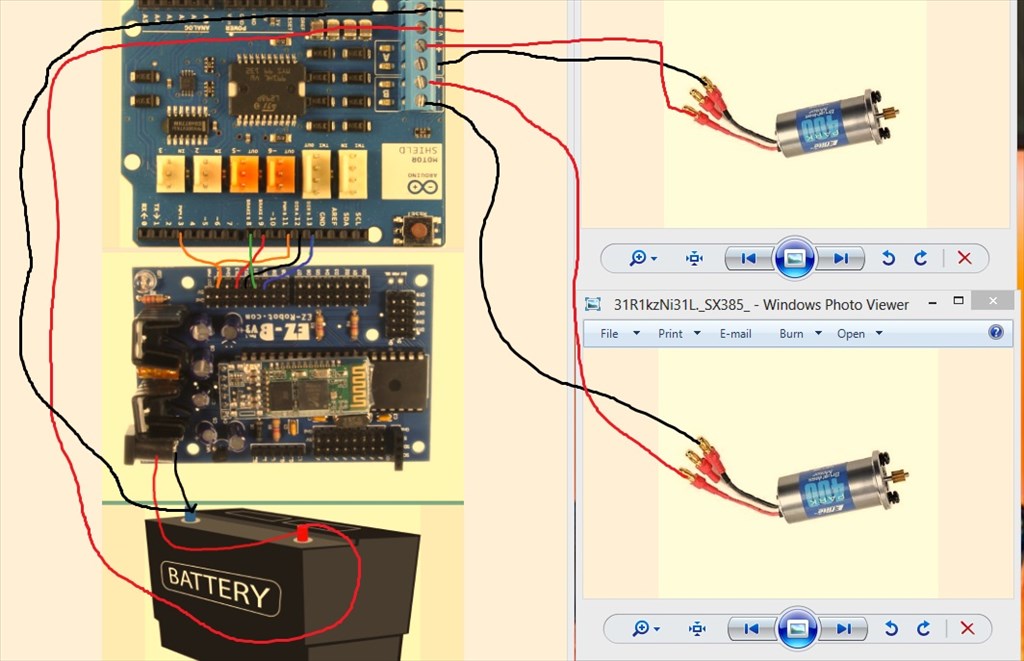
Custom H--bridge PWM D14 Orange ( arduino pin 11 & 3) D12 ( arduino pin 12) black D13 ( arduino pin 9) red D11 ( arduino pin 11) green D10 (arduino pin 13) blue
It's hard to tell the picture, but the diagram should help.
Thanks PJ! Exactly what I needed... However if I separated PWM 3 and 11 on respective digital pins I should be able to control the speed of the motors right? I see you tied them together...
I would say that you should separate the PWM anyway since this will make the motor move, the dir will determine the direction. So if you only wanted one motor to move you couldn't do that with combined PWM.
The brake may not be required too. It would stop the motor but just shutting off the PWM (setting to 0) would allow it to freewheel which in my opinion would be better if being used for movement.
P.S. It's still showing unresolved this end too, not that it's a problem
Ok Ill try it again...Thanks Rich and PJ!
In ARC, to make the motor move;
PWM control for whichever digital port you connect to PWMa PWM control for whichever digital port you connect to PWMb Set Digital for whichever digital port you connect to DIRa Set Digital for whichever digital port you connect to DIRb
So, if you chose D8 to D11
PWMA to D8 PWMB to D9 DIRA to D10 DIRB to D11
In your custom movement panel, to move both forwards use the code;
For reverse
For stop
For left
For right