
Change Release Notes
Communicate with your robot with QR Codes? Only with EZ-Robot! Due to your loyal support, we will never stop advancing the world of robotics. It's our passion to make robotics accessible to everyone! This means continually developing new features, new features, new features, and more new features
Changes
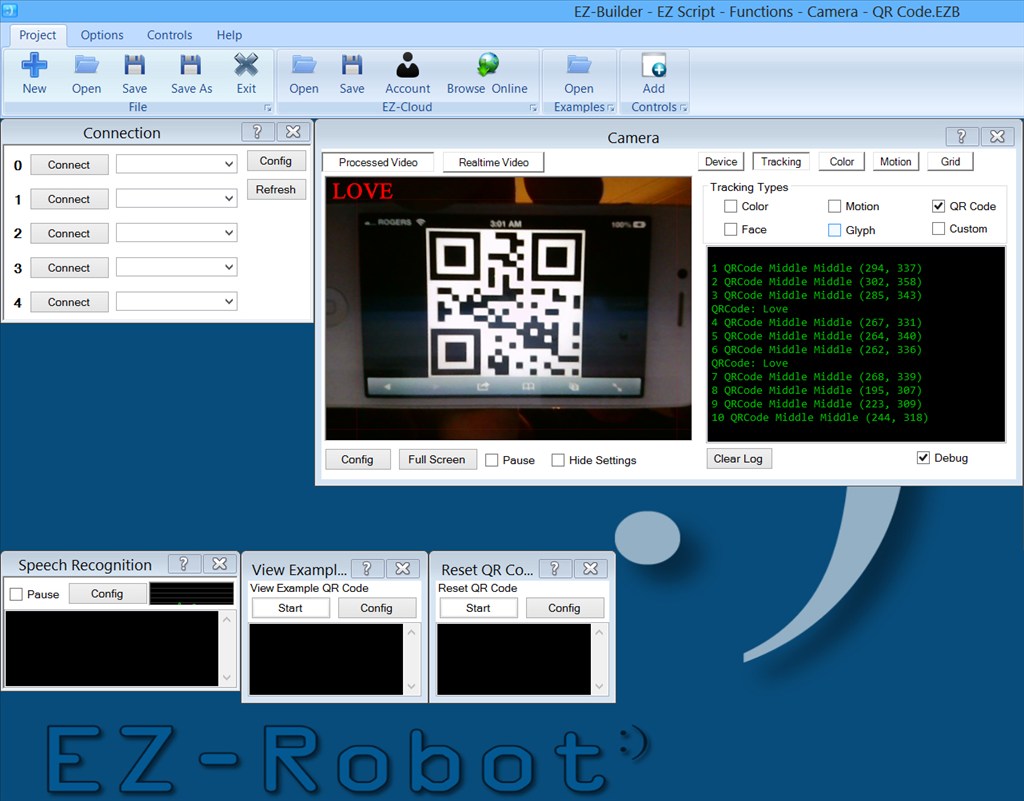
- Camera Control now detects QR Codes!
- New EZ-Script ControlCommand() parameters for Camera QRCode detection control
- New Example to demonstrate QR Code (Examples -> EZScript -> Functions -> Camera)
Enjoy
ARC Downloads
ARC
FREE
$0
always free
- 1 third-party plugin skill per project
- Trial cloud services
- Personal, DIY & education use
- Updated every 6–12 months
 Download
Recommended
ARC
PRO
$8.99
per month
- Use on 2+ PCs simultaneously
- Unlimited robot skills
- Cloud backup & revision history
- Weekly features & bug fixes
- Business use permitted
ARC
RUNTIME
$0
always free
- Load & run any ARC project
- Read-only mode
- Unlimited robot skills
- Includes early access fixes & features
- Minimum requirements: Windows 10 or higher, 2 GB RAM, 500 MB free disk space.
- Recommended: Windows 10 or higher, 8 GB RAM, 1 GB free disk space.
- Prices are in USD.
- More about each edition: Download & install guide.
- Latest changes: Release notes.
Compare Editions
| Feature |
ARC
FREE
|
ARC
PRO
|
|---|---|---|
| Get ARC Free | View Plans | |
| Usage | Personal · DIY · Education | Personal · DIY · Education · Business |
| Early access to new features & fixes | — | ✓ |
| Simultaneous microcontroller connections * | 1 | 255 |
| Robot skills * | 20 | Unlimited |
| Skill Store plugins * | 1 | Unlimited |
| Cognitive services usage ** | 10 / day | 6,000 / day |
| Auto-positions gait actions * | 40 | Unlimited |
| Speech recognition phrases * | 10 | Unlimited |
| Camera devices * | 1 | Unlimited |
| Vision resolution | max 320×240 | Unlimited |
| Interface builder * | 2 | Unlimited |
| Cloud project size | — | 128 MB |
| Cloud project revision history | — | ✓ |
| Create Exosphere requests | — | 50 / month |
| Exosphere API access | — | Contact Us |
| Volume license discounts | — | Contact Us |
| Get ARC Free | View Plans |
* Per robot project
** 1,000 per cognitive type: vision recognition, speech recognition, face detection, sentiment, text recognition, emotion detection, azure text to speech

Upgrade to ARC Pro
Join the ARC Pro community and gain access to a wealth of resources and support, ensuring your robot's success.
I just printed a couple of QR codes and held them up in front of the EZ-B camera. One says hello and the other opens a web page this is very cool
QR Codes are great, I have them on my business cards so flash it to the camera on my phone and it'll dial my number, bring up a map, go to my website, email me... this opens up so many new great features.
Thanks everyone! Wait until you see tomorrow's update ... I've extended the QR Code functionality - including a few other goodies
The man that never sleeps ... mmmm ... who could I be talking about ...
I had been wondering about using hand sign language to communicate with a robot but QR codes are amazing. Now anyone can communicate to the robot. While VR is awesome it is quite limited to the environment and is not universal for all speakers. Fabulous DJ!
Damn it DJ. I just get rolling with what I can and might do with the robot and you go and add more cool stuff....
I just cant keep up...
Way to go bud, big thanks to all your hard work.
This is indeed a great new piece of functionality, but I think I have found a glitch eek - I have printed off a couple of different codes to test and I find that if I show a code it works perfectly the first time I present it, but if I then hide it and re-present the same code again the recognition works (I can see the phrase on-screen), but the associated command does not execute. If I show a different code instead it also works, then the first code can successfully be shown again - is anyone else seeing this please?
Mr crisp, please read the documented notes in the example project.