
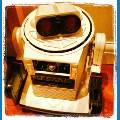
Here's my Omnibot tracking towards a glyph on the wall. As the camera is mounted in his head which flops about a bit and his wheels are wonky he does a really good job. When I get some more time I will add a script so he can navigate from room to room or glyph to glyph.
All achieved with the amazing EZ-B board and ARC software
Disclaimer "no robot was hurt in the making of this video"
By winstn60
— Last update
Discover more robots
Danbachmann's Dandroid 20Xx
EZ-B v4 Cybot robot uses IR and ultrasonic sensors for obstacle avoidance, wireless monitoring and human/animal activity...
DJ's And Now For Something Completely Different (Pdp-8)
VC8E oscilloscope emulator for PiDP-8 using Synthiam ARC: phosphor fade, configurable refresh, pixel size, intensity,...
PEEK's SAM Inmoov Robot
Building a complete InMoov robot as a newbie learning assembly and programming while seeking mentorship.

Thats pretty cool! Did you paint the robot?
Yep he was painted and I forgot to put his battery cover on
His head turns and both arms move up and down
Great job winstn!
We are tyring to do something similar. We would really like to scan the camera on a servo to acquire the target then move out and track it. We were even thinking of making a "crutch" where we designate a glypg as "turn left" and another as "turn right' then you would have a "target" glyph and perhaps an obstacle or hostile glyph. You have inspired us.
Thanks,
brian & Team
Good job winstn60, What joy to see videos with practical actions of a robot. I think you've come to the solution to a docking station automatic battery recharge, placing the station beneath the glyph and coupling a charging contacts on the front of the robot. Wait impatiently for his video navigation glyph to glyph!
Hi Winston,
I would love to discuss how you performed your navigating to a glyph. Did you post your project in examples?
Thanks,
Winston lol Neil is better
There's absolutely nothing to this just the standard camera panel in ARC and thats it. You just click on all the movement setting options in the config tracking tab. The only thing is the Glyph recognition isn't as sensitive for some reason in the later releases it used to work from about 4 metres away. Although Face and Colour tracking is much better now IMHO. You also need to add a Movement Panel in my case its the BV4113 that drives the standard Omnibot motors
Thanks Winston, you make it sound easy, you're good.
I agree our, glyph detection range, on an oversized glyph, went from 35 feet to 3 feet. That's not going to work.