
 Resolved by

So I've got my EZ-B v4. It works in AP mode and connects to my network in Client mode. So far so good. When I scan in ARC , the EZ-B gets located, but it disconnects and requires a firmware update. No problem I thought.
When I get into the firmware update I see that it will only connect to the EZ-B in AP mode, so I reset the EZ-B to be in AP mode and I connect in the firmware, but I get an error. (screen shot below)
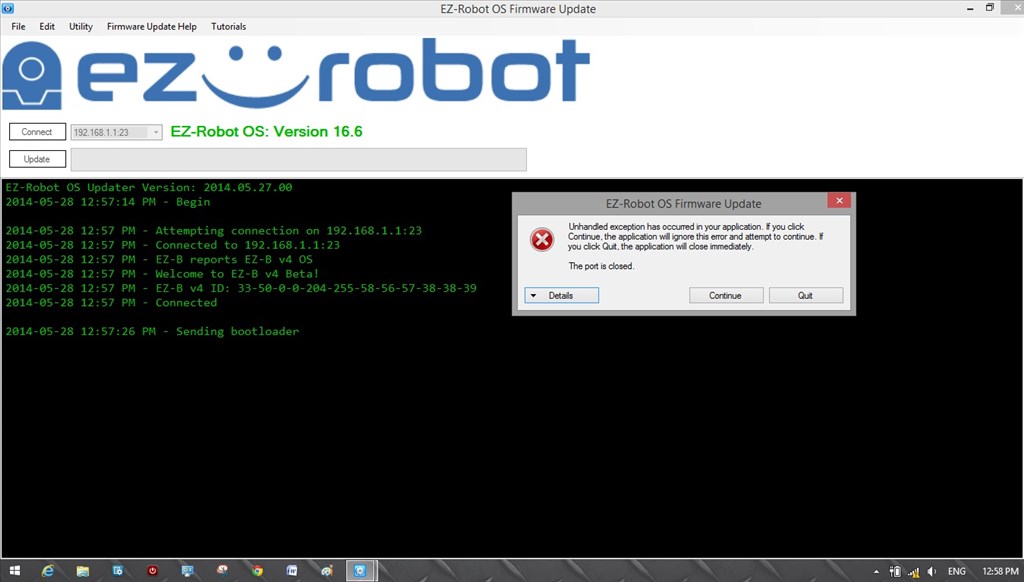
I thought I would rule out an issue with my laptop so I installed ARC on my son's laptop and tried all of the above actions and got the same error.
I hope I'm just missing something and it's an easy fix.
@DJ I have attached a zip of the logs just in case they are needed. Logs.zip

@RichardR - I use Cogeco (cable). It is the only cable choice I have in my City. I have their cable modem then my router connects to. When I was looking into my issue at work yesterday, I thought I saw that they offer modem/routers, I didn't really pay attention to that because I like to have the ability to change things up if I want, not when they want. Kind of what I just had, if I needed a new router I would have had to wait for them.