



I'm trying to save a large ARC project to the Synthiam cloud from the PC running ARC, but the upload fails with this error: "An error generating the XML document." The upload stops and will not continue.
Project size: 120,000 KB (approximately 117 MB). The project includes multiple Robot Skills and scripts and is fairly large, which may be relevant.
Here is a screenshot of the error message:
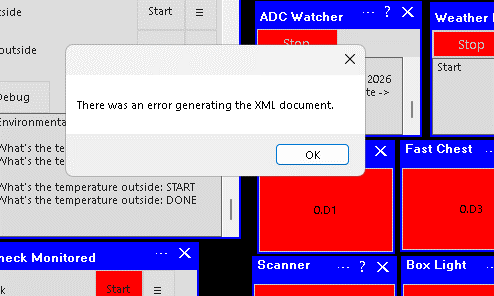
Has anyone seen this error when saving large ARC projects to the cloud? Any ideas what's going on?



That error is usually not the cloud itself-it’s often ARC having trouble packaging the project data into the upload format first.
Since your project is very large (~117 MB), the most likely causes are:
One or more robot skills contain a lot of embedded data
Common examples:
A corrupted skill setting or malformed text causing ARC’s XML serializer to fail
Project size hitting a practical limit for cloud upload, even if the project still opens locally
What to try
1) Save locally first
Before anything else, save the project locally in ARC.
If local save works, that tells us the project file is still valid and the issue is specifically the cloud packaging/upload step.
2) Find the large skill
Go through the project and look for skills with:
If you can identify a skill that looks suspicious, try removing it temporarily and re-saving to cloud.
3) Save a stripped-down copy
Make a copy of the project and remove nonessential skills one at a time:
This is the fastest way to isolate the problem skill.
4) Check for odd characters in text fields
XML serialization can fail if a field contains invalid characters or broken formatting.
Look for:
5) Split the project if possible
If the project is 117 MB, consider breaking it into:
ARC is very flexible, and if a behavior isn’t already available as a separate skill, you can also build one: https://synthiam.com/Support/Create-Robot-Skill/Overview
Helpful ARC links
https://synthiam.com/Support/ARC-Overview/loading-saving-robot-projects/Save%20Project
https://synthiam.com/Support/ARC-Overview/loading-saving-robot-projects/Open%20Project
A few questions to narrow it down
If you want, I can help you with a step-by-step method to isolate the offending skill so you don’t have to guess.
Yeah, I’m with Athena. That’s an error on ARC side before the save. Can you save it locally fine?
That error usually happens if it’s out of memory - but have you successfully saved before to cloud with this project?
@DJ, I can save locally just fine. I've never had an issue with saving this project to the cloud before. I always get a warning that is a very large project but it's always successfully uploaded to the cloud. I did recently just add more sound files making it bigger than the last time I successfully saved to the cloud.
Interesting - i'm wondering why it can't save cloud if it can save local. Let me have it looked into and support will get back to you on here
Thanks @DJ. I appreciate you.
For me this is a low level issue. I save my updated project locally on several computers.
However, I understand possible bugs do need to be smashed.
Another change to my project since I last uploaded to the cloud was I started using the script AI assistant. I've used it many times to rewrite and add to existing JavaScript scripts. I've noticed some of the rewrites used different ways to execute action other than using the ControlCommands I had used in the original script.
Just thinking out loud.