





ARCx - great look & feel and a lot more openness for Python developers
For the past few days I've been working with ARCx (version 2026.09.26.00) and getting my first hands-on experience with this new development environment. Besides the fresh, modern design, the system is noticeably more open than ARC: it runs on Windows, Linux, and ARM boards such as the Raspberry Pi, and Python developers finally get their money’s worth.
To be fair, I’m digging into ARCx much more deeply than I ever did with ARC Pro, so some of what I’m discovering may have been possible before - I simply never looked closely enough.
The new Python Native skill lets you choose your own interpreter per skill (I run a dedicated virtual environment), and it works in both directions: my scripts can list the project’s skills, read Feetech servo status, and register their own functions, which can then be called via ControlCommand from anywhere in the project. Helper modules live next to the entry script and travel with the project in the Synthiam Cloud; modules shared between skills go into the Shared Library (Documents\ARCx Data\Python Modules) and import without any sys.path tweaks. Each skill can carry its own package requirements (requirements.txt style, with an Install All button), which will make setting up the robot PC later much easier. The scripts even appear in the new GUI editor with start/stop controls. In my ongoing euphoria, the possibilities look endless.
As a user of Feetech and Waveshare smart servos, I’m especially pleased that ARCx supports their extended capabilities. On my test bench (RS485 via a Waveshare adapter), telemetry and direct parameter access worked right away, and Auto Position passes speed and acceleration through to the servos. The robot itself is connected: the screenshot below shows both of its buses in ARCx - 15 STS servos on COM7 at 1 Mbps with live temperature, voltage, load and current, and the two SM shoulder servos on COM37 at 115.2 kbps; the offline IDs are the left side, which isn’t built yet. This setup suggests I’m connecting the servos via serial/COM adapters directly to the PC (COM ports) rather than through an EZB. This will most likely make my self-written ARC-Python interface obsolete.
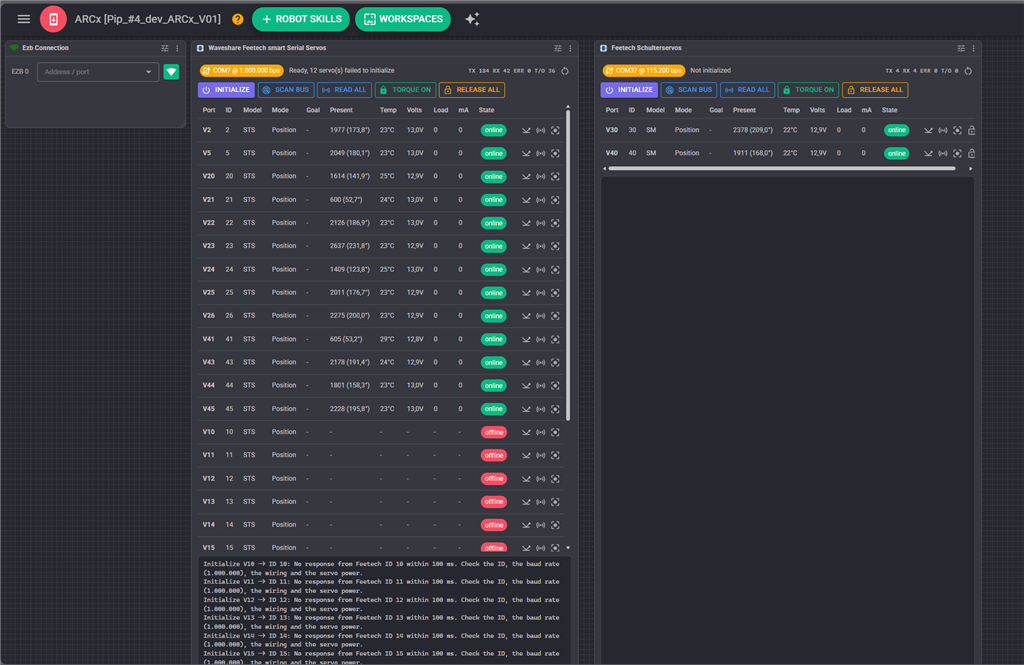
In a nutshell: my first experiences impressed me so much that I immediately started a re-engineering project. I’m moving my current development - a humanoid that plays Nine Men’s Morris and chess, based on the open-source pib platform - over to ARCx. First step: the hand’s closed-loop controller in Python Native with direct servo access. Later the whole system moves onto a LattePanda Sigma inside the robot’s torso. I know I’m walking on thin ice with a beta that updates almost daily; a system image before every update and a short acceptance test afterwards keep it manageable.
Auto Position: the one thing I’m missing so far
One structural change I only noticed while preparing the migration: ARC had two Auto Positions - the Movement Panel variant and "Auto Position (Gait)" in the servo category, with any number of instances. ARCx has only the Movement Panel variant, limited to one per project - I tried adding a second one:
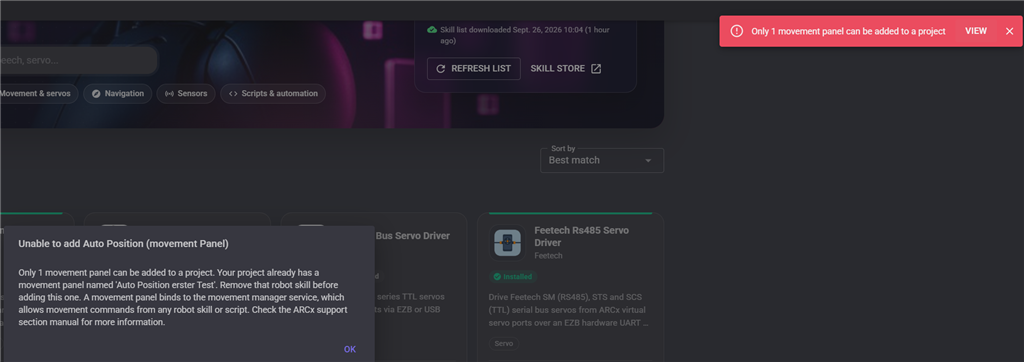
And within that one skill, every frame holds a position for every servo in the list.
This is how I have been working in ARC - one workspace, "AI Actions," with seven Auto Position instances: right arm, left arm, right hand, left hand, head, eyes, plus a whole-body init, each holding a couple dozen taught actions ("Arm_Rechts_Talk_0110", "Augen rollen", "Kopf nicken", "Hand_rechts_Faust", ). Other workspaces (init, start, per-limb work) hold a similar number, so a pib project ends up with 20 or more instances.
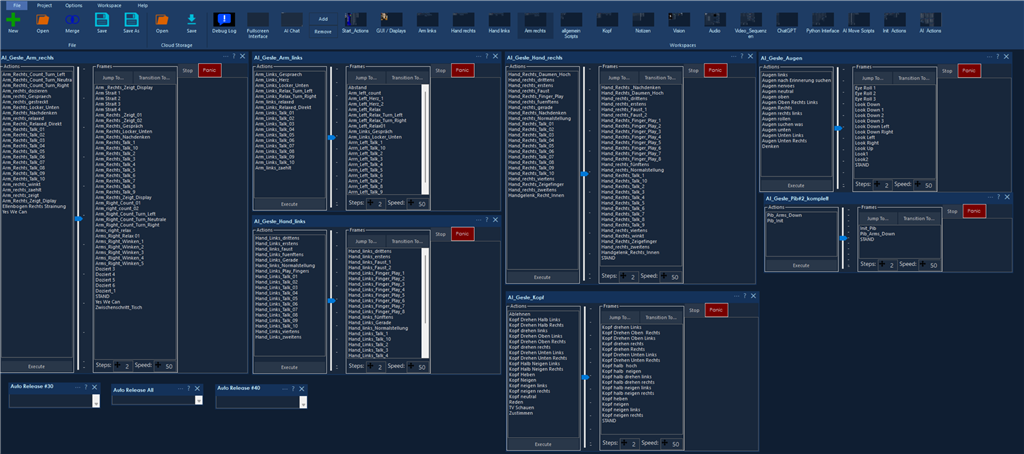
A humanoid’s expressiveness comes from combining these independent profiles: the eyes roll while both arms lift, or while only the left hand reaches forward. With one servo list per frame, every combination becomes its own action, and nothing can run concurrently. In ARCx, one frame looks like this - about 30 servos from head to hip in a single pose:
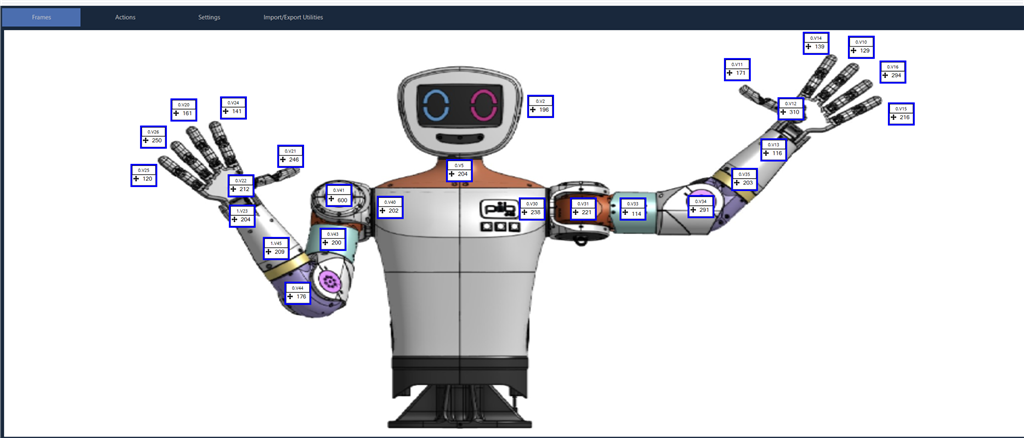
My AI layer picks these actions by name, so the scoping is also what keeps AI-triggered motion safe.
I fully understand that a new platform grows in steps and that not every ARC skill can be there on day one - the current ARCx Auto Position is clearly the gait/movement-panel side of it. My one wish is that the servo-animator side follows later with the quality it had in ARC: any number of instances (or named servo groups), taught frames per group, actions callable by ControlCommand with and without wait, script steps inside an action, and groups running independently and concurrently. If it is rebuilt for smart servos anyway - one sync write per frame with the servo’s own velocity/acceleration profile instead of a software step loop - even better; the Kinematics Service already thinks this way (chains, velocity/acceleration per position, Stop and IsMoving per chain). An ARC import that maps instances onto groups would make the migration straightforward. Is this on the roadmap? I’m happy to provide an .EZB project with 20+ instances as a test case.
A few further observations, meant as input rather than criticism:
- Shared Library modules were not restored after a cloud save and reload. Did I miss an option to include them?
- A TCP server skill (as in ARC) would make connecting external processes easy.
- In ARC, a frame inside an action could run a script at that step; ARCx offers only "On start" and "On end." That per-step hook was handy for sound, LEDs, or a grip in the middle of an animation. (Calling a single frame by ControlCommand, which ARCx now supports, is a nice addition.)
Once the first steps have settled - in about a month - I will publish the project in the Synthiam Cloud. Please see it as inspiration rather than plug-and-play: some modules with API keys will remain private in the Shared Library, and load-and-play would need identical hardware anyway. Videos from time to time: https://www.youtube.com/@robo-chess3027
Many thanks to the Synthiam team. The ARC DNA is fully preserved - the extremely high speed and the minimal effort to get a robot up and running - and it is highly valuable for makers, hobbyists and, to some extent, professional robot developers.

We have been evaluating how to release the second Auto Position that isn’t a movement panel. Because having two duplicates code, we are determining what that will look like. The second will come shortly, once we have a better idea for maintainability.
Thanks for all the feedback as well.
Oh, great-that sounds really good. I’ll be kicking off the re-engineering/transfer project in earnest at the end of October. There might be more skills available by then, though I’m already managing very well with native Python. The Auto Position skill is obviously one of ARC’s strongest features, so that would be fantastic.
Awesomeness. Hey did you see you can import ARC auto positions?
No, unfortunately, I didn't realize that. How do you do it? To me, ARC and ARCx have so far been two separate worlds with two separate Skill Stores.
We also noticed that you mentioned there is no script per frame. That feature exists in ARCx's Auto Position for every frame. It is labeled as a movement script for every frame. That is the script that runs for every frame. ARCx's Auto Position enhances the functionality, but ARC has no missing features.
We will add more question-mark hovers to the config to assist. Otherwise, the manual documents the options.
Thanks - I know the export/import path well, I used it in ARC to clone the many Auto Position skills and then just deleted the servos not needed in each one. And I found the per-frame movement script, my oversight.
So for me it really comes down to the one point from #1: multiple Auto Position instances (or servo groups) so head, arms and hands can run their own actions independently and at the same time. Looking forward to the second Auto Position - happy to test an early build with my 20+ ARC exports.
That’s great to hear.
The other Auto Position was made available earlier today. You will find it in the servos category.