



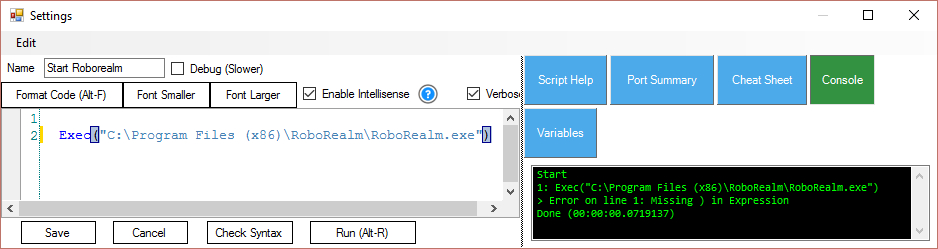
Exec("C:\Program Files (x86)\RoboRealm\RoboRealm.exe")
generates an error : missing ")" in expression.
I suppose the (x86) within the command generate the problem.
Any suggestion to work around this problem?
 Script Monitor
— Monitor and diagnose running ARC scripts: view active script labels, statuses, and stop long-running or background scripts easily.
Try it →
Script Monitor
— Monitor and diagnose running ARC scripts: view active script labels, statuses, and stop long-running or background scripts easily.
Try it →

 Resolved by ptp!
Exec("C:\Program Files (x86)\RoboRealm\RoboRealm.exe")
generates an error : missing ")" in expression.
I suppose the (x86) within the command generate the problem.
Any suggestion to work around this problem?

The issue is with the (x86) in the command. I built a link and call that link instead of the direct exe. The link would point to the exe. The link is stored in a directory that is simple like "C:\DirectoryWithoutSpacesOrSpecialCharacters".
just a work around and someone else may have a solution.
can you try the following:
or
I have tried using escape characters and haven't gotten it to work. I dont know that I tried those sequences though.
is a guess,
it will depend first how the EZB engine parses and handle escape characters (if it supports)
secondly it depends how the shell command is executed, i'm guessing the string is being passed directly to the shell versus a detailed call (working directory, program path, arguments)
try this:
basically you replaced the long name with a DOS (yes before windows) path name (8 characters):
to obtain DOS PATHs run:
in the parent directory for each sub-directory.
cheers
The last command did work.
Exec("C:\progra~2\RoboRealm\RoboRealm.exe")
Tanks to you both
Glad you got it working. I think you can also call the roborealm file directly if you are using multiple of them. It has been so long since I did this but it is either possible to call the robo file directly or pass it in as a parameter. I cant remember which.
did both options generated errors in EZB ?
I had faith that the first option could work too..