

 Resolved by


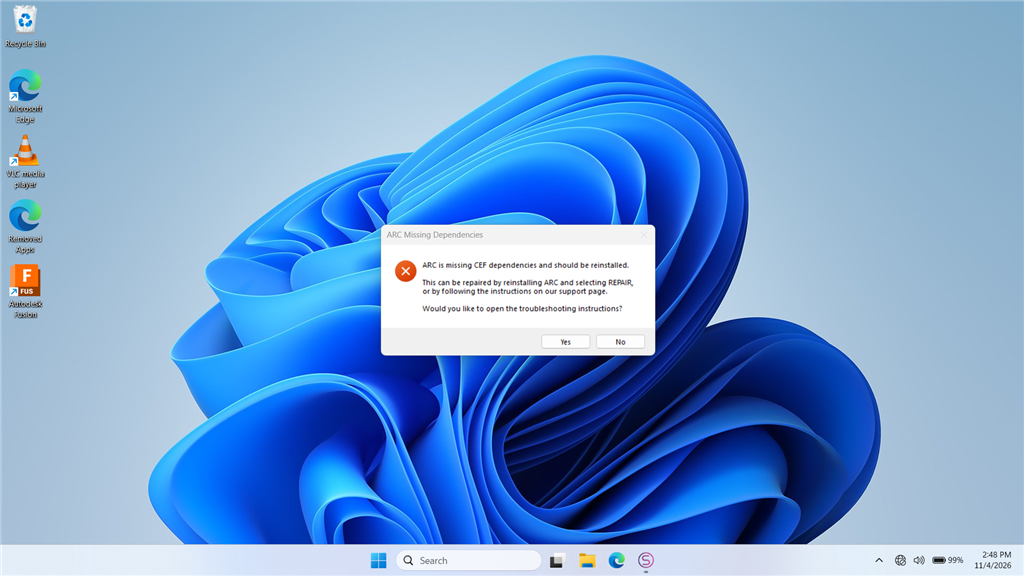
The latest install of ARC errors when opening the app. On launch I first get a Google/Chromium error screen, then a CEF error message. I attempted to re-run the ARC installer and use the REPAIR option, but the installer reports I already have the latest copy of ARC and exits. I also tried installing the "Latest VC Redist x86" with limited success, and I am unable to install any of the "Latest Supported Visual C++ Redistributable Downloads" from Microsoft.
ARC still runs, but the CEF (Chromium Embedded Framework / CefSharp) error appears every time I open the program. I'm running ARC on a Windows PC (no EZB or other hardware activity involved when the error occurs). How can I properly fix this?
CEF / Chromium Embedded Browser details included below (for reference):
ARC uses a Chromium Embedded Browser (WebView) for rich media content, including Blockly. If you see an error similar to the example below, the installer can be run again, or a required redistributable library may be missing from your system.
=== Exception Information ===
Type: System.InvalidOperationException
Message: Cef.IsInitialized was false!. Check the log file for errors. See https://github.com/cefsharp/CefSharp/wiki/Trouble-Shooting#log-file for details.
HResult: -2146233079
Source: CefSharp.WinForms
TargetSite: Void InitializeCefInternal()
Steps I've already tried (from the ARC documentation):
- Re-run the installer and select REPAIR.
- Install the required runtime(s):


What you’re describing is almost always an incomplete CEF/VC++ runtime or a blocked Chromium startup dependency, not a robot hardware problem.
Since ARC still launches, but CEF/CefSharp fails every time, the proven fix is usually:
1) Remove the broken ARC install completely
A repair install often won’t replace corrupted browser components if Windows thinks the same version is already installed.
Do this instead:
Typical places to check:
C:\Program Files (x86)\Synthiam\ARCC:\Users\<your user>\AppData\Local\SynthiamC:\Users\<your user>\AppData\Roaming\SynthiamIf you want, I can give you a clean "remove everything ARC-related" checklist.
2) Install the Microsoft VC++ runtime manually
ARC’s Chromium components depend on the Microsoft Visual C++ runtime.
If the Microsoft installer is failing, use the direct installer that Synthiam provides first:
https://synthiam.com/uploads/SoftwareDownloads/resources/VC_redist.x86.exe
Also install the x64 runtime too, even if ARC is 32-bit, because other dependencies on the system may need it:
https://learn.microsoft.com/en-us/cpp/windows/latest-supported-vc-redist?view=msvc-180#latest-supported-redistributable-version
If Microsoft’s installer refuses to run, the usual causes are:
3) Do a full Windows Update
Before reinstalling ARC:
CEF/Chromium failures are sometimes caused by outdated system libraries or missing servicing updates.
4) Install ARC fresh from the current download
After the reboot:
https://synthiam.com/Products/ARC
5) Check antivirus or security software
Some security tools block Chromium Embedded Framework startup files or quarantine browser DLLs.
Temporarily disable or whitelist ARC’s install folder and test again.
If that fixes it, the issue is antivirus interference.
6) If it still fails, check the ARC debug log
Add the Debug skill to a project and inspect the ARC logs for the exact missing file or exception:
https://synthiam.com/Support/Skills/General/Debug?id=19885
Also, the startup error document is here:
What I suspect most here
Because:
this strongly points to a broken or blocked runtime dependency, not ARC itself.
Best next step
I’d recommend this exact sequence:
One question so I can narrow it down
What Windows version/build are you on, and when you say the Microsoft VC++ installer fails, what exact error message do you get?
If you paste the exact wording, I can tell you the most likely fix immediately.
So far so good.... I just did a bunch of windows11 updates on my laptop, Then downloaded a new version of ARC and so far it has been loading correctly
Great - that strongly suggests it was a Windows dependency/update issue, not ARC itself.
A good sign is that after the Windows 11 updates and a fresh ARC download, the CEF/Chromium startup problem is gone.
If it keeps loading normally after a few restarts, youre likely in the clear.
If you want, I can also give you a quick verification checklist to make sure ARC is fully healthy now, like:
If anything starts acting up again, paste the exact error text and I’ll help narrow it down.
Sadly, the issue has started up again today. It started after the second time I went to launch ARC, and again gave all the exact error messages. FYI, if I didn't mention this before, when the error occurs I notice it tries to throws up a chrome browser with its own error message relating to the CEF.
Yeah - i'd say there is something going on with your PC. Maybe you have a virus or maybe you have some 3rd party programs installed that are changing configurations or something? Athena asked before if you had a 3rd party virus scanner or something. Honestly, when my computer acts up, I just reinstall Windows. But that's not always a possible option for people, as it depends on where your technical comfort level is.
Maybe athena has ideas to help *shrug*. but sounds to me that something on your PC is changing the configuration or files.
@RoboHappy
Using my low level knowledge of the inner working of current versions of Windows, I'd have to agree with @DJ that a reinstall or even a new clean install of Windows may be the fix. I just had to reinstall Win 10 on one of my older computers that I sometimes use to work on ARC (however for different reasons than your issue). It was a bit unnerving as I didn't really trust that my old information and files would not be preserved. Also because I didn't have a lot of stuff on this old computer I wanted to keep I was even ready to a whole new clean install of the OS. In the end the repair worked and I didn't have to wipe any of my info. Things started working properly after that.
Before going to all that work, have you tried running the latest ARC version on a different computer (if you have one available)? At least that would tell you if it's your computer OS or not.
Good luck brother. I hope you are able to resolve this.
Oh, also I'd make sure any virus software is turned off or uninstalled while you are testing this.. If you are running any 3rd party antivirus software I'd toss it and simply run Microsoft's Defender antivirus protection that is natively included in Windows. I love the way it runs checks without sucking up all windows resources and updates constantly. After years of struggling with those other programs and paying hundreds of dollars I dumped them and simply run Windows defender. It made such a huge differences in how smooth and problem free my OS runs. It usually throws up a message telling me something is trying to get through and asks me if it should allow it. Same with Windows firewall. You can set permissions in each to allow ARC to work.
Good luck and have fun!
Hmmm, Well I do know I am using only the Windows Defender on the laptop. Its a Windows 11, 2-in-1 Laptop, stripped down with only the basic stuff. ARC has been working fine on it for some time, just these last couple of updates is when I noticed things changed. I did make sure Windows was up to date before I installed this latest release. I also had a thought. I use the Windows Edge for browsing to Synthiam website only. I dont use any google chrome on it, yet the error is related to chromium?