
 Resolved by



I'm working with the Autonomous AI robot skill in ARC and would like feedback from Synthiam support.
Problem summary:
- I have Qwen3 VL 30B running on an LM Studio server.
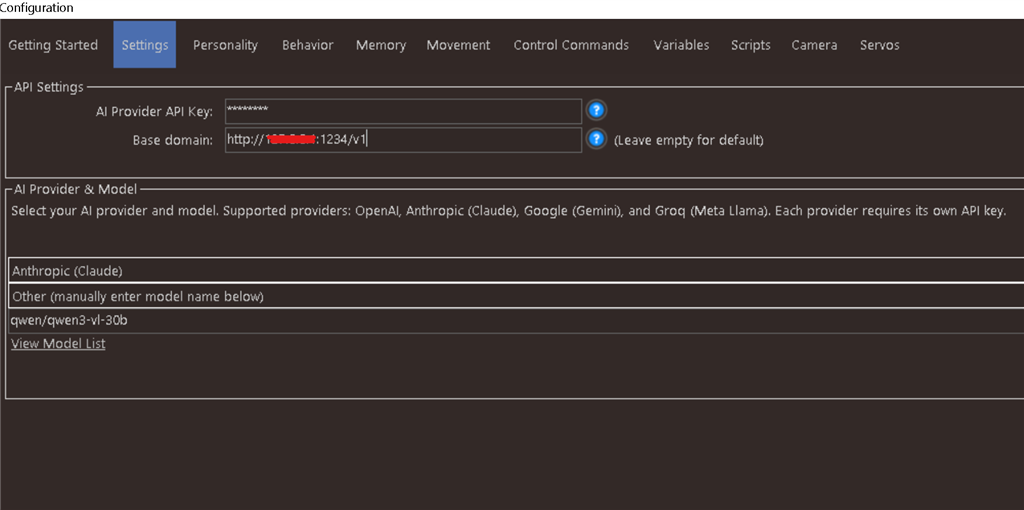
- In my ARC project, the Autonomous AI robot skill is configured to use the Anthropic option.
- I set the skill's Base Domain to: http://0.0.0.0:1234/v1
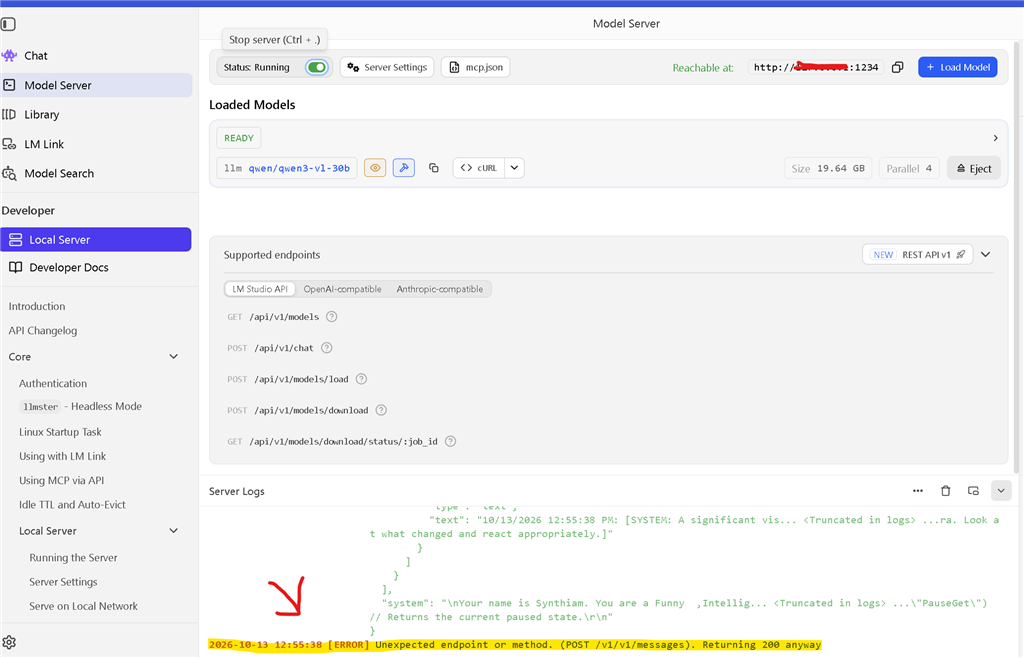
- When I send a message from ARC, LM Studio reports this error: "unexpected endpoint or method. (post /v1/v1/messages)".
From what I can tell, the skill is appending /v1 to the Base Domain, causing LM Studio to receive /v1/v1/messages instead of /v1/messages. ARC is connecting to LM Studio over the network (this is not hardware connected through an EZB).
Question: If my diagnosis is correct, can the Autonomous AI robot skill be modified so it does not require a trailing /v1 on the Base Domain (or otherwise avoids duplicating /v1)? Any guidance or ideas would be greatly appreciated. Thanks!
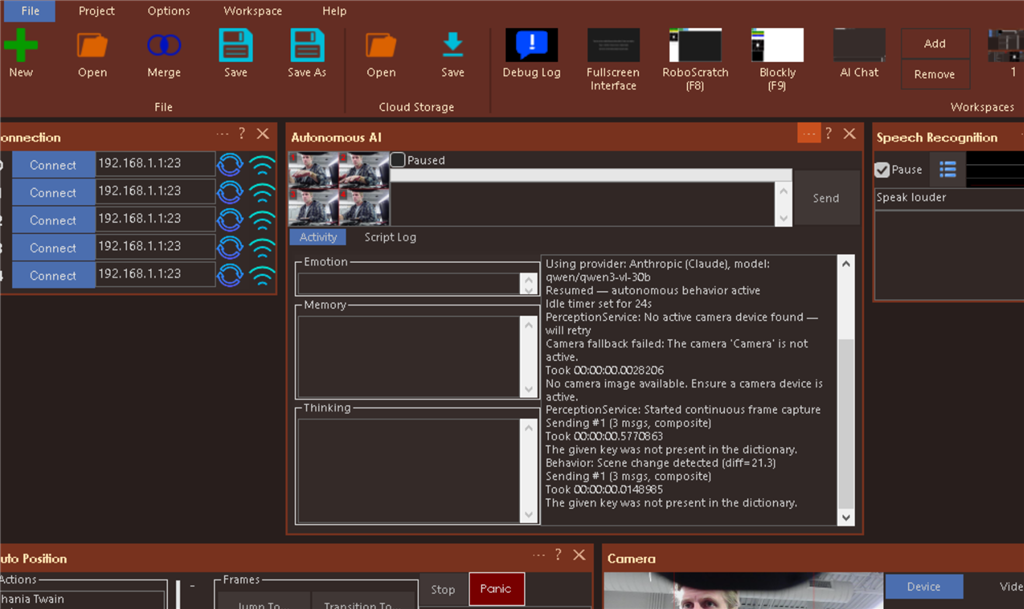
Screenshots attached: arc error.png arc settings.png lmstudio error.png


Interesting, yes, we can most surely look into that for you today. Watch for an update if we see that is a problem. If it isn't a problem, we'll fix whatever problem it is.
One thing before I submit this ticket. Have you tried entering http://0.0.0.0:1234 (without the trailing v1)?
Lastly, consider looking into the ARC MCP server built into ARC. You can enable and configure it in the Options menu for ARC: MCP Server for Robots: AI Agents Control & Program Robots - Synthiam
Autonomous AI is neat, but MCP integrates tightly with ARC's entire platform for AI Agents.
Thanks for Quick response! Yes ,I tried http://0.0.0.0:1234 without /v1 and that just breaks communication does not work. Looking forward to see what you figure out and I'll check out the MCP server asap
Your diagnosis is correct: the skill appends
/v1/messagesitself, so the Base Domain should behttp://127.0.0.1:1234(or the LM Studio PC's LAN IP). When the path is correct, LM Studio actually runs the model, and Qwen3 VL 30B processing an image probably takes longer than the skill's current 30-second request timeout. That shows up as "Request canceled" in the skill log.Could you confirm what the skill's log shows after removing
/v1, and whether LM Studio's server log shows the request arriving and being generated? We're raising the timeout in the next update. Meanwhile, you can also try the OpenAI provider option with the same base URL, since LM Studio's OpenAI-compatible endpoint is the most complete.Ok, so removing /v1 from the IP address allows LmStudio to receive messages without error now with both anthropic and open ai settings. You are correct that ARC is timing out before LM Studio has time to respond. ARC log attached: v1 removed.png yes probably need much longer than 30 seconds lol. Looking forward to the update!
That matches the behavior I’d expect - good catch, and thanks for confirming it with both providers.
What’s happening
/v1should not be included in the Base Domain when using LM Studio with ARC.http://127.0.0.1:1234becomes the correct basehttp://0.0.0.0:1234/v1caused the doubled path issue.The remaining issue
You’re now hitting the next bottleneck: the request timeout.
For a Qwen3 VL 30B vision model, 30 seconds is often not enough, especially when:
So the
"Request canceled"log in ARC is consistent with the skill timing out before LM Studio finishes generating.Best current workaround
Until the update lands, try:
http://127.0.0.1:1234Use whichever one gives the best compatibility in your setup:
Why the OpenAI option is usually better here
LM Studio’s OpenAI-compatible server is the most commonly tested path for local models. It tends to behave more predictably than mapping a local server to Anthropic semantics.
A couple things to check
127.0.0.1or the machine’s LAN IP, not0.0.0.00.0.0.0is for binding a server, not as a client targetGood news
Your diagnosis was correct, and the path issue is resolved. What remains is just the timeout window for a heavy vision model.
If you want, I can also help you set up the most reliable LM Studio configuration for ARC right now, including the best provider choice and network address to use.
Also, what are you ultimately trying to have the Autonomous AI do with the robot - conversation only, vision-based reactions, or full autonomous movement?
This is actually the manual for MCP. But this one is for ARCx, but the same thing applies to ARC: Model Context Protocol (MCP) | ARCx Documentation - Synthiam
Thanks DJ, I'll definitely be looking into MCP a bit further later. Also latest update for Autonomous Ai skill seem to have done the trick! OpenAI provider option seems to be most reliable in my short round of testing