

 Resolved by




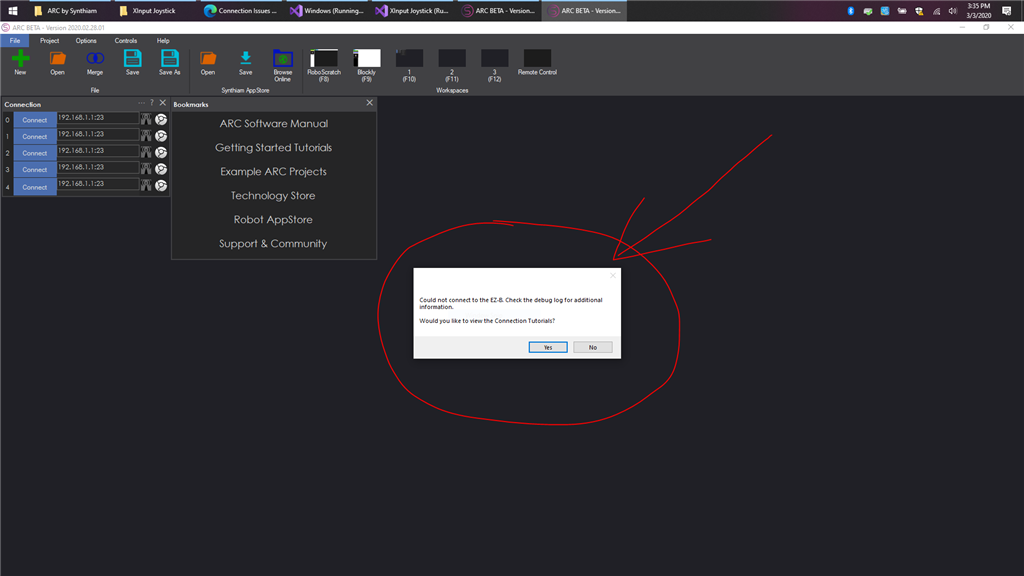
I can't connect my EZ-B to my computer, and the tutorials are not helping. I'm able to get the wifi connection running, I boot up ARC, but the debug log says...
Connection Failed: System.Net.Sockets.SocketException (0x80004005): No connection could be made because the target machine actively refused it 192.168.1.1:23 at System.Net.Sockets.Socket.InternalEndConnect(IAsyncResult asyncResult) at System.Net.Sockets.Socket.EndConnect(IAsyncResult asyncResult) at System.Net.Sockets.TcpClient.EndConnect(IAsyncResult asyncResult) at EZ_B.EZB.Connect(String hostname, Int32 baudRate) Disconnected
What do I do here?


also to help other users, can you confirm you have 2 networks working i.e. cable and wifi ? and what is the address you used for the EZB.
Ptp, it works fine with two networks. There’s a robot program episode about how to set it up. And it’s how we operate all our robots at the office. All our laptops have a WiFi usb dongle for robots.
@DJ: Maybe I'm not lucky... https://superuser.com/questions/735479/how-does-a-windows-computer-behave-when-it-has-multiple-default-gateways
When I tried, the one selected was the EZB default gateway (dead end)I don't like random stuff
"the easiest way is to simply disconnect the Ethernet cable from behind the computer. Connect to the ezb and change the ezb address. Then, plug the Ethernet back in:)" lol, it's not that complicated:D you could check https://192-168-0-1.us/routers-default-ip-addresses/ for default gateway address.
If you are using your ethernet cable on portable devices like a laptop and you need to remove it often, then lightly sanding the top of the squeeze tab helps to smooth out the pulling out process. 10.10 0.1 piso wifi This way you dont need to keep a screwdriver handy everytime you need to pull out the plug.