
Change Release Notes
When ez-bits are missing, do not allow user to SKIP. Now first time users must SYNC or CLOSE. Skip is no longer an option.
Script Flow control bug fix for 3rd party controls. Find out more about script flow by clicking HERE
Dynamic Turning with camera control Movement Tracking (see below)
This is a fun release because it has a pretty significant update to the camera movement tracking. The movement tracking is a setting in the camera configuration which tells the robot to physically follow the specified tracking type using the movement panel. Of course, a Movement Panel is required in the project for this to work. The old movement tracking would stop the robot and turn toward the object. This new addition uses a Dynamic Turning option. This means the robot will turn toward the object while moving forward. The further the object is to the edge of the screen, the harder the robot will turn in that direction.
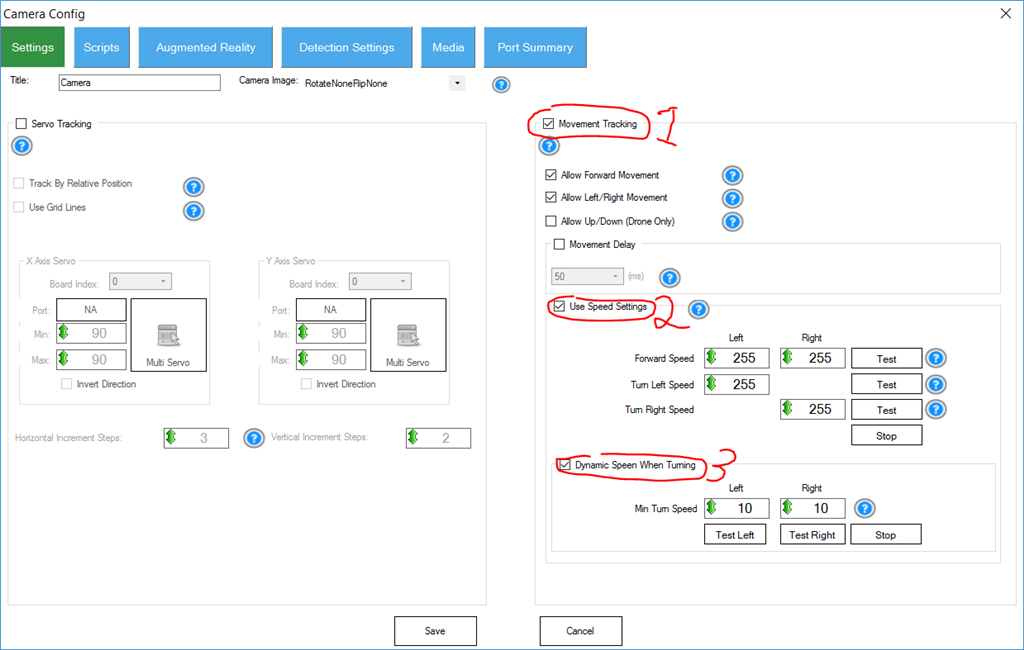
Enabling this checkbox instructs the camera control to use the Movement Panel and have the robot physically follow the object.
Enabling Speed Settings tells the robot to use the specified speeds when tracking with the movement panel. Forward, Left and Right speeds can be specified and tested here.
Enabling Dynamic Turning will have the robot turn toward the object at a variable speed. The values in this area are the SLOWEST speed the robot's wheel will turn in that direction. This means SLOWER = MORE TURNING. The further the detected object is from the center grid lines, the faster the robot will turn. Having this number as low as possible is usually best. For Roli, it would be set for a 1
Here is an example of the robot NOT using dynamic turning. Notice how the robot STOPS and TURNS and STOP and TURNS and STOPS and TURNS, etc...
Here is an example of the robot USING dynamic turning. Notice how the robot continues straight while tracking the object...
ARC Downloads
ARC
FREE- 1 third-party plugin skill per project
- Trial cloud services
- Personal, DIY & education use
- Updated every 6–12 months
 Download
ARC
PRO- Use on 2+ PCs simultaneously
- Unlimited robot skills
- Cloud backup & revision history
- Weekly features & bug fixes
- Business use permitted
ARC
RUNTIME- Load & run any ARC project
- Read-only mode
- Unlimited robot skills
- Includes early access fixes & features
- Minimum requirements: Windows 10 or higher, 2 GB RAM, 500 MB free disk space.
- Recommended: Windows 10 or higher, 8 GB RAM, 1 GB free disk space.
- Prices are in USD.
- More about each edition: Download & install guide.
- Latest changes: Release notes.
Compare Editions
| Feature |
ARC
FREE
|
ARC
PRO
|
|---|---|---|
| Get ARC Free | View Plans | |
| Usage | Personal · DIY · Education | Personal · DIY · Education · Business |
| Early access to new features & fixes | — | ✓ |
| Simultaneous microcontroller connections * | 1 | 255 |
| Robot skills * | 20 | Unlimited |
| Skill Store plugins * | 1 | Unlimited |
| Cognitive services usage ** | 10 / day | 6,000 / day |
| Auto-positions gait actions * | 40 | Unlimited |
| Speech recognition phrases * | 10 | Unlimited |
| Camera devices * | 1 | Unlimited |
| Vision resolution | max 320×240 | Unlimited |
| Interface builder * | 2 | Unlimited |
| Cloud project size | — | 128 MB |
| Cloud project revision history | — | ✓ |
| Create Exosphere requests | — | 50 / month |
| Exosphere API access | — | Contact Us |
| Volume license discounts | — | Contact Us |
| Get ARC Free | View Plans |
* Per robot project
** 1,000 per cognitive type: vision recognition, speech recognition, face detection, sentiment, text recognition, emotion detection, azure text to speech

Upgrade to ARC Pro
Synthiam ARC Pro is a new tool that will help unleash your creativity with programming robots in just seconds!
@DJ, thanks for this new release. You've been pumping these great releases out, it will take me 3 more years to caught up. . You must have figured out how to clone yourself.
Cheers