

Steps
- Professor E's Overview
- Software Download
- Loading an Example Project
- Building Instructions
- Servo Profile
- Connecting
- Microphone Control
- Soundboard Control
- Commonly Used Controls
- Gear Icon
- Camera Control
- Auto Position Control
- Frame Creation
- Coding Workspaces
- RoboScratch Workspace
- RoboScratch Commands
- Using Wait
- RoboScratch Program Execution
- RoboScratch Program Flow
- Blue Question Marks
- RoboScratch Source Code
- Blockly Workspace
- Blockly Commands
- Blockly Audio
- Blockly Logic
- Blockly Execution
- Blockly Source Code
- Additional Workspaces
- Adding Controls
- Third Party Plugins
- Scripting
- Scripting Control Options
- EZ-Script and Blockly
- Design Mode
- Connecting Custom Components
- Updating Build Instructions
- Reorder Build Steps
- Share with EZ-Cloud
- Public Sharing
- EZ-Cloud AppStore
- Load Revisions
- Learn More
- Quiz
The Robot Program Episode 006: Introducing ARC
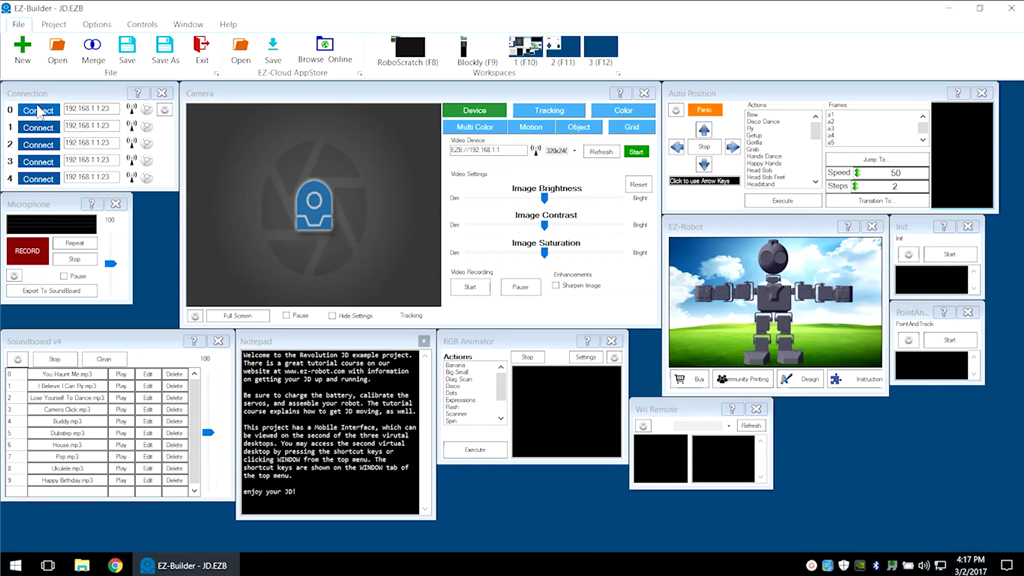
This lesson introduces the ARC Robot Software by exploring options and describing features. At the end of this lesson, the reader will be familiar with the overall layout and features of EZ-Builder. Follow along with The Robot Program Episode 006: Introducing EZ-Builder.
View the video episode here: https://www.ez-robot.com/Tutorials/Lesson/20

Professor E's Overview
This lesson introduces and demonstrates the ARC software. Follow along with The Robot Program Episode 006: Introducing EZ-Builder. At the end of this lesson, readers will be familiar with the layout, workspaces, and available controls of the ARC software.
The RoboScratch and Blockly workspaces will also be introduced, as well as EZ-Script and third-party plugins. Blue question marks and window questions marks can be used to find more information about a specific aspect or control.