






Asked
Soundboard Volume Zero Issue
I have a question about the ARC robot skill SoundBoard (EZB). Why can't the volume go to zero anymore?
I'm not sure when this changed, but it seems the soundboard volume can't be muted any longer. I found it really handy when troubleshooting to be able to turn the music down to zero if needed. If this change is permanent, would it be possible to get a Mute button (with on/off status) beside the Play/Stop button?
Related Hardware (view all EZB hardware)

EZ-B V4
by EZ-Robot
EZ-B v4/2 robot controller: dual Cortex ARM, Wi-Fi, audio/video, 24 servo/digital ports, I2C/UART, camera and Synthiam ARC control for custom robots
Wi-Fi / USB
Servos
24
Camera
Audio
UART
3
I2C
ADC
8
Digital
24
Related Robot Skill (view all robot skills)

Soundboard (EZB)
by Synthiam
Play WAV/MP3 via EZ-B v4, manage tracks, add timed scripts for synced robot actions, control via ControlCommand(), volume and clipping indicators.

Yes - you can work around this immediately and I can also help get a proper Mute button added to the SoundBoard(EZB) skill.
Summary
Quick toggle-mute script (JavaScript)
How to use the script from a button
Notes & alternatives
Want me to add:
If you want SoundBoard to have a native Mute button in the skill UI, please vote/request it on the SoundBoard(EZB) support page so the skill author can consider adding it: https://synthiam.com/Support/Skills/Audio/SoundBoard-EZB?id=16060
Tell me:
I’ll help you set up the button/script or provide an updated script that changes the button label/icon.
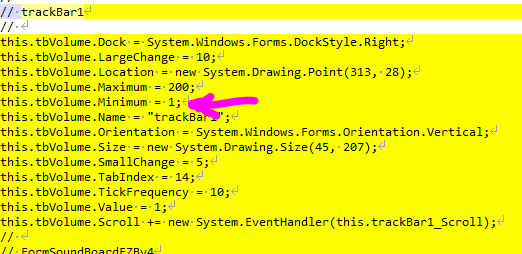
There's never been a volume 0 in the soundboard ezb.
Looking in SVN, the soundboard was first introduced on Tuesday, November 5, 2013 @ 12:03:32 AM Mountain time
The volume was added the same morning November 5, 2013 3:24:05 AM Mountain time and the min volume value has been 1 every since. Looks like i had late night! I'm not fully sure how volume 0 would work or what it would do but you can try it with Athena's suggestion.
Ha yup i see now what happens if you set the volume to 0 lol
That's very odd, I swear I could use the slider to bring the volume to zero. Is it possible that it was minimum: 1 on the backend and appeared as zero in the UI (and muted the sound)? Or maybe it was changed sometime between 2013 and 2026, and then was changed recently.
I will have to look at an older version of ARC with an older version of the Soundboard to check. It's something I automatically did in the past, but I was surprised that I couldn't mute the sound any longer.
I think it's because you put it at 1 but you have to start and stop the audio for it to take effect. I tried at 1 and you can't hear it at all - u probably did that
I might be able to change the volume in real time with the new encoder that was altered for esp32. i'll have to think about that
Yeah i figured out how to do it. Next update will have real-time volume adjustment over the ezb audio protocol
Thanks @DJ, maybe I'm mis-remembering. The volume adjustment did always happen in real time without stopping and starting but I remember the volume being muted when the volume bar was at a minimum (and stopping/starting the audio). Yesterday, I was surprised to still hear the music when the volume bar was at the lowest point. I don't remember it being like that.