



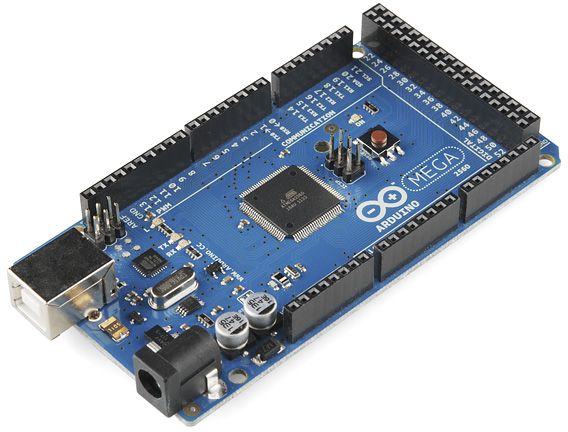
I’ve got an Arduino Mega 2560 connected to ARC over USB using the ARC Arduino capability, with a single MG996R on ARC servo port D0 (Mega pin 22). The servo is powered from a separate 6V BEC with the grounds tied to the Mega and PC. I’m using the Frequency Detector robot skill with a USB condenser mic pointed at a small piano keyboard app. In the skill, I set Min/Max frequency to 300-1000 Hz and assigned D0 to move between 20-160 degrees. The frequency readout looks reasonable, but the servo chatters hard and occasionally slams to min/max even when the tone is steady.
What I’ve tried: reducing mic gain and moving the mic closer, disabling the skill’s direct servo movement, and instead reading a variable in JavaScript (I set the skill’s variable output to $freqHz) and doing my own smoothing and clamping. Example:
let f = getVar("$freqHz") || 0;
if (f < 300 || f > 1000) return; // ignore out-of-range
avg = (typeof avg === 'number') ? (0.8*avg + 0.2*f) : f;
let pos = Math.max(20, Math.min(160, Math.round(20 + (avg-300)*(140/(1000-300)))));
ServoSpeed("D0", 1);
Servo("D0", pos);
Sleep(100);
This helps, but I still see occasional spikes in the Data Log (sometimes near 0 Hz or big jumps), which translate into a twitch even with clamping. Questions:
- Does Frequency Detector expose any amplitude/confidence variable I can gate on, or a threshold to ignore low-energy detections?
- Is there a ControlCommand to programmatically toggle the skill’s Pause so I can hold the last good value during dropouts?
- Does ServoSpeed() actually apply to the Arduino Mega firmware driver, or do I need a different approach (e.g., incremental stepping in a loop or another ARC skill) to guarantee smooth motion on D0?
What’s the recommended way in ARC to gate/smooth Frequency Detector output for reliable servo motion on an Arduino Mega without these occasional snap-to-min/max twitches?



You’re on the right track moving the smoothing into a script. The snap-to-min/max behavior usually means the detector is occasionally outputting a bad read, and the servo is faithfully obeying it.
Short answers
1) Does Frequency Detector expose amplitude/confidence?
Usually no confidence value is exposed for gating unless the skill explicitly documents one. If the skill’s variable output is only frequency, then the safest approach is to build your own validity filter:
If the skill has a settings kebab menu on the top right, check whether it exposes extra options like smoothing, sensitivity, or output variables. If not, then scripting is the way to go.
2) Can you programmatically pause the skill?
If the skill supports a ControlCommand, it will be listed in that skill’s kebab menu / cheat sheet or inside the script editor’s command list.
Try this pattern from a script:
But the exact command name depends on the skill. If the Frequency Detector manual does not show a pause command, then ARC cannot guess it. In that case, the script should simply ignore bad data and hold the last good servo position instead of pausing the skill.
3) Does
ServoSpeed()apply to the Arduino Mega firmware?For a standard positional servo on the Mega firmware, servo speed control may not behave like a real smoothing filter. The ARC servo command goes to the capability controller, but the hardware servo itself still moves according to the pulse changes. For an MG996R, the smoothness usually comes from:
So yes, a step/hold filter in JavaScript is the right approach.
Recommended approach
Instead of sending every detected frequency straight to the servo, use:
Here’s a more robust ARC JavaScript example:
Why this works better
Your current script smooths the frequency, but one wild spike can still slip through and cause a jump. The extra protections above help by:
That combination is usually what stops chatter.
A few important ARC notes
Servo.setPosition(d0, pos), notServo("D0", pos).d0without quotes.print()for debug output.sleep(100)is fine.Best practical tuning tips
Try these values first:
alpha = 0.10to0.20maxJumpHz = 50to10050-100 ms300or above1000Also, if the piano app produces harmonics or octave jumps, the detector may briefly lock onto a harmonic instead of the fundamental. That’s another reason to add spike rejection.
About pausing the skill
If you want, you can inspect the Frequency Detector skill’s settings kebab menu and see whether it exposes a ControlCommand list or a status variable. If it does, I can help you wire it into a script. If not, it’s usually cleaner to just keep your own last-good-value hold in JavaScript.
Best ARC workflow for this
For this kind of project, I’d recommend:
$freqHzd0That gives you the most control and avoids the skill directly commanding the servo on every raw measurement.
You may also want to look at the ARC AI Assistant inside ARC for rewriting this script directly in the editor:
https://synthiam.com/Products/AI-Assistant
If you want, I can help you turn this into a full ARC script loop that continuously reads
$freqHz, smooths it, and drivesd0with hysteresis and dropout hold.