







Does EZ-Face work with the V4 camera? For some reason I cant get it to be recognised in the EZ-Face software. I am running version 3.7.14. I can get it to work with the camera that is in my laptop.
Thanks David
Does EZ-Face work with the V4 camera? For some reason I cant get it to be recognised in the EZ-Face software. I am running version 3.7.14. I can get it to work with the camera that is in my laptop.
Thanks David

It looks like EZ-Face is using devices in the Imaging Devices section of the devices in the OS. The V4 camera doesn't show up there, so I doubt it will work. I will just have to come up with a different way to do facial recognition or put a different camera in the project along with the V4 for this project.
That is correct and a known short coming. EZ-Face currently does not work with the v4 camera or any cameras with an IP address. The source code in included so you are welcome to find a solution before I do.
Thank you Justin for the reply. I just wanted to make sure I wasn't missing something.
I opted to use roborealm in this project. It gets the feed from the custom web server in ARC and can do facial recognition and pass the parameter back into ARC.
Just wanted to post in case someone else is trying the same thing in the future.
I will be posting another video showing this and how it then is used to get data from the database based on the user of the robot I posted about in a different thread.
@Justin I hope you can find a solution. I have a prototype that could use the connection between EZ-Face and the V4 camera.Fingers crossed!
@JustinRatliff
This is like a bit of a treasure hunt. Find one clue (EZ-Face) then loose the path by discovering the v4 camera issue.
I would suggest adding a note to your web page with the software making it clear the latest software/hardware version does not work. I was pretty jazzed about this, but cannot use my babycam (IP based) or my JD. I may just put up a local camera, but will be waiting for an update either from you to access V4 and/or IP cameras, or from @Djshures to let windows see the V4 cameras.
Great work.
The issue is that it is an IP camera. I know that Justin is working on getting EZ-Face setup to work with IP cameras. Its not an issue with the V4 camera itself. The same issue would occur with any IP based camera.
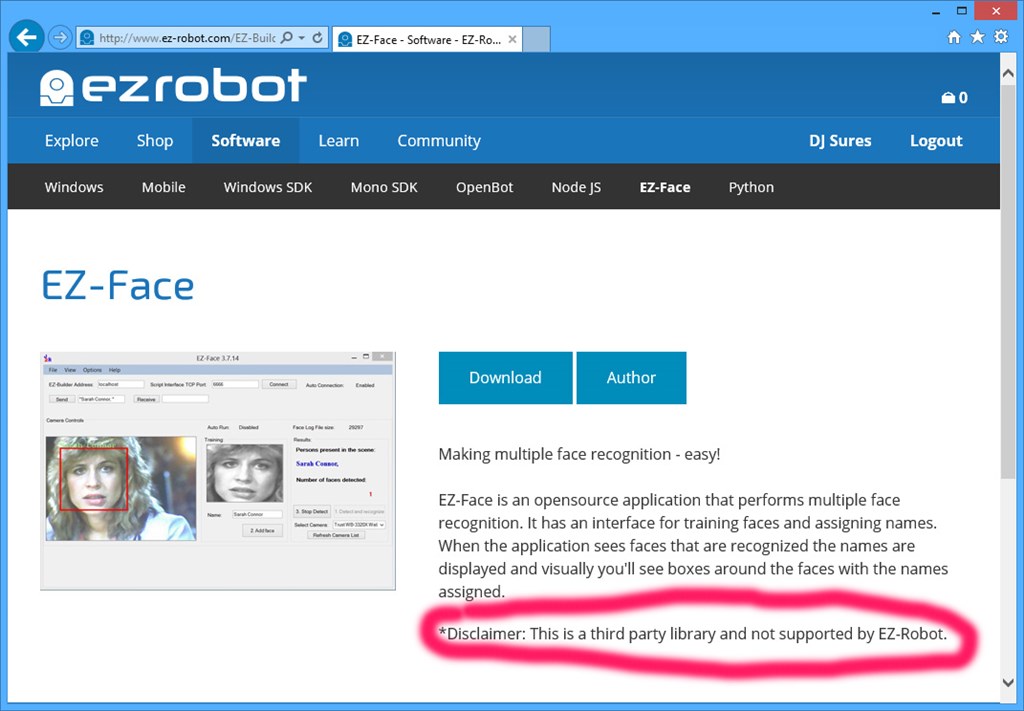
@Iamachine You will find the link to the third party software package from our Software page. On that page is a disclaimer that it is a third party software package and not supported by EZ-Robot. For your convenience, I circled the disclaimer and here is a screenshot:
As mentioned by others, Justin is working on an update and it will be released when it's done . In the meantime, use the camera on your laptop for experimenting with it.