


 Resolved by Synthiam Support!
AI Scripting In ARC?
I know I can ask for JavaScript writing help here on the forum from Athena. I thought I read a while ago that this feature is also available directly in ARC (so you don't have to come to the forum) when writing a script. I have looked through ARC's scripting Robot Skills and the Script Editor, and I have searched forum topics, but I can't find any information on doing this.
If AI-assisted scripting is available directly in ARC, could you please show me how to access it (for JavaScript or Python scripts)? Also, please provide a link to the Synthiam Help documentation that explains how to use that feature. Thanks.
Related Hardware (view all EZB hardware)

Related Robot Skills (view all robot skills)


Upgrade to ARC Pro
Harnessing the power of ARC Pro, your robot can be more than just a simple automated machine.
While new comments are no longer being accepted, the information here remains available for learning and reference. Check the most recent comment for additional details.
Yes - AI-assisted scripting is available directly inside ARC, and it works in the Script robot skill editor for JavaScript and Python.
How to access it in ARC
Add the Script robot skill
Open the Script skill settings
Choose your scripting language
Use the built-in editor assistance
AI help inside ARC
If you mean AI-generated code suggestions inside ARC, that is typically done by using the OpenAI ChatGPT robot skill rather than the Script skill itself.
That skill can be configured to generate responses and even execute JavaScript or Python snippets in ARC.
OpenAI ChatGPT robot skill docs
https://synthiam.com/Support/Skills/Artificial-Intelligence/OpenAI-ChatGPT?id=21559
Script robot skill docs
https://synthiam.com/Support/Skills/Scripting/Script?id=16089
ARC scripting overview
https://synthiam.com/Support/Programming/code-editor/overview
If you want AI-assisted script generation
The usual workflow is:
If your goal is to have ARC itself help you write code on demand while editing, the closest built-in feature is the Script editor’s Intellisense + the OpenAI ChatGPT skill workflow.
Helpful note
If you were expecting a dedicated "AI code writer button" inside the Script editor, I’m not aware of a separate standalone tool like that in ARC today. The recommended path is the OpenAI ChatGPT robot skill plus the Script skill.
If you want, I can also show you:
OK, thanks. This answers my question. I was talking about using the OpenAI ChatGPT robot skill . I didn't know this was the proper skill to use for code generation. I'll proceed trying that way.
We have been working on an AI Agent (putting athena local, so to speak) and leveraging our partnership with open ai using gpt codex to do so. Internally we have a copy working but we're having difficulty navigating the pricing around the compute usage. This is why all those "vibe coding tools" have fees for token/credit usage - because it's really expensive to use AI, specifically for large code snippets. I might have it pushed out this upcoming week for people to use because it is very usable, even if it can cost a few bucks a month.
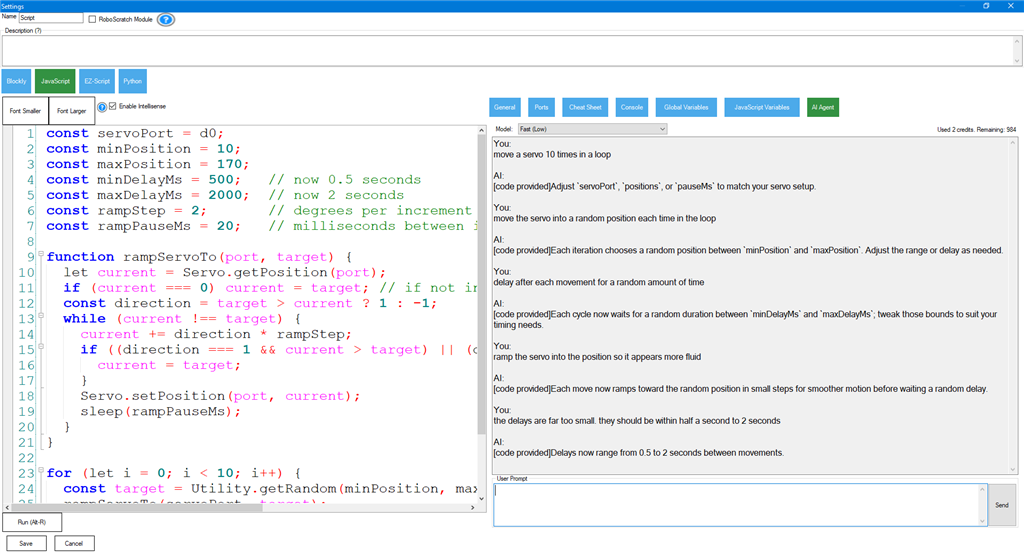
You bet - and here is an example with a most recent test... On the right, you can see the queries that are sent to the AI. It's an add-on that works across all ARC robot skill script edits. Currently, it's mostly complete, but waiting for a few bugs to be fixed before release. We most likely can't have it out this week, but the following week is promising.
This all sounds exciting. I'm looking forward to trying this out when it's released.
@DJ, thanks for your insight and personal touch. You make the difference, that's for sure!
@Synthiam Support , I appreciate your work and comments on this new feature. Please do not hurry on my part. I can wait until it's ready to be ready for release.
Oh it's pretty cool, i have to say. I'm having a blast with it!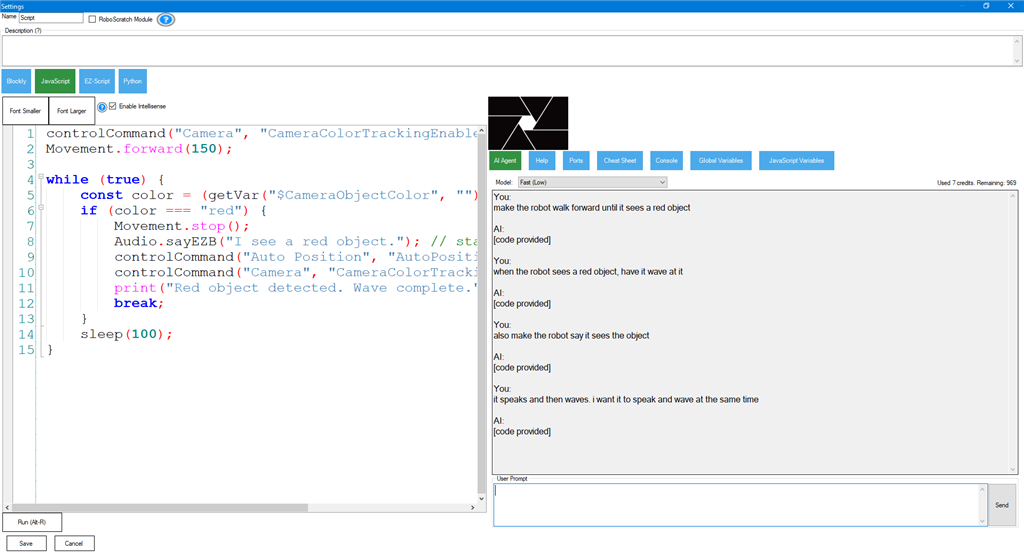
I gotta say that does look pretty cool and fun.
@DJ, Question (no need to get too deep with the answer);
By you simply typing "make the robot wave", how does the AI know how to pick the proper Auto Position action ControlCommand from all the actions that are built in this AutoPosition skill?
Ha - that question has a complicated answer about how it works technically. But a summary is that ARC is super modular, built with all these little components that can be expanded. Over the last few years, we've been expanding the components to include more metadata about what they do. So, when the AI Agent evaluates the state of ARC based on the project configuration, it knows what each thing does.
Also, to really help that system work, the manual includes a few tips. It's useful to fill out the project's port descriptor in the Project Settings menu. Also, when using global variables, give them descriptions. And for auto position, proper naming helps, but also entering the description field in the Auto Position config menu. The same goes for creating scripts: use the script description field to provide a brief description.
But eventually, most of that description-field stuff will be automated as well.
The idea is to eventually remove the need for programming and just tell the robot what you want in English.