




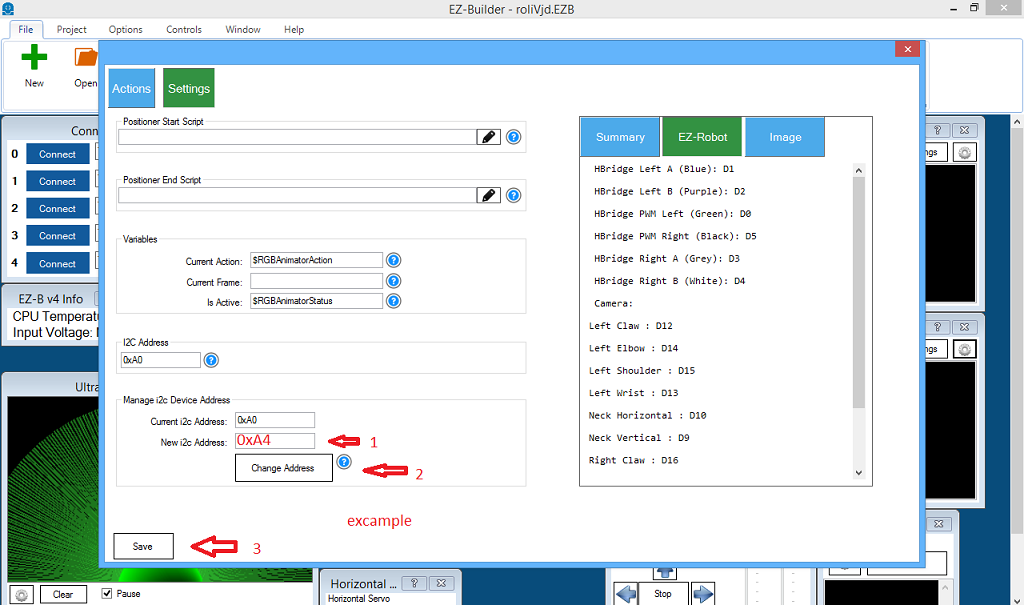
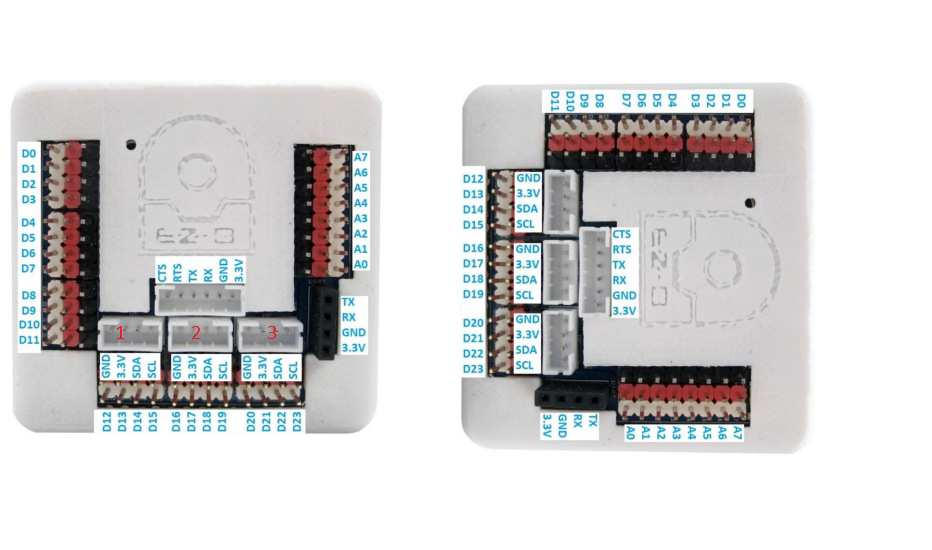
i know i asked this before.but i cant find the topic. my question is ,if i change a 12c port as in pic below. how do i now withs port i changed on ezbv ?sinds there are 3 ports.
 Resolved by Athena!
i know i asked this before.but i cant find the topic. my question is ,if i change a 12c port as in pic below. how do i now withs port i changed on ezbv ?sinds there are 3 ports.



Stay on the cutting edge of robotics with ARC Pro, guaranteeing that your robot is always ahead of the game.
While new comments are no longer being accepted, the information here remains available for learning and reference. Check the most recent comment for additional details.
@athena
i received today my 8x8 . do i need anything else than the 8x8 skill ? when i connect to ezbv4 i see 3 letters flashing but none works .
Yes - for the RGB 8x8 Display, you normally only need:
A few important clarifications:
1) The 3 I2C connectors on the EZ-B v4 are the same
The three I2C ports on the EZ-B v4 are not separate buses. They are duplicates of the same I2C lines. So it does not matter which of the 3 ports you plug the 8x8 into.
2) The 8x8 uses an I2C address, not a port name
The display has an I2C address like
0xA0,0xA2, etc.If you have more than one 8x8 display, each one must have a different I2C address.
3) If ARC sees the 3 letters flashing but nothing works
That usually means one of these:
4) What to check
Please verify:
5) If you have only one RGB 8x8
Use the default address first and don’t change it until needed.
6) If you are unsure of the address
Open the RGB 8x8 Animator skill and check its Settings from the kebab menu. There you can view or change the I2C address.
You can read more here:
7) About renaming the skill window
You mentioned it would be nice to rename it to something like RGB1 or RGB Left - that’s a good idea for organizing multiple displays. ARC doesn’t rename the built-in skill window title like that directly, but you can make the project easier to understand by:
If you want, I can show you a clean way to run two RGB 8x8 displays in ARC with different addresses and keep them organized.
Can you tell me:
@athena
i have only one connected but tested bolt . the address is 0xa2 i use empty ARC and one 8x8 skill .
@athena
problem solved . i turned the cable 180 and there it was .
thank you