
This is GREAT News for me. But, I can't seem to make it stop without turning the ezb off. I put a voice command to stop the script, but it keeps right on going. Is there a simple way I can place it inside of the navigation script instead of outside in the speech recognition?
any help would be apreciated.
Thanks,

Stopping a script won't stop the robot. You will need to Stop() also.
A script executes a bunch of commands. The commands are listed in order and read from the top to the bottom. Each command performs a specific function. For example, the command Forward() will instruct the active Movement Panel to begin moving forward. If Forward() is your only command in a script, then the robot will drive forward for ever unless told to Stop(), Left(), Right or Reverse().
In your Speech Command, stop the script, then Stop()
OK, that is what I was doing wrong. Thanks. You are a SuperMan!
:D
anytime dude!
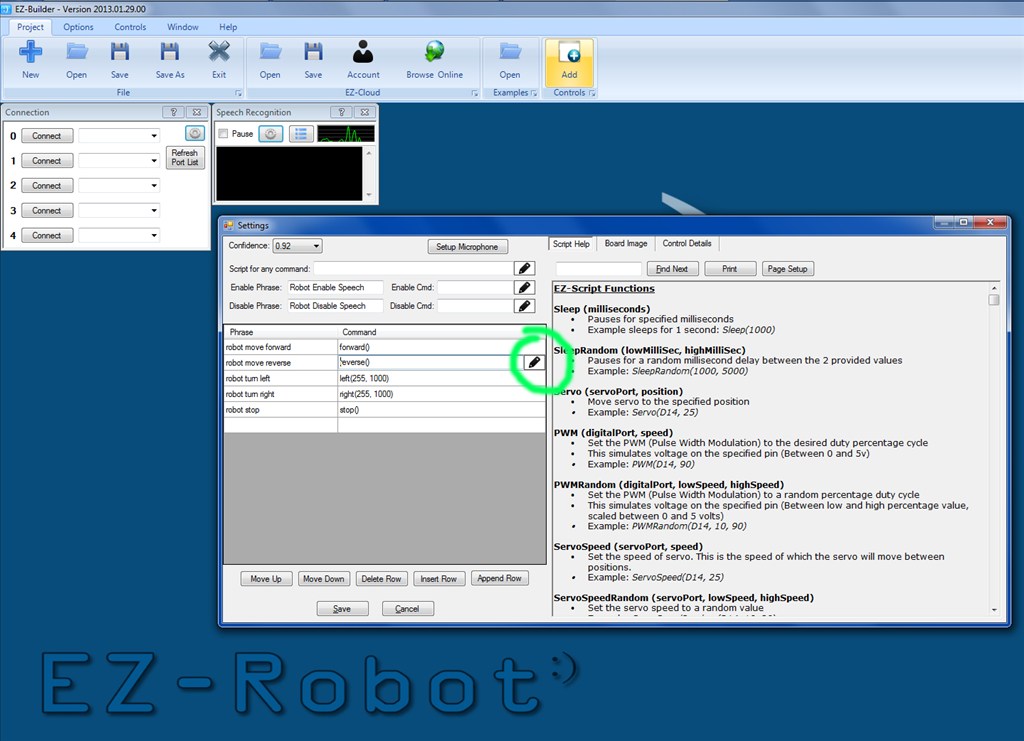
Stupid question. But, how would I put two commands on the same line in speech recognition?
When editing any single line script, press the little icon to the right. It will open the multi-line dialog.
Alright!
MEL you should post your EZB file in EZ-Cloud for others to use if needed
I will certainly do that.