

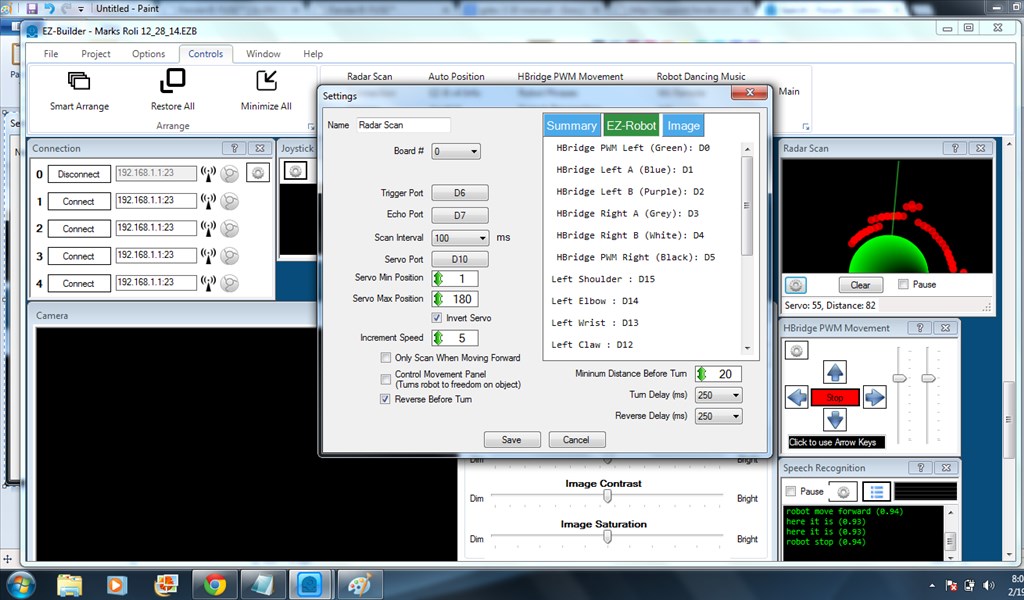
Since DJ changed the servo scaling from 0 to 100 to 0 to 180, the radar scan does not perform as expected. The scan does not go from 0 to 180 on the radar screen even though the servo moves completely through the range. I have attached a screenshot.
 Resolved by DJ Sures!

Have you tried adjusting to increase the scan interval to see if it makes a difference?
Yes. It does not matter. I moved it around to as small as the increment of "1". It still does not show the visualization correctly. It appears to be a bug.
Ok. Well apart from asking if you have the latest ARC version downloaded and suggesting you removed the radar control and then re-add it to see if it makes a difference, I'm out of ideas.
Sorry I couldn't be of any more help.
mstephens_42 is correct - the radar control is optimized for 100 positions of servo movement, not 180. I didn't realize that until now.
I have added it to my list Thanks for the heads up!
Thanks DJ. I look forward to the bug fix.