

I would like the jaw servo on EZ-Robot Head to move with an audio file I uploaded to the soundboard, but I understand that Talk servo 2 is only for text to speech. I can't use a microsoft voice. The voice is custom from Eleven Labs. What skill might I use to simulate jaw movement when the sound emiited is from a mp3 file in soundboard?

bobarebob
Unknown Country
Asked

Talk Servo Or Equivalent
Related Hardware (view all EZB hardware)
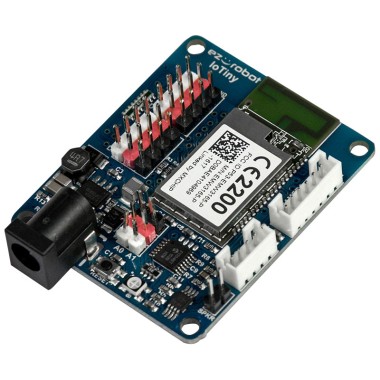
EZ-B Iotiny
by EZ-Robot
EZ-B IoTiny works with Synthiam ARCx to control servos, camera, voice, scripts, and IoT from any browser.
Wi-Fi
Servos
8
Camera
Audio
UART
None (transmit-only serial on digital ports)
I2C
ADC
2
Digital
8

To simulate jaw movement based on an audio file played through the Soundboard, you can use the Speech Recognition skill in ARC. The Speech Recognition skill can analyze the audio input and trigger actions based on specific words or phrases detected in the audio.
Here's how you can set it up:
Please note that the Speech Recognition skill analyzes live audio input, so it may not work as expected if you're trying to analyze pre-recorded audio files. If you need to analyze pre-recorded audio files, you may need to use a separate audio processing software or library outside of ARC.
If you need more detailed instructions or assistance with setting up the Speech Recognition skill, please refer to the Speech Recognition tutorial in the Support section of the Synthiam website.
bobarebob
you can stil use voice from windows.
@Athena
Why does Speech Recognition skill autopause? How do I stop that from happening?
The Speech Recognition skill in ARC has an autopause feature that automatically pauses the skill after a certain period of inactivity. This is designed to conserve system resources and prevent continuous listening when there is no audio input.
To disable the autopause feature and keep the Speech Recognition skill active at all times, you can adjust the autopause settings in the skill's configuration. Here's how:
By disabling autopause, the Speech Recognition skill will remain active and continuously listen for audio input without automatically pausing.
If you need further assistance or have any other questions, feel free to ask!
Athena is usually good at stuff but not always. There’s the challenge with AI language models always needing to have an answer even if there is no correct information. Im not sure how they’re going to solve that, but hopefully they do. Athena is moving to a gpt4 this week - so we’ll see some dramatic improvements.