


Dual Hbridge W/PWM icon Dual Hbridge W/PWM — Dual H-Bridge w/PWM movement panel: control two DC motors' direction and speed via EZ-B PWM for responsive forward/reverse/turning. Try it →
Asked
Resolved Resolved by EzAng!
2 Participants

Using ADC Ports

is there a possebility to use the ADC inputs for controlling a servo? i try the micro servo a,d a HDD from ez robot. that didn work.


Related Hardware (view all EZB hardware)
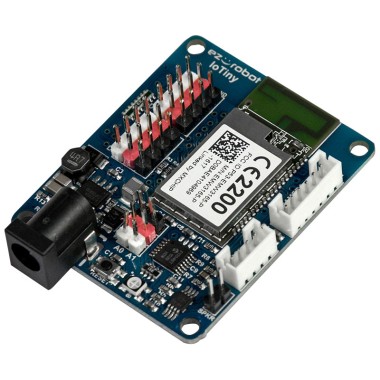
EZ-B Iotiny by EZ-Robot
EZ-B IoTiny works with Synthiam ARCx to control servos, camera, voice, scripts, and IoT from any browser.
Wi-Fi
Servos 8
Camera
Audio
UART None (transmit-only serial on digital ports)
I2C
ADC 2
Digital 8

ARC Pro

Upgrade to ARC Pro

Experience early access to the latest features and updates. You'll have everything that is needed to unleash your robot's potential.

Author Avatar
PRO
Synthiam
LinkedIn Thingiverse Twitter YouTube GitHub
#1  

This would work... Maps the adc's input between 0 and 255 to servo degrees 1 to 180. It'll work on d0 and ADC0.


while (true) {

  // duplicate this line for other servos
  Servo.setPosition(d0, Utility.map(ADC.get(ADC0), 0, 255, 1, 180));

  sleep(100);
}
Author Avatar
PRO
Belgium
Thingiverse
#2  

hi dj

i wanna use two ez wheel servo's. looks like the script is for one servo?

Author Avatar
PRO
Belgium
Thingiverse
#3  

oops i can duplicate for more servo's.got it

thank you

Author Avatar
PRO
Belgium
Thingiverse
#4  

got error 

Start

Error on line 1: Missing String Quotes or Invalid Expression at index 0: while ( ( Done (00:00:00.0094850)

Author Avatar
PRO
Synthiam
LinkedIn Thingiverse Twitter YouTube GitHub
#5  

That’s JavaScript I posted. I’ll never ever post ezscript

Author Avatar
PRO
Belgium
Thingiverse
#6  

this what i have .

while(0)(true)
while(1)(true)

{ // duplicate this line for other servos

Servo.setPosition(d0, Utility.map(ADC.get(ADC0), 0, 255, 1, 180));

Servo.setPosition(d1, Utility.map(ADC.get(ADC1), 0, 255, 1, 180));

sleep(100);

}

Author Avatar
PRO
Synthiam
LinkedIn Thingiverse Twitter YouTube GitHub
#7  

lol how did you get that from my example hehe. Here you go...

while(true) {

Servo.setPosition(d0, Utility.map(ADC.get(ADC0), 0, 255, 1, 180));

Servo.setPosition(d1, Utility.map(ADC.get(ADC1), 0, 255, 1, 180));

sleep(100);

}
Author Avatar
PRO
Belgium
Thingiverse
#8  

haha i was not far off.but it doesn move the ADC0 servo. it move head d0 and d1. i wanted to use ADC0 and ADC1 alone
