

Hello i think my camera was glued together as i cant get it apart at all i was hoping to connect it to my EZ-B like DJ did in this Video but nomatter what i do i cant open it at all
HELP
 Diagnostic Report
— Collects and sends ARC diagnostic reports to Synthiam to help troubleshoot EZ-B and robot connection issues
Try it →
Diagnostic Report
— Collects and sends ARC diagnostic reports to Synthiam to help troubleshoot EZ-B and robot connection issues
Try it →

Hello i think my camera was glued together as i cant get it apart at all i was hoping to connect it to my EZ-B like DJ did in this Video but nomatter what i do i cant open it at all
HELP

ok i hope thats it but i think i will wait abit before i make that connection
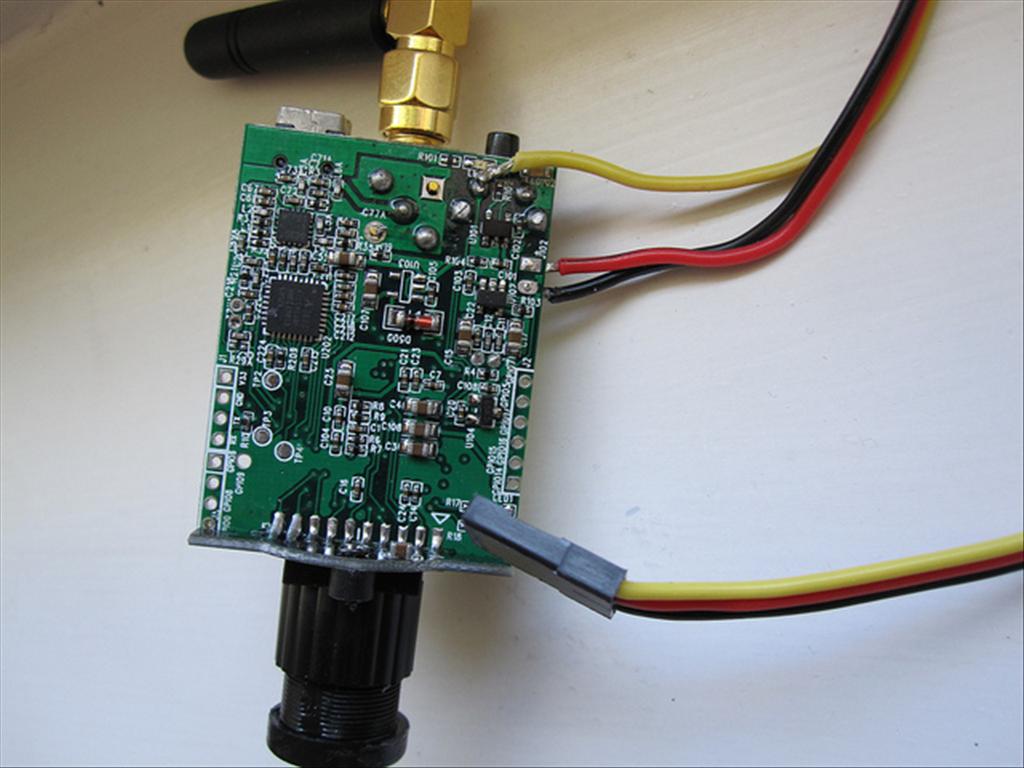
Its my pic
The yellow wire is as Rich says connects to the switch terminal. Follow the circuit board tracks so the camera thinks the switch is pressed when the its actually an EZB port
Like the desk Wolfie mines not much better!
I just did this last night. Turned out pretty good. Be careful soldering as it's really tight in there. it's easy to splash or overfill. The guys are wright, attach to the left switch leg (looking from the underside). Attach to the termenal and not the switch support. Its attached to ground.
To turn the camera on your script will have to keep the digital port on for 2 seconds. Then to turn it off the port should come on for 5-8 seconds. find the timing that works best for you.
ok cool thank you