
Change Release Notes
Tomorrow is a big day for me because I'm going tubing. I meant for this release to be for December 31st, so you'll have to accept it being a day early. Oh, isn't that rough?
So I've been on holidays - which means more time spent on new features. I seem to be the most inspired when I am on vacation shrug. In this case, it's a pretty big deal to EZ-Robot users. Specifically regarding the Mobile ARC.
Mobile Interface Builder
Now everyone can make Robot Apps for your iOS or Android mobile phone or tablet - without programming! Introducing the Mobile Interface Builder with Drag'n'Drop functionality for creating robot apps for your mobile device!
There is a new control under Add Control in ARC located in the new Mobile category. This new control is an interface builder for mobile apps. By default, if you do not have any mobile interfaces, the default ARC Desktop #1 will be displayed. However, if you use the Interface Builder to build apps, you can specify which interface will be displayed.
*Note: You may specify which control is default displayed in the Project Details menu. It doesn't have to be a Interface Builder. It can be any control - Camera, Wii, Script, Connection, Etc.. Just specify by it's name.
The interface builder configuration menu allows you to specify a background for your robot interface. Then, start adding buttons for a variety of features. For example, there are buttons for movements, scripts, connection, camera, sliders and more. Each button actually acts as a script, so you can add EZ-Script to the button press. If your script loops, the button will turn red for when it is running. Press again and the script exits.
All of the features are testable in the Windows ARC - except the Camera view. This is because the camera view in ARC displays in it's own viewport already. It can't display in two separate places, that's just silly
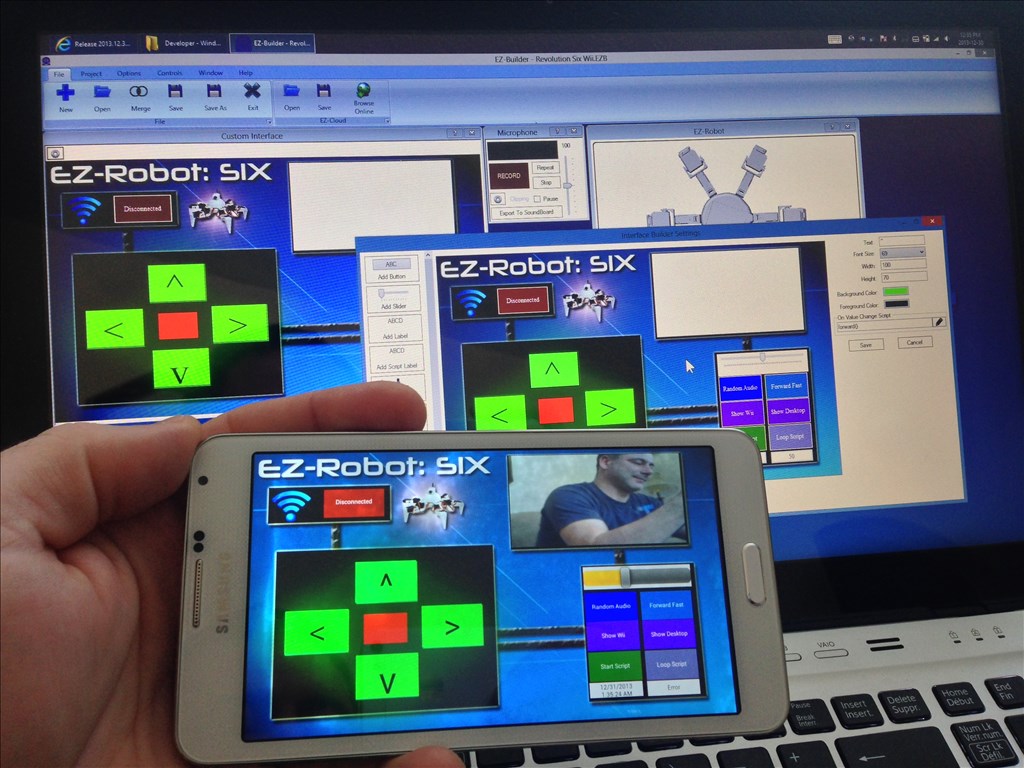
I included the demo app from the photo above in the Examples\Mobile Apps folder.
Instructions to view demo app:
- Press Open
- Select Examples button
- Double click on Mobile Apps
- Select Revolution Six with Wii
Mobile App All ARC projects run on the Mobile version. The mobile version is compatible with Android and iOS devices. The mobile app will be released for Android in beta within the next week or two. The iOS version is developed along side the Android version. The iOS version will take longer to be released due to the Apple iTunes review process.
The mobile version of ARC does not require a computer. It is a standalone application that lets you control your robot from your mobile device.
- New Example Project section for "Mobile Apps"
- Camera engine rewritten to be faster and in exchange use a little more memory
- Mobile Interface Builder
- new command ShowControl() for mobile use
- new command ShowDesktop() will display the specified virtual desktop
- Project Details specifies which default control is displayed for Mobile Apps
ARC Downloads
ARC
FREE- 1 third-party plugin skill per project
- Trial cloud services
- Personal, DIY & education use
- Updated every 6–12 months
 Download
ARC
PRO- Use on 2+ PCs simultaneously
- Unlimited robot skills
- Cloud backup & revision history
- Weekly features & bug fixes
- Business use permitted
ARC
RUNTIME- Load & run any ARC project
- Read-only mode
- Unlimited robot skills
- Includes early access fixes & features
- Minimum requirements: Windows 10 or higher, 2 GB RAM, 500 MB free disk space.
- Recommended: Windows 10 or higher, 8 GB RAM, 1 GB free disk space.
- Prices are in USD.
- More about each edition: Download & install guide.
- Latest changes: Release notes.
Compare Editions
| Feature |
ARC
FREE
|
ARC
PRO
|
|---|---|---|
| Get ARC Free | View Plans | |
| Usage | Personal · DIY · Education | Personal · DIY · Education · Business |
| Early access to new features & fixes | — | ✓ |
| Simultaneous microcontroller connections * | 1 | 255 |
| Robot skills * | 20 | Unlimited |
| Skill Store plugins * | 1 | Unlimited |
| Cognitive services usage ** | 10 / day | 6,000 / day |
| Auto-positions gait actions * | 40 | Unlimited |
| Speech recognition phrases * | 10 | Unlimited |
| Camera devices * | 1 | Unlimited |
| Vision resolution | max 320×240 | Unlimited |
| Interface builder * | 2 | Unlimited |
| Cloud project size | — | 128 MB |
| Cloud project revision history | — | ✓ |
| Create Exosphere requests | — | 50 / month |
| Exosphere API access | — | Contact Us |
| Volume license discounts | — | Contact Us |
| Get ARC Free | View Plans |
* Per robot project
** 1,000 per cognitive type: vision recognition, speech recognition, face detection, sentiment, text recognition, emotion detection, azure text to speech

Upgrade to ARC Pro
Harnessing the power of ARC Pro, your robot can be more than just a simple automated machine.
@Justin I had to uninstall first too. @DJ Thanks, looking forward to Android app
Only Ezv4? OMG I need one now! jaja! Thanks! happy new year for everybody!
I am so excited about this I can't stand it......
Alan
Another game changer! Fantastic work!
I was playing with the mobile app maker and I can't change the main background color. The color picker doesn't pop up. I can add and remove a picture. I also can change the color of the buttons Small bug but I figured I'd post it.
I can't wait to be using all of this stuff for real with my Roli.
DJ Sures it's amazing like always but it is a great revolution for us again - thank you very much for such gift in new year :-) Our robots can be realy independent because everybody has android or ios in own pocket :-)