


Asked

Using The EZB Stress Test And Results

I am using the EZB Stress Test robot skill in Synthiam ARC.

The instructions for the skill detail physically placing a jumper on the TX/RX pins on UART 0 to conduct the EZB UART test, which I have completed successfully.

I then created a new, clean project, started my robot, and connected to the EZB on connection 0 using a USB to Serial cable. Within the EZB Stress Test, I selected the "Enable Testing" button, and the console window confirmed that one EZB was connected and ready for testing.

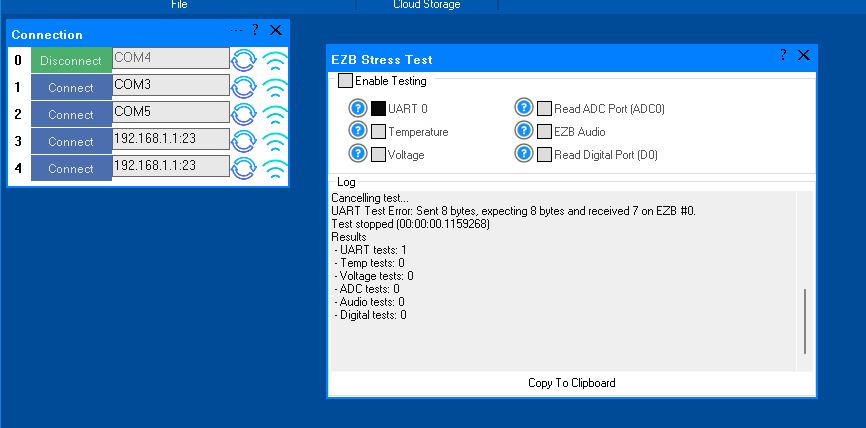
However, when I initiated the UART test, it immediately failed. The test stopped, indicating there was no EZB connected, and the "Enable Testing" button was reset. In the console window, the UART Test displayed the number 4.

Importantly, despite the failure, the connected EZB did not disconnect, freeze, or require a reboot. Here is the logged information from that test:

Timestamp: 2025-12-11 22:18:09 UTC
ARC Version: 2025.12.03.00
OS Version: Microsoft Windows NT 10.0.26100.0
Base Directory: C:\Program Files (x86)\Synthiam Inc\ARC by Synthiam\

=== Exception Information ===
Type: System.Runtime.InteropServices.ExternalException
Message: Requested Clipboard operation did not succeed.
HResult: -2147221040
Source: System.Windows.Forms
TargetSite: Void ThrowIfFailed(Int32)

StackTrace:
   at System.Windows.Forms.Clipboard.ThrowIfFailed(Int32 hr)
   at System.Windows.Forms.Clipboard.SetDataObject(Object data, Boolean copy, Int32 retryTimes, Int32 retryDelay)
   at System.Windows.Forms.Clipboard.SetText(String text, TextDataFormat format)
   at System.Windows.Forms.Clipboard.SetText(String text)
   at EZBStressTest.MainForm.button1_Click(Object sender, EventArgs e) in C:\My Documents\SVN\Developer - Controls\In Production\EZB Stress Test\EZB Stress Test\MY_PROJECT_NAME\MainForm.cs:line 49
   at System.Windows.Forms.Control.OnClick(EventArgs e)
   at System.Windows.Forms.Button.OnClick(EventArgs e)
   at System.Windows.Forms.Button.OnMouseUp(MouseEventArgs mevent)
   at System.Windows.Forms.Control.WmMouseUp(Message& m, MouseButtons button, Int32 clicks)
   at System.Windows.Forms.Control.WndProc(Message& m)
   at System.Windows.Forms.ButtonBase.WndProc(Message& m)
   at System.Windows.Forms.Button.WndProc(Message& m)
   at System.Windows.Forms.Control.ControlNativeWindow.OnMessage(Message& m)
   at System.Windows.Forms.Control.ControlNativeWindow.WndProc(Message& m)
   at System.Windows.Forms.NativeWindow.Callback(IntPtr hWnd, Int32 msg, IntPtr wparam, IntPtr lparam)

Here is an image of the ended UART test:

User-inserted image

Additionally, the Stress Test Skill froze, requiring removal and reinstallation to initiate another test.

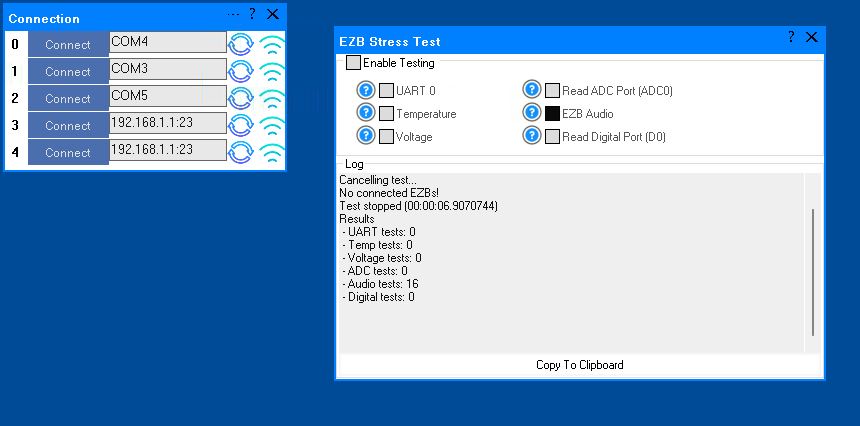
A similar issue occurred with the Audio test. The console window showed the failed Audio test result as number 16. When running this test and it fails, the connected EZB freezes and needs to be rebooted.

I will post the logged information from the failed Audio test in the next post.

Here is the logged information from the failed Audio test:
User-inserted image

What do these results indicate?


Related Hardware EZ-B v4

ARC Pro

Upgrade to ARC Pro

With Synthiam ARC Pro, you're not just programming a robot; you're shaping the future of automation, one innovative idea at a time.

#33  

Update:

This morning's run, after moving and shortening the above mentioned UART converter cable, failed. I was running the robot on it's regular ARC project. It ran for about 4 hours and Connection 0 disconnected once more.

Thanks to the Customer Service on todays update fix for the Stress test skill so it will now allow audio and UART testing of multiple ezbs simultaneously. This was a major reason I wasn't using this skill more for testing.

After setting all baud rates to 230400I I now have this skill testing all of my three EZBs at the same time with all tests running except the audio test. Sorry but the constant beeping is annoying. I don't have any audio being played by any of my EZBs anyway.

#34  

Great to hear the stress test is working.

To help diagnose your connection issue, we need to see your debug log. The debug log will show the last command and what ARC was waiting for during a disconnection. You can access the debug log via the top menu, where you select Workspaces. This page shows information about how to access the debug log: https://synthiam.com/Support/ARC-Overview/Virtual-Workspaces

By excluding debug log data, we're unable to provide advice on where to look to resolve your connectivity issue.

#35  

Hi. Thanks for the update to ARC. Nice update!

After updating ARC I started my robot project, connected the three EZBs to ARC and let it run. Within an hour I got two disconnects on Connection 0 in half an hour. Here's the ARC log for between start up and the disconnect: Please note that I have a script looping that sees the disconnects and then reconnects. The EZB does not need to be rebottled. Just reconnected.

EZB 0: 
EZB 1: 
EZB 2: 
EZB 3: 
EZB 4: 
Windows version: Microsoft Windows NT 10.0.26100.0
Synthiam account: [email protected]
Screen Resolution: 1360x768 (96x96 DPI, 100% scaling)
ARC Pro Version: 2025.12.21.00
Speech Recognition Culture: en-US
Loaded speech recognition successfully
Adding 20 robot skill(s) to page 0:
 - ARC.UCForms.FormConnection (Connection)
 - ARC.UCForms.FormScriptCollection (Connection Check Monitored)
 - ARC.UCForms.FormPWM (Ear Motor Speed)
 - ARC.UCForms.FormPWM (Crown Motor Speed)
 - ARC.UCForms.FormSetDigital (Alternet Light Pattern D1)
 - ARC.UCForms.FormSetDigital (Fast Chest Lights D3)
 - ARC.UCForms.FormScript (Connection Check)
 - ARC.UCForms.FormScriptCollection (Bing Script Support)
 - ARC.UCForms.FormSetDigital (Ears D0)
 - ARC.UCForms.FormPersonalityGenerator (Personality Generator)
 - ARC.UCForms.FormBingSpeechRecognition (Bing Speech Recognition)
 - ARC.UCForms.FormSetDigital (Brain Fast light D10)
 - ARC.UCForms.FormSetDigital (Kill Brain D8)
 - ARC.UCForms.FormScript (InitScript)
 - ARC.UCForms.FormSetDigital (Soil Sampler 1.D23)
 - ARC.UCForms.FormSetDigital (Crown Motor D9)
 - ARC.UCForms.FormScript (Shutdown PC)
 - ARC.UCForms.FormSetDigital (Scanner Lights D2)
 - ARC.UCForms.FormSetDigital (Box Light Pattern D4)
 - ARC.UCForms.FormNotes (Notepad 2)

Adding 26 robot skill(s) to page 1:
 - ARC.UCForms.FormScriptCollection (Robot Anamations)
 - ARC.UCForms.FormAutoPositionerNoMovement (Auto Both Arms)
 - ARC.UCForms.FormScriptMonitor (Script Monitor)
 - ARC.UCForms.FormScript (Say Any Number)
 - ARC.UCForms.FormScriptCollection (Script Manager)
 - ARC.UCForms.FormScript (Timer Status)
 - ARC.UCForms.FormScript (EZ Say Any Number)
 - ARC.UCForms.FormScript (Cancel Timer)
 - ARC.UCForms.FormScript (Timer)
 - ARC.UCForms.FormAutoPositionerNoMovement (Auto Left Arm)
 - ARC.UCForms.FormAutoPositionerNoMovement (Auto Right Arm)
 - ARC.UCForms.FormServo (Rt Claw)
 - ARC.UCForms.FormServo (Lft Claw)
 - ARC.UCForms.FormServo (Rt Up_Dn Wrist Servo)
 - ARC.UCForms.FormServo (Lft Up_Dn Wrist Servo)
 - ARC.UCForms.FormScriptCollection (Leg Section)
 - ARC.UCForms.FormScriptCollection (Head Section)
 - ARC.UCForms.FormScriptCollection (Left Arm)
 - ARC.UCForms.FormADCValue (Rt Elbo Center Sw)
 - ARC.UCForms.FormScriptCollection (Right Arm)
 - ARC.UCForms.FormScriptCollection (Amanation Support)
 - ARC.UCForms.FormScriptCollection (Time, Date & Temp)
 - ARC.UCForms.FormServo (Lft Side_to_Side Wrist)
 - ARC.UCForms.FormServo (Rt side_to_side Wrist)
 - ARC.UCForms.FormADCValue (Lft_Elbw_Cnt)
 - SmartVariableWatcher.FormMain (Smart Variable Watcher) v4 (10e5e62c-c8e5-44e9-bb47-ea9e911db679)

Adding 30 robot skill(s) to page 2:
 - ARC.UCForms.FormADCValue (Detent + Pos)
 - ARC.UCForms.FormSoundBoard (Dr_Smith)
 - ARC.UCForms.FormADCValue (Alpha 202-Torso Rotate Left)
 - ARC.UCForms.FormADCValue (Bata 101-Single Phrase)
 - ARC.UCForms.FormSoundBoard (Tufeld)
 - ARC.UCForms.FormScript (Sound file length Test / Main Speaker)
 - ARC.UCForms.FormSoundBoardEZBv4 (EZB-1 Leg Speaker)
 - ARC.UCForms.FormSoundBoardEZBv4 (EZB-0 Torso Speaker)
 - ARC.UCForms.FormADCValue (Vector Hold-Torso Rotate Right)
 - ARC.UCForms.FormADCValue (Gamma 202/Robot Shutdown)
 - ARC.UCForms.FormADCValue (Power Pack Pulll Switch)
 - ARC.UCForms.FormADCValue (Gamma 101 Personality Toggle)
 - ARC.UCForms.FormADCValue (Detent - Neg / Ramdom Phrases)
 - ARC.UCForms.FormADCValue (Vector Release-Soil Sampler)
 - ARC.UCForms.FormSoundBoard (PC_DBeard_Phrases)
 - ARC.UCForms.FormSoundBoard (SFX)
 - ARC.UCForms.FormSoundBoard (Hal9000)
 - ARC.UCForms.FormSoundBoard (Don)
 - ARC.UCForms.FormSoundBoard (Robby)
 - ARC.UCForms.FormSoundBoard (R2D2)
 - ARC.UCForms.FormSoundBoard (Wall_e)
 - ARC.UCForms.FormSoundBoard (Bender)
 - ARC.UCForms.FormSoundBoard (Judy)
 - ARC.UCForms.FormSoundBoard (Penny)
 - ARC.UCForms.FormSoundBoard (Maureen)
 - ARC.UCForms.FormSoundBoard (John)
 - ARC.UCForms.FormSoundBoard (Will)
 - ARC.UCForms.FormSoundBoard (Phrases)
 - ARC.UCForms.FormSoundBoard (Soundboard 2)
 - ARC.UCForms.FormSoundBoard (Soundboard v4)

Adding 15 robot skill(s) to page 3:
 - ARC.UCForms.FormScript (INT Backup)
 - ARC.UCForms.FormSoundBoard (Months)
 - ARC.UCForms.FormScript (Orig Wind Speed)
 - ARC.UCForms.FormScript (Orig Humidity)
 - ARC.UCForms.FormSoundBoard (TimePast)
 - ARC.UCForms.FormSoundBoard (Numbers)
 - ARC.UCForms.FormScript (Original Temp Script)
 - ARC.UCForms.FormSoundBoard (TimeBefore)
 - ARC.UCForms.FormSoundBoard (PC_Timer)
 - ARC.UCForms.FormSoundBoard (DayNames)
 - ARC.UCForms.FormSoundBoard (DayNumber)
 - ARC.UCForms.FormSoundBoard (Year)
 - ARC.UCForms.FormSoundBoard (Hour)
 - ARC.UCForms.FormSoundBoard (Minutes)
 - Soundboardv2PC.MainForm (Soundboard v2 (PC)) v6 (eefcb83c-2e3e-471c-a649-680e319f0ee6)

Adding 2 robot skill(s) to page 4:
 - ARC.InterfaceBuilder.FormInterfaceBuilder (First User Interface)
 - ARC.InterfaceBuilder.FormInterfaceBuilder (2nd User Interface)

TCP Server for Remote UI started on 3184
Remote UI Broadcast Server: Started
Attempting connection on COM7
Connected to COM7 at 230400 (tx timeout: 2000, rx timeout: 2000, tx buffer: 2048 rx buffer: 4096, dtr: False, rts: False)
Reports EZB v4 OS With Comm 1
Firmware 'EZ-B v4.x/1 Native Firmware' on 'EZ-Robot EZ-B v4.x/1' supports the following capabilities:
 - ADC with 12 bit Resolution
 - Can stream Audio v4 codec
 - Reports battery voltage
 - Reports CPU temperature
 - Read/Write Digital I/O Ports
 - Hardware UART TX/RX with DMA buffer and adjustable baud rate
 - I2C Master
 - LIPO battery protection & shutdown
 - PWM Duty on digital ports
 - PWM servos on digital ports
 - PWM servos on digital ports can release their position
 - servo speed for PWM servos on digital ports
 - Has NVRam configuration and can be restored to default settings
 - Transmit Uart TX on all digital ports
 - Adjustable I2C clock speed
 - Configurable UART TX digital port baud timing
 - Ultrasonic Ping distance sensor support
 - 12 Byte Unique Identifier
 - Can stream video v4 codec
 - Native WiFi Connectivity from ARC

EZ-B v4.x/1 Native Firmware ID: 57-54-0-0-223-255-59-58-57-37-37-38
Setting battery monitor voltage: 7.0
Setting battery protection: False
**WARNING: The low battery warning monitor is set DISABLED. If using the LiPo batteries, for battery longevity and your safety we highly recommend that you re-enable the battery monitor. This setting can be found in the Connection Control Config Menu.
Setting i2c rate: 100000
EZ-B voltage is 12.16v
EZ-B temperature is 24.73c
Connected
Attempting connection on COM3
Connected to COM3 at 230400 (tx timeout: 2000, rx timeout: 2000, tx buffer: 2048 rx buffer: 4096, dtr: False, rts: False)
Reports EZB v4 OS With Comm 1
Firmware 'EZ-B v4.x/1 Native Firmware' on 'EZ-Robot EZ-B v4.x/1' supports the following capabilities:
 - ADC with 12 bit Resolution
 - Can stream Audio v4 codec
 - Reports battery voltage
 - Reports CPU temperature
 - Read/Write Digital I/O Ports
 - Hardware UART TX/RX with DMA buffer and adjustable baud rate
 - I2C Master
 - LIPO battery protection & shutdown
 - PWM Duty on digital ports
 - PWM servos on digital ports
 - PWM servos on digital ports can release their position
 - servo speed for PWM servos on digital ports
 - Has NVRam configuration and can be restored to default settings
 - Transmit Uart TX on all digital ports
 - Adjustable I2C clock speed
 - Configurable UART TX digital port baud timing
 - Ultrasonic Ping distance sensor support
 - 12 Byte Unique Identifier
 - Can stream video v4 codec
 - Native WiFi Connectivity from ARC

EZ-B v4.x/1 Native Firmware ID: 54-49-0-0-46-255-56-54-57-38-37-38
Setting battery monitor voltage: 7.0
Setting battery protection: False
**WARNING: The low battery warning monitor is set DISABLED. If using the LiPo batteries, for battery longevity and your safety we highly recommend that you re-enable the battery monitor. This setting can be found in the Connection Control Config Menu.
Setting i2c rate: 100000
EZ-B voltage is 11.77v
EZ-B temperature is 24.68c
Connected
Attempting connection on COM5
Connected to COM5 at 230400 (tx timeout: 2000, rx timeout: 2000, tx buffer: 2048 rx buffer: 4096, dtr: False, rts: False)
Reports EZB v4 OS With Comm 1
Firmware 'EZ-B v4.x/1 Native Firmware' on 'EZ-Robot EZ-B v4.x/1' supports the following capabilities:
 - ADC with 12 bit Resolution
 - Can stream Audio v4 codec
 - Reports battery voltage
 - Reports CPU temperature
 - Read/Write Digital I/O Ports
 - Hardware UART TX/RX with DMA buffer and adjustable baud rate
 - I2C Master
 - LIPO battery protection & shutdown
 - PWM Duty on digital ports
 - PWM servos on digital ports
 - PWM servos on digital ports can release their position
 - servo speed for PWM servos on digital ports
 - Has NVRam configuration and can be restored to default settings
 - Transmit Uart TX on all digital ports
 - Adjustable I2C clock speed
 - Configurable UART TX digital port baud timing
 - Ultrasonic Ping distance sensor support
 - 12 Byte Unique Identifier
 - Can stream video v4 codec
 - Native WiFi Connectivity from ARC

EZ-B v4.x/1 Native Firmware ID: 81-75-0-0-223-255-59-56-56-38-38-38
Setting battery monitor voltage: 7.0
Setting battery protection: False
**WARNING: The low battery warning monitor is set DISABLED. If using the LiPo batteries, for battery longevity and your safety we highly recommend that you re-enable the battery monitor. This setting can be found in the Connection Control Config Menu.
Setting i2c rate: 100000
EZ-B voltage is 12.09v
EZ-B temperature is 24.63c
Connected
Serial Comm Error: The write timed out.
Sent: 200 
Bytes Expected: 2
Received (0 bytes): 
Disconnected
Attempting connection on COM7
Connected to COM7 at 230400 (tx timeout: 2000, rx timeout: 2000, tx buffer: 2048 rx buffer: 4096, dtr: False, rts: False)
Reports EZB v4 OS With Comm 1
Firmware 'EZ-B v4.x/1 Native Firmware' on 'EZ-Robot EZ-B v4.x/1' supports the following capabilities:
 - ADC with 12 bit Resolution
 - Can stream Audio v4 codec
 - Reports battery voltage
 - Reports CPU temperature
 - Read/Write Digital I/O Ports
 - Hardware UART TX/RX with DMA buffer and adjustable baud rate
 - I2C Master
 - LIPO battery protection & shutdown
 - PWM Duty on digital ports
 - PWM servos on digital ports
 - PWM servos on digital ports can release their position
 - servo speed for PWM servos on digital ports
 - Has NVRam configuration and can be restored to default settings
 - Transmit Uart TX on all digital ports
 - Adjustable I2C clock speed
 - Configurable UART TX digital port baud timing
 - Ultrasonic Ping distance sensor support
 - 12 Byte Unique Identifier
 - Can stream video v4 codec
 - Native WiFi Connectivity from ARC

EZ-B v4.x/1 Native Firmware ID: 57-54-0-0-223-255-59-58-57-37-37-38
Setting battery monitor voltage: 7.0
Setting battery protection: False
**WARNING: The low battery warning monitor is set DISABLED. If using the LiPo batteries, for battery longevity and your safety we highly recommend that you re-enable the battery monitor. This setting can be found in the Connection Control Config Menu.
Setting i2c rate: 100000
EZ-B voltage is 12.11v
EZ-B temperature is 25.68c
Connected
Serial Comm Error: The write timed out.
Sent: 199 
Bytes Expected: 2
Received (0 bytes): 
Disconnected
Attempting connection on COM7
Connected to COM7 at 230400 (tx timeout: 2000, rx timeout: 2000, tx buffer: 2048 rx buffer: 4096, dtr: False, rts: False)
Reports EZB v4 OS With Comm 1
Firmware 'EZ-B v4.x/1 Native Firmware' on 'EZ-Robot EZ-B v4.x/1' supports the following capabilities:
 - ADC with 12 bit Resolution
 - Can stream Audio v4 codec
 - Reports battery voltage
 - Reports CPU temperature
 - Read/Write Digital I/O Ports
 - Hardware UART TX/RX with DMA buffer and adjustable baud rate
 - I2C Master
 - LIPO battery protection & shutdown
 - PWM Duty on digital ports
 - PWM servos on digital ports
 - PWM servos on digital ports can release their position
 - servo speed for PWM servos on digital ports
 - Has NVRam configuration and can be restored to default settings
 - Transmit Uart TX on all digital ports
 - Adjustable I2C clock speed
 - Configurable UART TX digital port baud timing
 - Ultrasonic Ping distance sensor support
 - 12 Byte Unique Identifier
 - Can stream video v4 codec
 - Native WiFi Connectivity from ARC

EZ-B v4.x/1 Native Firmware ID: 57-54-0-0-223-255-59-58-57-37-37-38
Setting battery monitor voltage: 7.0
Setting battery protection: False
**WARNING: The low battery warning monitor is set DISABLED. If using the LiPo batteries, for battery longevity and your safety we highly recommend that you re-enable the battery monitor. This setting can be found in the Connection Control Config Menu.
Setting i2c rate: 100000
EZ-B voltage is 12.11v
EZ-B temperature is 25.97c
Connected
Author Avatar
PRO
Synthiam
#36   — Edited

You can read that log and see

Serial Comm Error: The write timed out.
Sent: 200 
Bytes Expected: 2
Received (0 bytes): 

WRITE timed out means your USB device disappeared. So the USB/uart adapters are disconnecting from the pc. There's also a problem with either your cable or the computer's USB port. Loose USB ports can cause issues.

-OR-

You have CTS and RTS connected to something on the UART adapter, and it doesn't know what to do. Maybe they're floating or something? Perhaps they're connected to an empty wire and acting like an antenna.

Either way, one of those two things is happening. You used to get time-out read errors; now you're getting write errors. It's easy to assist with software stuff, but I'm not in front of your robot to see how you have things wired, what kind of cables you're using, etc. I'm blind. But maybe the errors shifted from one problem to another?

-OR-

Maybe that brand of UART adapter has a buggy driver, and it just doesn't work very well.

Author Avatar
PRO
Synthiam
#37   — Edited

*edit: scratch this comment. I see you are using 230400. For some reason I thought 256000.

Connected to COM7 at 230400 (tx timeout: 2000, rx timeout: 2000, tx buffer: 2048 rx buffer: 4096, dtr: False, rts: False)

ignore below Also - since you're not using audio on the ezb... use a more standard baudrate like 230400

that will remove any chance that the uart adapter can't adapt to the 256k baudrate

Author Avatar
PRO
Synthiam
#38  

Lastly, it looks like you're testing with your project, so you haven't really ruled out anything strange there yet. I recommend continuing testing with the stress test robot skill.

  1. Let it run overnight. Let it run for a long time.

  2. Wiggle the wires while it's running and try to crash it. Wiggle the USB cable. Wiggle the uart cables. Wiggle things. Touch things. Shake things. Make it crash and find out what's causing it.

  3. Do tests with the stress test because that's a consistent stream of data to test with. The stress test is a known parameter. It's something dependable that we can reproduce disconnects with once you figure out what's causing it.

Your project is unknown and random to me, so it adds far more complexity, and there's not much I can do to help. At least with the stress tool, I can see a log and know precisely what it's doing.

Author Avatar
PRO
Synthiam
#39   — Edited

One more thing. Can you confirm the ezb and ARC are both set for 230400 baud? Because it will kinda-might-sorta work if ezb is set to 256000 and ARC is 230400 (vice versa). But they both need to be 230400 (matching).

#40  

@dj, I completely understand the challenges you have helping with remote issues like this. Expectedly home built hardware troubleshooting when you are the Software provider. I want you to know that your input and guidance has been very helpful and more appreciated then you know.

I can confirm that the setting on both sides, ARC and the EZB are set to 230400 baud. I also have the Bits Per Second in the all Com setting in Device set to match this setting. I don't know if that last step is needed but I doesn't seem right to leave that at the default of 9600 baud when I'm having problems like this.

I've started exclusively started using the Stress test now. I'll also double check that I have the latest driver installed for my USB to TTL COnverters. I'm pretty sure I do as I went over all this when I first started with this issue. The converter is a well respected brand with tomes of good reviews. It's running the a FTDI FT232RL Chip which is suppose to be one of the best and most reliable. Added to this I've tried several converters with the same issue happening.

I'm running the stress test on all three EZBs at once for the past few hours and will continue for the rest of the day into the night. I've wiggled around all connections and the connection held.

Again, thanks for hanging in there on this with me. I'll report back.

