


Using The EZB Stress Test And Results
I am using the EZB Stress Test robot skill in Synthiam ARC.
The instructions for the skill detail physically placing a jumper on the TX/RX pins on UART 0 to conduct the EZB UART test, which I have completed successfully.
I then created a new, clean project, started my robot, and connected to the EZB on connection 0 using a USB to Serial cable. Within the EZB Stress Test, I selected the "Enable Testing" button, and the console window confirmed that one EZB was connected and ready for testing.
However, when I initiated the UART test, it immediately failed. The test stopped, indicating there was no EZB connected, and the "Enable Testing" button was reset. In the console window, the UART Test displayed the number 4.
Importantly, despite the failure, the connected EZB did not disconnect, freeze, or require a reboot. Here is the logged information from that test:
Timestamp: 2025-12-11 22:18:09 UTC
ARC Version: 2025.12.03.00
OS Version: Microsoft Windows NT 10.0.26100.0
Base Directory: C:\Program Files (x86)\Synthiam Inc\ARC by Synthiam\

=== Exception Information ===
Type: System.Runtime.InteropServices.ExternalException
Message: Requested Clipboard operation did not succeed.
HResult: -2147221040
Source: System.Windows.Forms
TargetSite: Void ThrowIfFailed(Int32)

StackTrace:
   at System.Windows.Forms.Clipboard.ThrowIfFailed(Int32 hr)
   at System.Windows.Forms.Clipboard.SetDataObject(Object data, Boolean copy, Int32 retryTimes, Int32 retryDelay)
   at System.Windows.Forms.Clipboard.SetText(String text, TextDataFormat format)
   at System.Windows.Forms.Clipboard.SetText(String text)
   at EZBStressTest.MainForm.button1_Click(Object sender, EventArgs e) in C:\My Documents\SVN\Developer - Controls\In Production\EZB Stress Test\EZB Stress Test\MY_PROJECT_NAME\MainForm.cs:line 49
   at System.Windows.Forms.Control.OnClick(EventArgs e)
   at System.Windows.Forms.Button.OnClick(EventArgs e)
   at System.Windows.Forms.Button.OnMouseUp(MouseEventArgs mevent)
   at System.Windows.Forms.Control.WmMouseUp(Message& m, MouseButtons button, Int32 clicks)
   at System.Windows.Forms.Control.WndProc(Message& m)
   at System.Windows.Forms.ButtonBase.WndProc(Message& m)
   at System.Windows.Forms.Button.WndProc(Message& m)
   at System.Windows.Forms.Control.ControlNativeWindow.OnMessage(Message& m)
   at System.Windows.Forms.Control.ControlNativeWindow.WndProc(Message& m)
   at System.Windows.Forms.NativeWindow.Callback(IntPtr hWnd, Int32 msg, IntPtr wparam, IntPtr lparam)
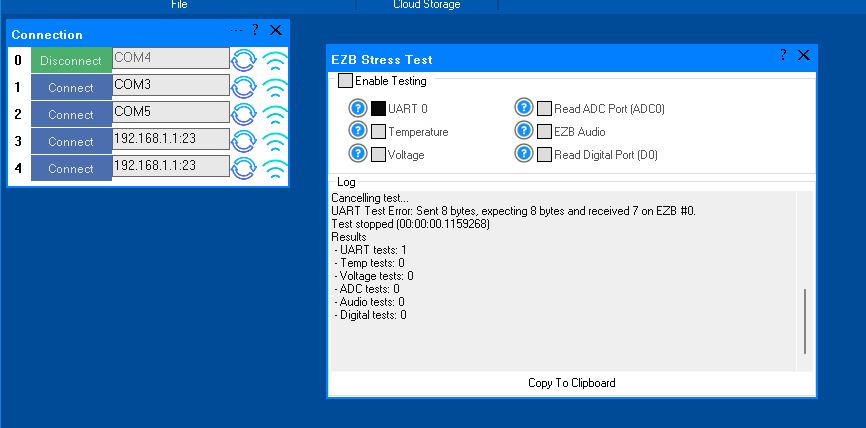
Here is an image of the ended UART test:
Additionally, the Stress Test Skill froze, requiring removal and reinstallation to initiate another test.
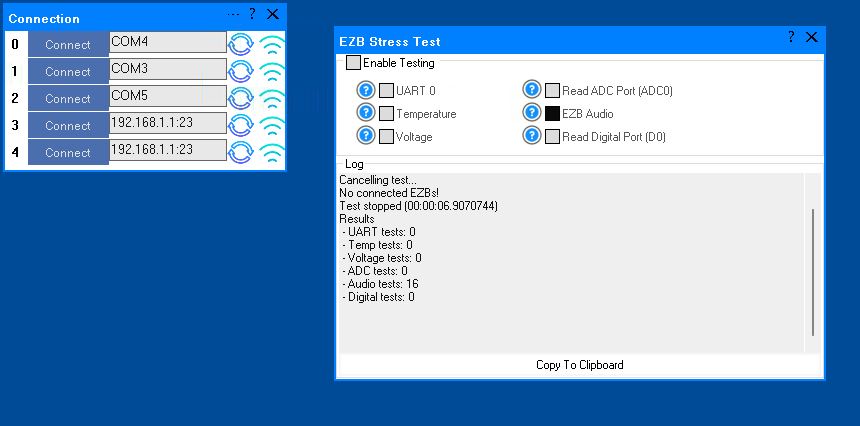
A similar issue occurred with the Audio test. The console window showed the failed Audio test result as number 16. When running this test and it fails, the connected EZB freezes and needs to be rebooted.
I will post the logged information from the failed Audio test in the next post.
Here is the logged information from the failed Audio test:
What do these results indicate?
Related Hardware (view all EZB hardware)


I upgraded to the latest EZB Stress Test version (11). It looks like you guys added a 500ms delay writing and reading UART to ensure data has been entirely transmitted from the EZB's TX DMA buffer.
Report: I was able to get the UART test to run and keep running. In fact I can now get all test to run at the same time.
However I was only able to get the UART test to run if the EZB is connected to ARC over WIFI. If I'm set up and connected through the USB, Serial cable, Com connection to the computer the UART test fails.
Is this normal behavior?
Also, the Audio test now gives tones tones when run by itself. Not like before when it only clicked a little. Actually to be honest, these beeping sounds are loud and annoying and I really can't keep this audio running for long. LOL.
There appears to be an issue with the USB UART, as you have identified. If it works over Wi-Fi but not over USB UART, then the issue lies with the USB UART.
The things to check are the serial cable between the UART USB adapter and the EZB. I would recommend ensuring the cable is short, twisted-pair like a phone cable, or at least shielded. Twisted pair is ideal. Bytes are being lost during UART transmission, causing the EZB issues. This issue is evident when writing and reading from the UART and playing audio.
It's good news that you have identified the issue, and the EZB Stress Test works.
You have not pasted any log info, which is unfortunate because it would be helpful for additional diagnostics. When pasting on a forum, please wrap the diagnostic log text in code tags in the editor to ensure it is appropriately formatted.
Thanks, we'll stay tuned for further details.
OK, There's something going on with the usb to serial adaptor cable connection. Now that I want to switch back to the USB connection from the EZB to the Computer, only one com shows up in the device manager when both cables are attached (connection 0, Com 4 and and connection 1, Com 3). When I pull the one that corresponds to connection 0 that Com disappears and nothing shows in Device manager for Coms.
Check that your USB port isn’t damaged, and that the USB plug on the UART adapter isn’t damaged. You will hear a ding sound when wiggling it through the windows.
Also, don’t forget that changing USB devices while ARC is loading requires you to press refresh on the port to refresh the list of ports.
Also, make sure it has the correct drivers for the device.
It sounds like it might be a hardware plug-related issue. Otherwise, a failing uart adapter could be a cause.
At least you narrowed it down to why it’s happening.
PS, lowering the baud rate to 256,000 and testing should help determine whether the issue is with the wiring or with the UART on the USB device. Having a spare USBUART device is always suitable for the toolbox, as it can be swapped out to help identify problems like this. Hardware is challenging to diagnose, and software can only help identify that "something" is failing, but it is generally not good at pinpointing what is failing.
Update:
Please disregard my last couple tests. After looking closer at the baud settings of the three different connections in both ARC and the EZB interface I found I had a couple mismatches. I also found a partially disconnected USB cable.
After resetting the USB cables and matching all baud setting in both ARC and the EZB interface to 25600 (this is what the EZB Stress Test stated the baud rate must be for an audio test) I got all three EZBs to connect over USB through the COMs in ARC to the computer.
However there is still a bone in the soup.
I tried running all the Stress Tests on all three EZBs at the same time. The test failed. BUT, with more testing here's what I see:
All tests running except UART test on 3 connected EZB's:
All tests running with the UART test running on 3 connected EZB's:
All tests running with the UART test on only 1 connected EZB (connection 0) The same thing happens on the other two connections when active one at a time:
Questions:
Is not being able to run the UART Test on three connections at a time a limitation on the Stress Test Program or my hardware?
I see in Windows 11 Device manager, under the Com ports section, there is also a baud rate setting for these ports. Do I need to match that rate setting also to what ARC and the EZB are set to for a USB / Serial connection?
Thanks for hanging in there with me.
That's a good question - it shouldn't matter to the stress test. But i'll have to look into it and see. At least you discovered connectivity issues - that's good news. Your disconnection problem will most likely go away now that you've fixed that.
Thanks @DJ. Actually I haven't "fixed" anything yet. I got another disconnect late last night. I still don't really know what the root cause is. However we have eliminated almost everything except power, the computer itself or something hooked up to the EZb like a Sabertooth or servos. I'm going to hook the EZB up to an external power supply off robot and see what happens. I only have a few more tries up my sleeve. It's hard not to get discouraged.
Have you been checking the disconnect log to see what the error is? Sometimes there will be details that will be helpful - such as what the last packet bytes sent were or something like that...