


Using The EZB Stress Test And Results
I am using the EZB Stress Test robot skill in Synthiam ARC.
The instructions for the skill detail physically placing a jumper on the TX/RX pins on UART 0 to conduct the EZB UART test, which I have completed successfully.
I then created a new, clean project, started my robot, and connected to the EZB on connection 0 using a USB to Serial cable. Within the EZB Stress Test, I selected the "Enable Testing" button, and the console window confirmed that one EZB was connected and ready for testing.
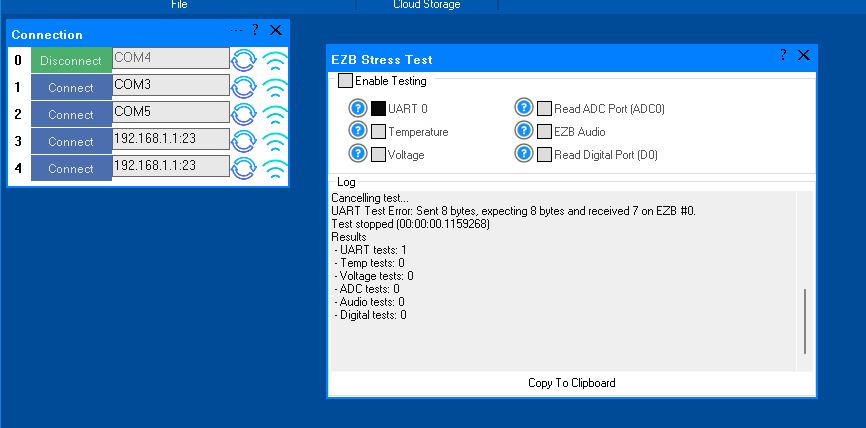
However, when I initiated the UART test, it immediately failed. The test stopped, indicating there was no EZB connected, and the "Enable Testing" button was reset. In the console window, the UART Test displayed the number 4.
Importantly, despite the failure, the connected EZB did not disconnect, freeze, or require a reboot. Here is the logged information from that test:
Timestamp: 2025-12-11 22:18:09 UTC
ARC Version: 2025.12.03.00
OS Version: Microsoft Windows NT 10.0.26100.0
Base Directory: C:\Program Files (x86)\Synthiam Inc\ARC by Synthiam\

=== Exception Information ===
Type: System.Runtime.InteropServices.ExternalException
Message: Requested Clipboard operation did not succeed.
HResult: -2147221040
Source: System.Windows.Forms
TargetSite: Void ThrowIfFailed(Int32)

StackTrace:
   at System.Windows.Forms.Clipboard.ThrowIfFailed(Int32 hr)
   at System.Windows.Forms.Clipboard.SetDataObject(Object data, Boolean copy, Int32 retryTimes, Int32 retryDelay)
   at System.Windows.Forms.Clipboard.SetText(String text, TextDataFormat format)
   at System.Windows.Forms.Clipboard.SetText(String text)
   at EZBStressTest.MainForm.button1_Click(Object sender, EventArgs e) in C:\My Documents\SVN\Developer - Controls\In Production\EZB Stress Test\EZB Stress Test\MY_PROJECT_NAME\MainForm.cs:line 49
   at System.Windows.Forms.Control.OnClick(EventArgs e)
   at System.Windows.Forms.Button.OnClick(EventArgs e)
   at System.Windows.Forms.Button.OnMouseUp(MouseEventArgs mevent)
   at System.Windows.Forms.Control.WmMouseUp(Message& m, MouseButtons button, Int32 clicks)
   at System.Windows.Forms.Control.WndProc(Message& m)
   at System.Windows.Forms.ButtonBase.WndProc(Message& m)
   at System.Windows.Forms.Button.WndProc(Message& m)
   at System.Windows.Forms.Control.ControlNativeWindow.OnMessage(Message& m)
   at System.Windows.Forms.Control.ControlNativeWindow.WndProc(Message& m)
   at System.Windows.Forms.NativeWindow.Callback(IntPtr hWnd, Int32 msg, IntPtr wparam, IntPtr lparam)
Here is an image of the ended UART test:
Additionally, the Stress Test Skill froze, requiring removal and reinstallation to initiate another test.
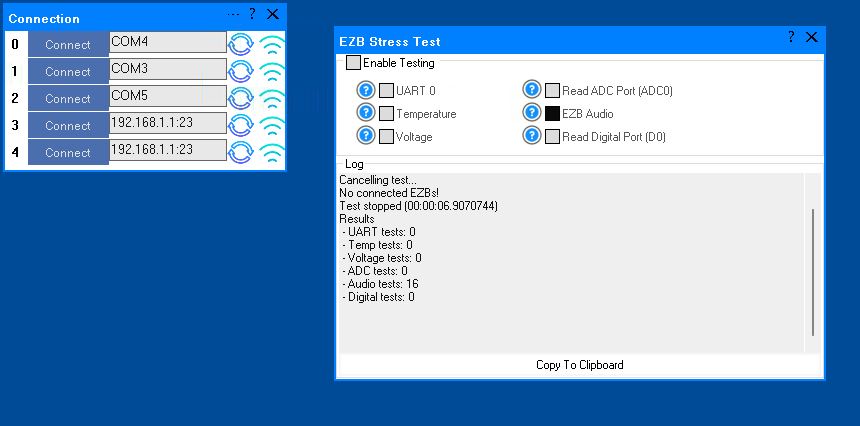
A similar issue occurred with the Audio test. The console window showed the failed Audio test result as number 16. When running this test and it fails, the connected EZB freezes and needs to be rebooted.
I will post the logged information from the failed Audio test in the next post.
Here is the logged information from the failed Audio test:
What do these results indicate?
Related Hardware (view all EZB hardware)


Which disconnect log are you talking about DJ? There are a few different logs that were mentioned. I was not running the Stress Test when last nights disconnect happened so I didn't have that readout. I did not check the other Windows System event log that Athena mentioned once before. It was late and I was involved with other stuff at the time.
This latest disconnect happened when the offending EZB (connection 0) was disconnected from the robots internal power supply and running on it's own dedicated 20 amp, AC to 12vdc DC power supply. This PS was plugged into the wall outlet and not interconnected with the robot al all. Everything was attached and running. Stuff like Servos, relays and two Sabertooth/Kangaroo motor controllers attached to two Uart ports.
Arc log. View the ARC log to see the details I mentioned above. It’s called debug and is on the top menu, where you select the desktops. This document explains more: https://synthiam.com/Support/ARC-Overview/Virtual-Workspaces
Another disconnect like above after hours. One thing I noticed was the comment "Serial Comm Error: The operation has timed out. BytesToExpect: 2: Here's the log:
I noticed that I don't have the battery Monitor disabled even though I'm not running on batteries. I have a power supply and running around 12vdc. I remember having to have this setting set to disable the monitor. Could this be the issue? I now have the battery monitor override set. We'll see.
no that wouldn't be an issue with the battery monitor if you're providing 12v.
The 2-byte timeout is the telltale sign. One of these things is happening because you know the error now. It's a communication issue somewhere.
bytes from the bottom board to the top board of the EZB are being lost (broken solder joint, loose connection)
usb uart adapter is losing bytes (faulty /failing)
usb uart cable to the ezb is losing bytes (poor connection OR wires picking up interference because they're not sheilded)
jst connector at the ezb camera port for the uart/usb is loose or faulty
@DJ, I appreacheat your valuable insight into this. This helps.
I'm still testing and troubleshooting possible causes by replacing or eliminating things that may be leading to these disconneces on connection 0, Com 4. It's odd that the disconnect is isolated to just the one EZB on the before mentioned connection.
I looked close at your list in your last post and here are my comments:
bytes from the bottom board to the top board of the EZB are being lost (broken solder joint, loose connection) Actually I've replaced all my EZB in the robot with newly bought units to try to solve this issue. They are all the newest available and have updated firmware.
usb uart adapter is losing bytes (faulty /failing) The USB to TTL converter I'm using is connected to it's own cable that's about 3 foot long and attached to the proper connector that fits the Camera port on the EZB. The adaptor has a FT232RL Chip in it that is suppose to be one of the best for reliability. I've swapped this cable adaptor with one of the other USB to TTl cables connected to a stable EZB and the problem stayed with the problem EZB on Connection 0, Com 4. I do have a new adaptor cable I'm planning to add a new JST connector to and replace this current cable with. Just in case and as a last mesure.
usb uart cable to the ezb is losing bytes (poor connection OR wires picking up interference because they're not sheilded) This is interesting. I have rerouted this USB to TTL cable converter going to this EZB as far away from power cables as I can. Nothing changed. However this EZB is sitting pertty close to the chest neon that flashes with spoken words. I'd say the closest neon glass tube is about 4 inches away from the EZB. The neon's transformer is much farther away though. I know this Neon is triggered by very high voltage from it's transformer and really puts out a ton of EMF's when it flashes. I've turned off this neon and am currently running the robot to see if the disconnect happens with the Neon removed for the equation.
Jst connector at the ezb camera port for the uart/usb is loose or faulty See the above adaptor answer.
Again, Thanks for sticking with me on this. finding out about the ARC Log and what it's reporting has helped give me some much needed new direction.
Update: In my last post I said I was thinking the EMFs from the chest neon flashing may be causing the EZB on Connection 0, Com 4 to disconnect. This is not the case. After turning off the neon that flashed on every word spoken I still experienced a disconnect after 2.5 hours.
After looking at the ARC Debug Log I see the same info as before with a little more info provided. Here the new info seen in that log. Not sure what to make of this.
Here's the entire log report after the disconnect and an ARC script that reconnects after it sees the loss of connection:
My nest step is to replace the USB to TTL converter cable to this EZB that I just received. I'm a little doubtful this will help as I already tried to run this connection on WIFI after disabling and disconnecting the UART connection and still got this disconnect. I feel like I'm running out of options.
Awesome - looks like you're on the right track because you have definetly narrowed down the issue. Communication beween the EZB and UART is dropping bytes. Are you still using the stress test to identify when the ezb is disconnected so it can be reproduced? it would be useful if the logs from the stress test were pasted instead of unrelated log entries.
Awesome so you can rule that out. Okay, looks like you have more debugging to do to rule that out. The communication between the EZB and UART is dropping bytes. It's either the wires acting as antennas, static building up on the antenna wires, etc.. or it's the jst connector that you said you're "going to replace" but you didn't yet so it's not ruled out. Okay, sounds like you have more debugging to do here still. Your response doesn't address the suggestion for shielded. Right now you have several nice long antennas connected to your UART and EZB. I googled this for ya: https://www.versitron.com/blogs/post/shielded-and-unshielded-twisted-pair-cables-why-and-when-should-you-choose-themokay, so you now know the issue is isolated with one ezb so that way you can consider how it's different than the others based on what I mentioned above.