


Using The EZB Stress Test And Results
I am using the EZB Stress Test robot skill in Synthiam ARC.
The instructions for the skill detail physically placing a jumper on the TX/RX pins on UART 0 to conduct the EZB UART test, which I have completed successfully.
I then created a new, clean project, started my robot, and connected to the EZB on connection 0 using a USB to Serial cable. Within the EZB Stress Test, I selected the "Enable Testing" button, and the console window confirmed that one EZB was connected and ready for testing.
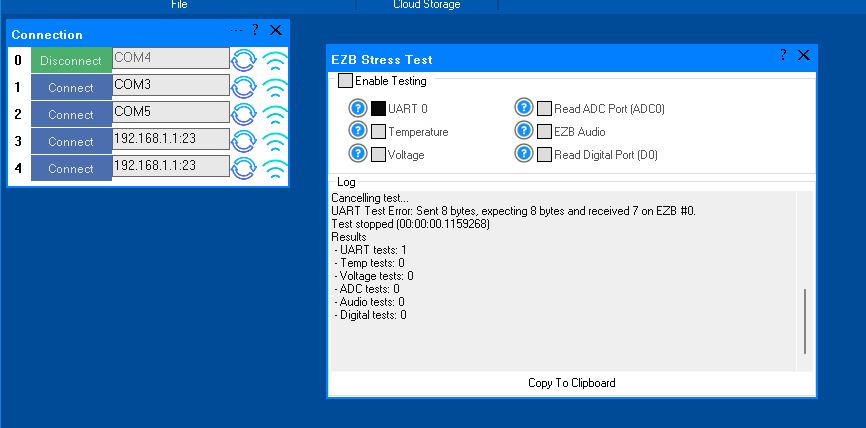
However, when I initiated the UART test, it immediately failed. The test stopped, indicating there was no EZB connected, and the "Enable Testing" button was reset. In the console window, the UART Test displayed the number 4.
Importantly, despite the failure, the connected EZB did not disconnect, freeze, or require a reboot. Here is the logged information from that test:
Timestamp: 2025-12-11 22:18:09 UTC
ARC Version: 2025.12.03.00
OS Version: Microsoft Windows NT 10.0.26100.0
Base Directory: C:\Program Files (x86)\Synthiam Inc\ARC by Synthiam\

=== Exception Information ===
Type: System.Runtime.InteropServices.ExternalException
Message: Requested Clipboard operation did not succeed.
HResult: -2147221040
Source: System.Windows.Forms
TargetSite: Void ThrowIfFailed(Int32)

StackTrace:
   at System.Windows.Forms.Clipboard.ThrowIfFailed(Int32 hr)
   at System.Windows.Forms.Clipboard.SetDataObject(Object data, Boolean copy, Int32 retryTimes, Int32 retryDelay)
   at System.Windows.Forms.Clipboard.SetText(String text, TextDataFormat format)
   at System.Windows.Forms.Clipboard.SetText(String text)
   at EZBStressTest.MainForm.button1_Click(Object sender, EventArgs e) in C:\My Documents\SVN\Developer - Controls\In Production\EZB Stress Test\EZB Stress Test\MY_PROJECT_NAME\MainForm.cs:line 49
   at System.Windows.Forms.Control.OnClick(EventArgs e)
   at System.Windows.Forms.Button.OnClick(EventArgs e)
   at System.Windows.Forms.Button.OnMouseUp(MouseEventArgs mevent)
   at System.Windows.Forms.Control.WmMouseUp(Message& m, MouseButtons button, Int32 clicks)
   at System.Windows.Forms.Control.WndProc(Message& m)
   at System.Windows.Forms.ButtonBase.WndProc(Message& m)
   at System.Windows.Forms.Button.WndProc(Message& m)
   at System.Windows.Forms.Control.ControlNativeWindow.OnMessage(Message& m)
   at System.Windows.Forms.Control.ControlNativeWindow.WndProc(Message& m)
   at System.Windows.Forms.NativeWindow.Callback(IntPtr hWnd, Int32 msg, IntPtr wparam, IntPtr lparam)
Here is an image of the ended UART test:
Additionally, the Stress Test Skill froze, requiring removal and reinstallation to initiate another test.
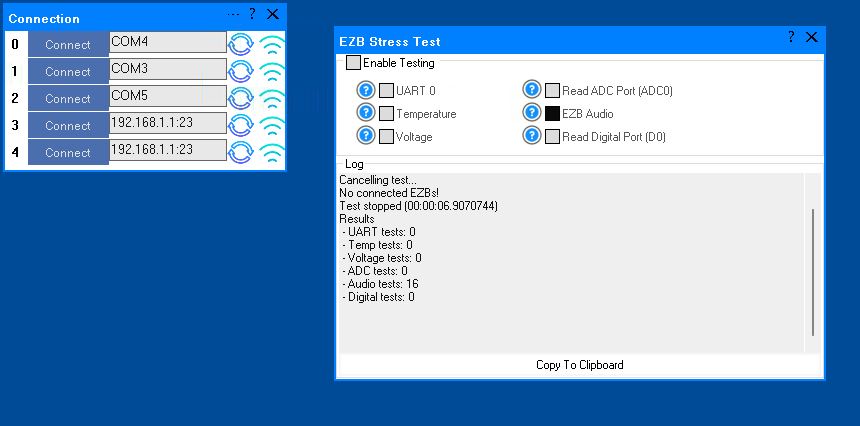
A similar issue occurred with the Audio test. The console window showed the failed Audio test result as number 16. When running this test and it fails, the connected EZB freezes and needs to be rebooted.
I will post the logged information from the failed Audio test in the next post.
Here is the logged information from the failed Audio test:
What do these results indicate?
Related Hardware (view all EZB hardware)


OK, I've updated the stress test to the latest version 4.
The behavior is the same as before.
The UART test stops immediately by it's self but the EZB stays connected. The Audio test stops after a few seconds and the EZB disconnects and locks up. It then needs to be rebooted The other tests run continuously as expected. .
Here are the copied log results on the UART and Audio. Like I said, each test stops on it's own.
Does any of this help?
That’s concerning - about the audio and uart. The audio test shows you weren't connected to an EZB, so your connection was dropped before the test. Was there a red LED on the EZB that stayed steady before that test? Because it showed that the test started with one ezb connected, and when trying to receive data, it realized there was no ezb, and it disconnected. So the connection dropped between the UART and the AUDIO test.
Try the volt, temp, digital, and adc test all at once
PS i edited your post to put the log in a code tag so it formats correctly
We have updated the robot skill to V9, which has several more debugging details. The recent update will indicate whether an EZB was disconnected during the test. Please update to the latest version for future tests and report back with DJ's suggested tests.
OK, I know the instructions on this skill says to leave it run for 24 to 48 hours. However I started running the remaining tests DJ asked me to run and stopped after a couple hours without a fault. Wow, over 20k reads in about 2.75 hours.
I'll rerun the volt, temp, digital, and adc test all at once for the full required length again later. I want to rerun the AUDIO test again to see if the red LED is on after I run the UART test before I start the Audio test. These two tests seem to show issues to my untrained eyes.
Here is the result of the tests I was just running on the volt, temp, digital, and adc that I mentioned above. This is with the latest version 9 of the Stress Test Skill. (Thanks for working to make it better!):
oh, it is locking up in Audio test because your baudrate is 9600. That's waaaaaaaaaaaaaay to slow for audio.
207k reads is normal for 9600. At a proper faster baudrate it'll be way more.
I just completed two separate tests that @DJ asked about. The UART and AUDIO tests.
First the UART which failed right away and auto stopped. There was no disconnect and no red LED light on the EZB after the failed UART test.
I just saw that @DJ found the issue with the AUDIO teat failing. I'll bump up the Baud rate, retest the Audio and see what happens. BTW, after a failed Audio test the red LED is on on the EZB and it is locked up requiring a reboot. I'll report back later after I adjust the Baud rate. I'm off to the dog vet now for my pup.
Still, I'm concerned about the UART failing. Here are the two test results:
Thanks!!!
UART:
Audio:
The audio is locking up because the EZB is waiting to receive the audio packet. At 9600 baud, it would take 37 minutes to receive 1 second of audio to the EZB. Increasing the baud rate should make the audio work.
We have also updated the robot skill to return an error if an Audio test is attempted at a low baud rate to prevent this from happening in the future.
Good luck with the pup!
Updated this skill to latest ver 10 and upped the baud to 25600 in the EZB and ARC for this connection 0.
The Audio test now runs. I don not hear the tones coming from the EZB during the test like the instructions say. However if I run all the tests (except the UART test, more on this later) I do hear the tones. When I do stop the test I hear a single tone. The feedback in the console does however report the test ran with the run count so I think all is working there.
Now, the UART test still shuts down immediately and stops reporting an error and only two counts and only one test. .
The puppy is doing good. Thanks for the well wishes.