


Using The EZB Stress Test And Results
I am using the EZB Stress Test robot skill in Synthiam ARC.
The instructions for the skill detail physically placing a jumper on the TX/RX pins on UART 0 to conduct the EZB UART test, which I have completed successfully.
I then created a new, clean project, started my robot, and connected to the EZB on connection 0 using a USB to Serial cable. Within the EZB Stress Test, I selected the "Enable Testing" button, and the console window confirmed that one EZB was connected and ready for testing.
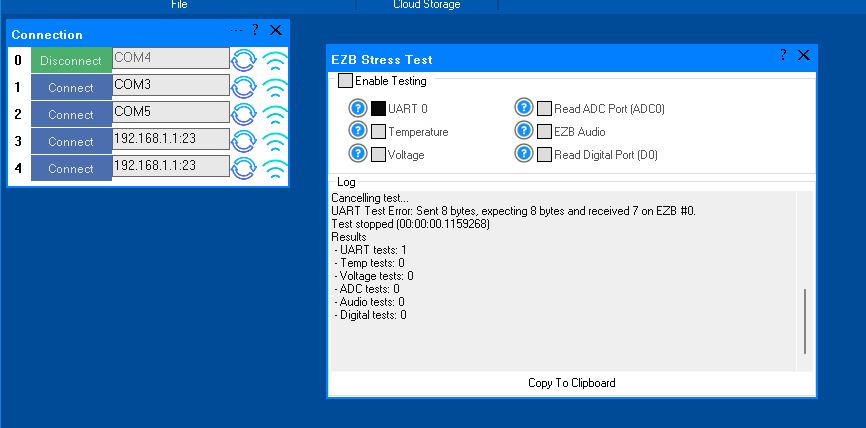
However, when I initiated the UART test, it immediately failed. The test stopped, indicating there was no EZB connected, and the "Enable Testing" button was reset. In the console window, the UART Test displayed the number 4.
Importantly, despite the failure, the connected EZB did not disconnect, freeze, or require a reboot. Here is the logged information from that test:
Timestamp: 2025-12-11 22:18:09 UTC
ARC Version: 2025.12.03.00
OS Version: Microsoft Windows NT 10.0.26100.0
Base Directory: C:\Program Files (x86)\Synthiam Inc\ARC by Synthiam\

=== Exception Information ===
Type: System.Runtime.InteropServices.ExternalException
Message: Requested Clipboard operation did not succeed.
HResult: -2147221040
Source: System.Windows.Forms
TargetSite: Void ThrowIfFailed(Int32)

StackTrace:
   at System.Windows.Forms.Clipboard.ThrowIfFailed(Int32 hr)
   at System.Windows.Forms.Clipboard.SetDataObject(Object data, Boolean copy, Int32 retryTimes, Int32 retryDelay)
   at System.Windows.Forms.Clipboard.SetText(String text, TextDataFormat format)
   at System.Windows.Forms.Clipboard.SetText(String text)
   at EZBStressTest.MainForm.button1_Click(Object sender, EventArgs e) in C:\My Documents\SVN\Developer - Controls\In Production\EZB Stress Test\EZB Stress Test\MY_PROJECT_NAME\MainForm.cs:line 49
   at System.Windows.Forms.Control.OnClick(EventArgs e)
   at System.Windows.Forms.Button.OnClick(EventArgs e)
   at System.Windows.Forms.Button.OnMouseUp(MouseEventArgs mevent)
   at System.Windows.Forms.Control.WmMouseUp(Message& m, MouseButtons button, Int32 clicks)
   at System.Windows.Forms.Control.WndProc(Message& m)
   at System.Windows.Forms.ButtonBase.WndProc(Message& m)
   at System.Windows.Forms.Button.WndProc(Message& m)
   at System.Windows.Forms.Control.ControlNativeWindow.OnMessage(Message& m)
   at System.Windows.Forms.Control.ControlNativeWindow.WndProc(Message& m)
   at System.Windows.Forms.NativeWindow.Callback(IntPtr hWnd, Int32 msg, IntPtr wparam, IntPtr lparam)
Here is an image of the ended UART test:
Additionally, the Stress Test Skill froze, requiring removal and reinstallation to initiate another test.
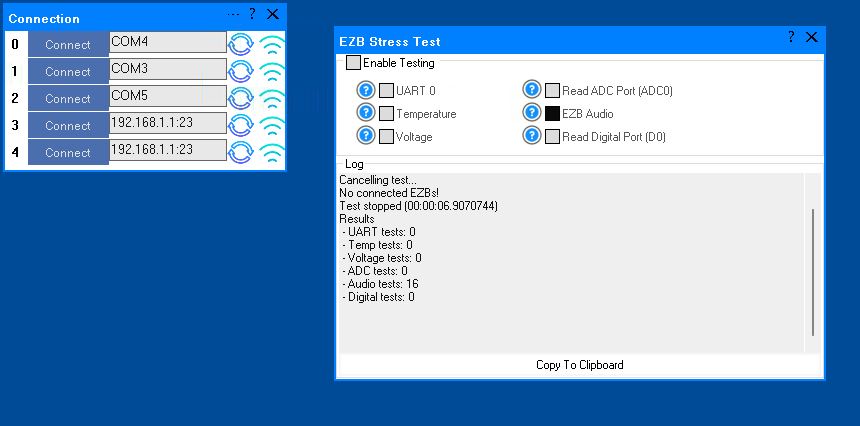
A similar issue occurred with the Audio test. The console window showed the failed Audio test result as number 16. When running this test and it fails, the connected EZB freezes and needs to be rebooted.
I will post the logged information from the failed Audio test in the next post.
Here is the logged information from the failed Audio test:
What do these results indicate?
Related Hardware (view all EZB hardware)


Actually I'm leaning towards a grounding issue on the DC negative side of the AC to DC power converters. I think I may have something miswired and causing one device attached to the UARTS to be grounded through another one. I know I have no ties between the Earth or AC grounds and the DC negative side. I'll have to look closer and test some more. if I can narrow things down to just one or two devices this will be much easier to fix.
I do have a list of what I have attached to each pin of each EZB. I'll have to look close and see.