


Using The EZB Stress Test And Results
I am using the EZB Stress Test robot skill in Synthiam ARC.
The instructions for the skill detail physically placing a jumper on the TX/RX pins on UART 0 to conduct the EZB UART test, which I have completed successfully.
I then created a new, clean project, started my robot, and connected to the EZB on connection 0 using a USB to Serial cable. Within the EZB Stress Test, I selected the "Enable Testing" button, and the console window confirmed that one EZB was connected and ready for testing.
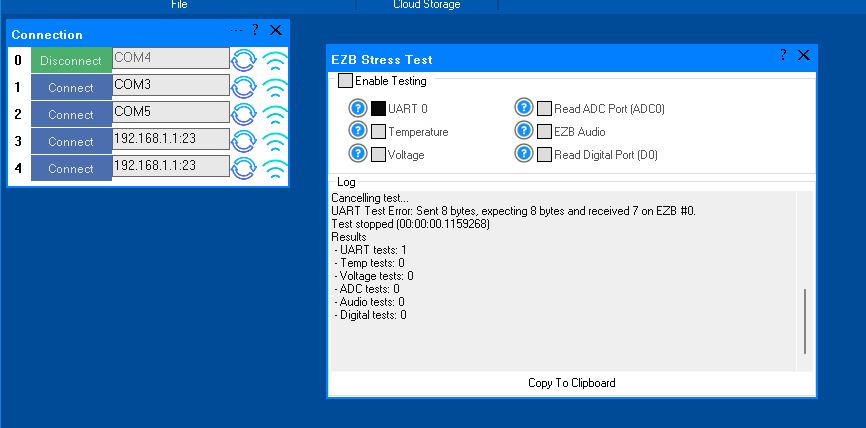
However, when I initiated the UART test, it immediately failed. The test stopped, indicating there was no EZB connected, and the "Enable Testing" button was reset. In the console window, the UART Test displayed the number 4.
Importantly, despite the failure, the connected EZB did not disconnect, freeze, or require a reboot. Here is the logged information from that test:
Timestamp: 2025-12-11 22:18:09 UTC
ARC Version: 2025.12.03.00
OS Version: Microsoft Windows NT 10.0.26100.0
Base Directory: C:\Program Files (x86)\Synthiam Inc\ARC by Synthiam\

=== Exception Information ===
Type: System.Runtime.InteropServices.ExternalException
Message: Requested Clipboard operation did not succeed.
HResult: -2147221040
Source: System.Windows.Forms
TargetSite: Void ThrowIfFailed(Int32)

StackTrace:
   at System.Windows.Forms.Clipboard.ThrowIfFailed(Int32 hr)
   at System.Windows.Forms.Clipboard.SetDataObject(Object data, Boolean copy, Int32 retryTimes, Int32 retryDelay)
   at System.Windows.Forms.Clipboard.SetText(String text, TextDataFormat format)
   at System.Windows.Forms.Clipboard.SetText(String text)
   at EZBStressTest.MainForm.button1_Click(Object sender, EventArgs e) in C:\My Documents\SVN\Developer - Controls\In Production\EZB Stress Test\EZB Stress Test\MY_PROJECT_NAME\MainForm.cs:line 49
   at System.Windows.Forms.Control.OnClick(EventArgs e)
   at System.Windows.Forms.Button.OnClick(EventArgs e)
   at System.Windows.Forms.Button.OnMouseUp(MouseEventArgs mevent)
   at System.Windows.Forms.Control.WmMouseUp(Message& m, MouseButtons button, Int32 clicks)
   at System.Windows.Forms.Control.WndProc(Message& m)
   at System.Windows.Forms.ButtonBase.WndProc(Message& m)
   at System.Windows.Forms.Button.WndProc(Message& m)
   at System.Windows.Forms.Control.ControlNativeWindow.OnMessage(Message& m)
   at System.Windows.Forms.Control.ControlNativeWindow.WndProc(Message& m)
   at System.Windows.Forms.NativeWindow.Callback(IntPtr hWnd, Int32 msg, IntPtr wparam, IntPtr lparam)
Here is an image of the ended UART test:
Additionally, the Stress Test Skill froze, requiring removal and reinstallation to initiate another test.
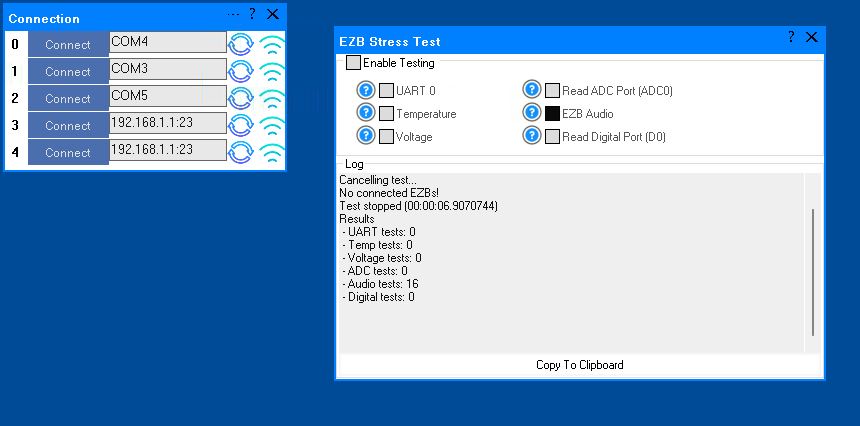
A similar issue occurred with the Audio test. The console window showed the failed Audio test result as number 16. When running this test and it fails, the connected EZB freezes and needs to be rebooted.
I will post the logged information from the failed Audio test in the next post.
Here is the logged information from the failed Audio test:
What do these results indicate?
Related Hardware (view all EZB hardware)


I have an question.
I've been chasing this disconnect gremlin around my robot for over a month now. I've replaced most everything that may be causing this issue except the computer, moved wires around, changed from USB connection to WIFI and followed expert tips to overcome this. All with the same exact acting disconnect continuing to happening.
It seems I'm down to looking at invisible causes like EMF saturation to the EZB or wires connected to it. Thinking outside of this box that I feel that I'm stuck in, I started looking at devices sitting around the one EZB (of three) that's effected.
I noticed that I have this efficted EZB sitting about 2 inches (5cm) above a 4" midrange speaker with a big magnet attached to the back of it. Speakers with magnets put out magnetic fields that change when in use.
This EZB is sitting on a shelf of 3/4" Lexan plastic with a 1/8" aluminum backing plate. I know that EMFs can pass through plastic with little attenuation but aluminum effectively blocks or reflects most EMF at common frequencies (according to Google). There is however a big gap for the EMFs to escape through.
Your thoughts on this? Could this big speaker magnet that sits 2 inches (5cm) below the EZB be causing the intermittent disconnects by scrambling or blocking the serial signal between the computer and the EZB?
I haven't been able to reproduce the disconnect when just running the Stress Test. However when the robot is running on it's regular ARC project (that involves this speaker making noise) this EZB will randomly disconnect as I described before.
I can't really move the speaker to test but I can move the EZB away from. I'll give that a try later. This is a slow process as the problem only happens every 2 to 8 hours.
Here is a picture of how close the EZB is to the speaker that is mounted down inside the robot.
Those things won't matter to the disconnect. I'll write again about things you haven't checked or replaced, or maybe have, I dunno... This is THE list. This is a checklist. Reference this; do not lose this checklist.
No tinfoil hats
Do not put pieces of tinfoil around things to make antennas. Do not make antennas. If you want to create grounding plates, you can go on ChatGPT and ask it how to do it, because that's an entire science of its own. Grounding plates and grounding shields need to be grounded. The grounding can't be a long antenna either.
Stress Test Settings
Stress test MUST run with all settings except audio because you don't use it. ALL SETTINGS EXCEPT AUDIO.
Summary of this list
Run a stress test to crash it and find out why it's disconnecting. Just having your project run and watching it disconnect over and over isn't going to tell you why it's disconnecting. Making a checklist of things to verify when it doesn't disconnect is the way to remove the suspects.
Ensure ARC and EZB are both set to 230400 baud
Run the stress test and move the USB port wires on the computer. Shake wires. Move things. Try to create a disconnect with the stress test running by wiggling wires and moving things around to rule out a loose connection. RULE THIS OUT
wiggle the UART wire and the JST connector wire going between the uart adapter and ezb with stress test running. RULE THAT OUT
Let the stress test run for a day or overnight. If it runs overnight or longer without a disconnect, then we have to start considering that something in your project is doing the disconnect. Do not use the computer at all when the stress test is running. Do not touch the mouse. Do not touch the keyboard. Do not use it. Because if you use it, you can't tell whether the computer shutting down the USB port (Suspending) is power-related or something else. Make sure USB suspend is disabled (instructions below)
Make sure the wire between EZB and UART is shorter than 12". Also it would be useful if the wire between ezb and uart is twisted pair (tx/gnd and rx/gnd and gnd with all other wires) rather than straight wires. But also make sure it's less than 12".
Verify the RTS and CTS pins on the uart adapter are not connected to anything. Ensure there's nothing hooked up to them. Do not have wires hooked up to ANY pins of the uart adapter that aren't being used. Do not hook up VCC, RTS, or CTS. Only GND TX and RX should be hooked up.
USB-UART chipset & driver. Identify the exact chipset on the USB-UART adapter (CH340, CP2102, FT232, PL2303, etc). Install the latest driver from the chipset manufacturer, not Windows Update. If it’s a PL2303, throw it out. They are notorious for random disconnects, especially at high baud rates.
Windows power management > per-device.
Hardcore
If you can, go hardcore and do an EZB bench test on THE SAME computer that has no hardware hooked up to it other than the RX/TX crossover (needed for the UART test). Run that and see if it disconnects on the bench. Do not touch the computer. Do not move the mouse. Do not use the computer during testing.
Bench stress test
Remove ALL other wiring from EZ-B. Disconnect every sensor, servo, motor, relay, camera, anything. Stress test with only EZ-B + UART. Add components back one at a time after stability is proven.
Confirm no software is touching the COM port Ensure no other program is opening the same COM port: Serial monitors Arduino IDE VS Code extensions Only ARC should have it open.
Baud rate sanity test If 230400 still fails after everything: Temporarily test 115200 If 115200 is rock solid and 230400 is not: That’s electrical or adapter quality, not ARC.
Cable quality Use twisted pair for TX/GND and RX/GND if possible. Avoid ribbon cable. Shielded cable grounded at one end only (PC side).
Try a different computer. Bench test a different computer with an ezb on the bench. If it passes then try that different computer on the robot.
And finally, you can go completely crazy, hardcore, and use an oscilloscope or a voltage logger and monitor the voltage of the ezb. Record the signal noise etc...
You might even consider reinstalling Windows shrug. You've tried a lot of things but haven't ruled any of them out yet. If the disconnects are still happening, it hasn't been ruled out that it's a USB port issue, Windows doing something, or a 3rd-party program installed that wants the COM connection.
Change Hardware
Move to an arduino mega with a sensor shield.
OK, Thanks. I'll keep all this in mind and practice. Good list to keep my sanity. I'll keep you posted. I guess I need to take off my tin hat now. LOL.
LOL, ye,s no tin foil hats allowed
If you wiggle the wires during a stress test and find that the computer's USB ports are okay, you might want to go with the ezb Arduino Mega route. I keep thinking that it'll be a better fit because it's a straight USB with no uart. Well, technically, there is a UART, but it's built into the PCB. The thing about an Arduino Mega is that you can remove the ezb v4 overhead and even customize the firmware if needed. For your application, it might be better off.
I'm not sure I mentioned this but I did wiggle all the USB connections around (a lot) with the Stress Test running and had no errors or disconnects. I'll be trying it again later.
I ran the Stress Test overnight and it's been running on the robot now for about a whole day. It's humming along nicely with now disconnects or errors.
Your opinion please; Does a clean Stress Test on three EZBs (all tests except Audio) mean the computer, it's USB port, the converter and EZB check out good? My thought process says yes.
BTW, I'm still loving this list you made up. Maybe it, or something like it, should be included in the Support section?
so now we know there’s something with the project. But what and why
In your project, are you reading and writing to the ezb uart lots? Do the ezbs that disconnect read a lot from the uart? Maybe to a sabertooth or kangaroo or something over uart?
Here's the log for my last Stress Test. It was well over 24 hours (Or their abouts) with no errors or disconnects.
To answer your questions @DJ:
Not really in the computer/digital world. A command is transmitted through the UARTs of the offending EZB every few minutes. There is a read for where the position called for even less often. The other EZBs UARTs get used even less frequently. See above answer. I have 6 Sabretooth Motor controllers with Kangaroo X2 attached for position and speed control in this robot. Theirs's two of these controllers attached to each of the three EZBs. All six controllers use the EZB Uarts to send and receive speed and position from ARC. The only time the data is sent back and forth (using JavaScript) through the UARTs is during robot start up, when an animation needs a motor to move, from a command script sent by me or from the personality generator script. Oddly these scripts run successfully many times over the 2 to 5 hours it takes to have a disconnect.How are you feeling about the possibility of a brownout or feedback on a digital or ground pin? ie, do you have a detailed list of what is connected to all pins of all ezbs?