


Using The EZB Stress Test And Results
I am using the EZB Stress Test robot skill in Synthiam ARC.
The instructions for the skill detail physically placing a jumper on the TX/RX pins on UART 0 to conduct the EZB UART test, which I have completed successfully.
I then created a new, clean project, started my robot, and connected to the EZB on connection 0 using a USB to Serial cable. Within the EZB Stress Test, I selected the "Enable Testing" button, and the console window confirmed that one EZB was connected and ready for testing.
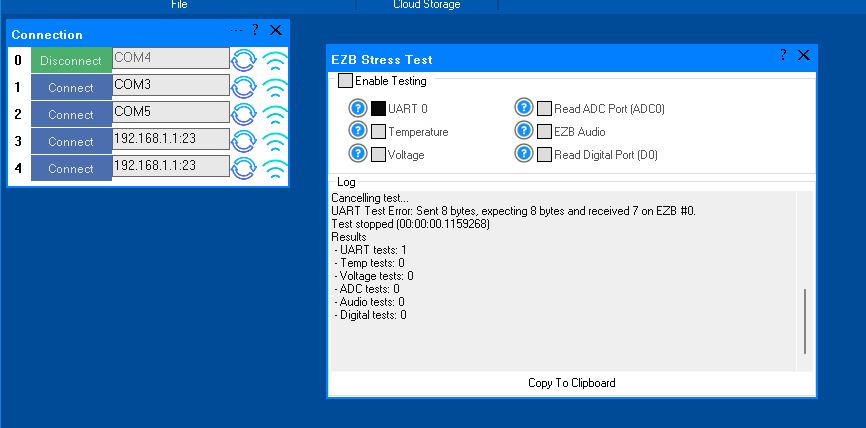
However, when I initiated the UART test, it immediately failed. The test stopped, indicating there was no EZB connected, and the "Enable Testing" button was reset. In the console window, the UART Test displayed the number 4.
Importantly, despite the failure, the connected EZB did not disconnect, freeze, or require a reboot. Here is the logged information from that test:
Timestamp: 2025-12-11 22:18:09 UTC
ARC Version: 2025.12.03.00
OS Version: Microsoft Windows NT 10.0.26100.0
Base Directory: C:\Program Files (x86)\Synthiam Inc\ARC by Synthiam\

=== Exception Information ===
Type: System.Runtime.InteropServices.ExternalException
Message: Requested Clipboard operation did not succeed.
HResult: -2147221040
Source: System.Windows.Forms
TargetSite: Void ThrowIfFailed(Int32)

StackTrace:
   at System.Windows.Forms.Clipboard.ThrowIfFailed(Int32 hr)
   at System.Windows.Forms.Clipboard.SetDataObject(Object data, Boolean copy, Int32 retryTimes, Int32 retryDelay)
   at System.Windows.Forms.Clipboard.SetText(String text, TextDataFormat format)
   at System.Windows.Forms.Clipboard.SetText(String text)
   at EZBStressTest.MainForm.button1_Click(Object sender, EventArgs e) in C:\My Documents\SVN\Developer - Controls\In Production\EZB Stress Test\EZB Stress Test\MY_PROJECT_NAME\MainForm.cs:line 49
   at System.Windows.Forms.Control.OnClick(EventArgs e)
   at System.Windows.Forms.Button.OnClick(EventArgs e)
   at System.Windows.Forms.Button.OnMouseUp(MouseEventArgs mevent)
   at System.Windows.Forms.Control.WmMouseUp(Message& m, MouseButtons button, Int32 clicks)
   at System.Windows.Forms.Control.WndProc(Message& m)
   at System.Windows.Forms.ButtonBase.WndProc(Message& m)
   at System.Windows.Forms.Button.WndProc(Message& m)
   at System.Windows.Forms.Control.ControlNativeWindow.OnMessage(Message& m)
   at System.Windows.Forms.Control.ControlNativeWindow.WndProc(Message& m)
   at System.Windows.Forms.NativeWindow.Callback(IntPtr hWnd, Int32 msg, IntPtr wparam, IntPtr lparam)
Here is an image of the ended UART test:
Additionally, the Stress Test Skill froze, requiring removal and reinstallation to initiate another test.
A similar issue occurred with the Audio test. The console window showed the failed Audio test result as number 16. When running this test and it fails, the connected EZB freezes and needs to be rebooted.
I will post the logged information from the failed Audio test in the next post.
Here is the logged information from the failed Audio test:
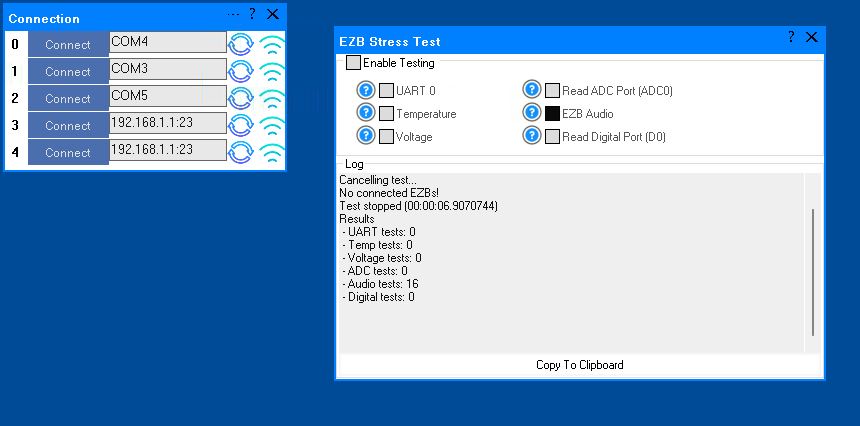
What do these results indicate?
Related Hardware (view all EZB hardware)


Oh, I also should add that UART is not meant for long runs. Also, remember that the UART is only 3.3V, so any resistance will cause issues. Also, your cable isn't shielded or twisted pair, so it'll act as an antenna and resonate with other antennas at high frequencies. Plus, it's in a cased-in area, which helps resonance.
Lastly, even 3 feet is a long run for UART at 3.3 V. I wouldn't recommend anything longer than 12 inches (30 cm). So your best bet would be to run as short a wire as you can between the EZB and UART and use a longer USB cable.
If you MUST run it a longer distance at 3 feet, I would buy Cat5 cable and use that. TX/GND on one twist, RX/GND on the other twist. And make sure all the different twists are GND as well, because you don't want any more antennas. Empty (floating) wires are antennas. They should be grounded.
Thanks for the advice @DJ.
You mention the length of a UART run being less then 3 feet. Does this also refer to the USB to TTL conversion cable used for the connection between the computer and the camera port on the EZB?
If so mine was only 2.5 feet between the computer USB port and the EZB but it was not shielded.
The UART should be less than a foot long and ideally shielded or a twisted pair. There's good detail in this support document about what kind of cables to use, how, and why, for uart: https://synthiam.com/Support/troubleshooting/Troubleshoot-USB-Connections
Your usb can be as long as you want within the usb specification. I don't know what the USB specification is for cable lengths and how it affects speed and reliability.
Thanks for the advice @DJ.
You mention the length of a UART run being less then 3 feet. Does this also refer to the USB to TTL conversion cable used for the connection between the computer and the camera port on the EZB?
If so mine was only 2.5 feet between the computer USB port and the EZB but it was not shielded. It did have unused wires and none had a ground wire around them.
This document explains far more detail than i can: https://synthiam.com/Support/troubleshooting/Troubleshoot-USB-Connections
OK, thanks. Your advice and support means more then you know.
I'm taking your advice and focusing on the location of the USB to TTL converter and moving it closer to the EZB.
The converter part of the cable was inside the robot's shell and down where the computer is, plugged directly into it's USB port. That left about 2 feet of non shielded cable (with a few unused wires in it) running through a lot of possible interference sources.
I ran a USB extension cable up to the top of the robot where the EZB is mounted in the clear and away from any power. Then I placed a new USB to TTL converter with a short run of wires going to the EZB. I didn't twist that short run between the converter and EZB (yet). I simply ran out of time and energy to take that step.
I'll let the robot run and see what happens. I'll know more tomorrow. If I get another disconnect I'll make up a Cat5 cable, shorten up the run some more, twist and ground the unused wires and shielding.
I think you asked if I was using the Stress Test. I was until today but started using my regular project and pulling the ARC log info when you asked about that. If the disconnect presistes after today I'll go back to that test and get the log info for both ARC and the Stress Test.
Okay, so you're bouncing between the stress test and a real project - that's good for testing. The length of the uart run should definitely be the shortest path. I know we've tested longer UART runs of up to 3 feet, but that's on test beds, and every use case is unique. The thing with UART is that it isn't a communication protocol with error checking or clock/packet syncing, so it's dependent on the connection quality. To ensure a high connection quality, a short run is ideal to avoid interference.
On a sidenote, this isn't the first time I've been involved in a discussion regarding UART-style communication. While uart is designed for short runs, there are alternatives such as rs485, which is a differential hardware protocol. The problem is that all communication methods have documented specifications, which makes the protocol reliable if it stays within those bounds. For example, Ethernet is very reliable when using the correct cable, which is why it's widely available. If you were to run Ethernet with straight wires, you'd experience poor communication. So what I'm getting at is if you follow the specification, you'll experience dependable quality. But if you work outside of the specifications, you'll experience poor quality.
By making the changes that you're doing, running a longer USB run and shortening the uart, you'll eliminate that as an issue. Keep doing what you're doing, and we'll sort it out.
Cool @DJ. Again, I appreacheate your wisdom and experience in helping me out here. Your support and guidance had been key to the progress I've seen (and my sanity. LOL).
I don't want to jinx this but....
Yesterday evening, after I shortened up the UART run and moving the converter out of the inside of the robot, I got over 8 hours of connectivity without a disconnect on this connection. then I shut it down for the night and went to bed with a smile on my lips. This is with the robot running it's regular project, which is pretty busy. As mentioned in the past I usually only got 2 to 5 hours before a disconnect on this connection.
I restarted the robot this morning and it's been running nicely for a couple hours now. I'll keep it running it to test this new setup the rest of the day and see where we are at.