


Hi Guys,
We are trying to set variables through the network (Telnet) on ARC, but we could not find a way to change the variables values.
Is there a way to alter variables or pass parameters to custom made scripts through the network?
Thanks Guys 


Hi Guys,
We are trying to set variables through the network (Telnet) on ARC, but we could not find a way to change the variables values.
Is there a way to alter variables or pass parameters to custom made scripts through the network?
Thanks Guys

ARC is a Raw TCP Server and will accept and run valid EZ-Script sentences:
First activate the server:
Then i used a windows 10 telnet client:
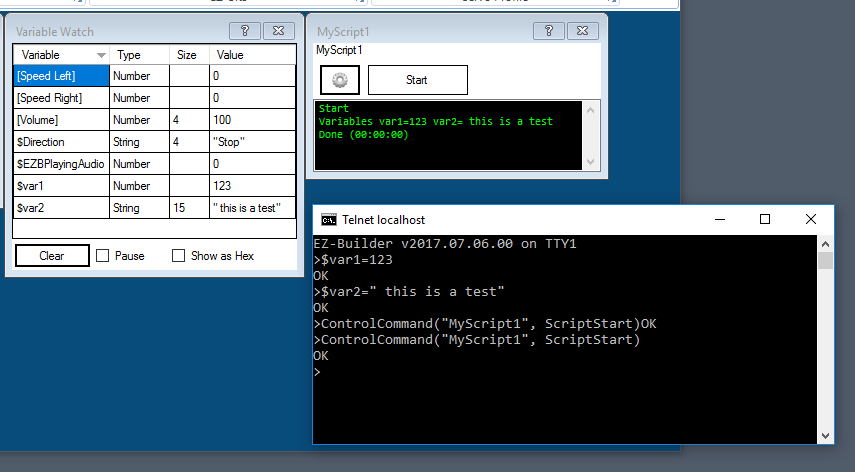
As you can see (ARC window):I managed to change/create variables and i executed MyScript1
BUT
From ARC:
Note: bear in mind although ARC accepts Telnet clients is not a Telnet Server
Telnet is an old and well documented protocol: https://en.wikipedia.org/wiki/Telnet
and supports 7 bit clients, so when you make a connection both parties can negotiate the data transfer mode, the server can send you a data byte to negotiate or a client can actively start negotiating.
ARC is not a Telnet Server so will not start the negotiation neither will accept a client negotiation.
So if you use a full Telnet client like putty:
and then you start sending EZ-Script statements:
you will notice the first statement fails!
The reason is Putty (Telnet Client) engaged the Telnet Protocol negotiating by sending a control byte to the ARC Tcp Server.
ARC server waits for the End-Of-Line sequence to execute the EZ-Script statement.
So the first statement has unexpected data (telnet client control byte) and ARC will report an error.
You have few choices:
send some end-of-line sequences e.g. enter (CR/LF) characters before starting the EZ-Script statements. After the first statement all the other statements were successfully executed.
Use a passive negotiator Telnet Client e.g. Windows 10 Telnet. The client does not start telnet negotiating but will negotiate if the server starts the negotiation process.
use a RAW tcp client application or RAW mode (putty) when connecting to the ARC TCP Server.
Easiest way is to use http server: https://synthiam.com/Tutorials/Help.aspx?id=48
Nothing beats a shell command
Create a command file e.g. morning.txt
and if you have putty with plink installed.
Note: