


 Resolved by


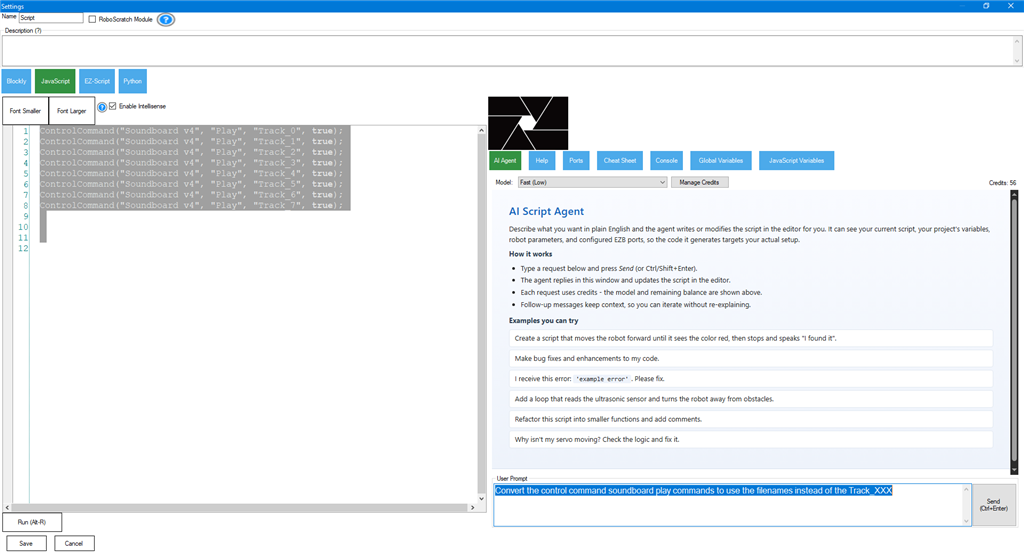
I need a little guidance with getting the Script AI assistant to do what I need. Maybe I'm not asking correctly so it understands what I want.
I've been trying a while now to get it to change a bunch of soundboard controlCommands I currently have have that are using the old track number format to the new filename format.
For example I want it to change all of these commands in a script from
controlCommand("Dr_Smith", "Track_2")
to
ControlCommand("Dr_Smith", "Play", "Evil purpose.mp3");
I've already waisted 200 credits trying to figure this out. Oddly sometimes the AI will convert the commands like I want but it will only do about 8 out of 50 I have scripted. Other times it will tell me I need to give it the mapping to the file names. I thought this Script AI knew my project? If I provide mapping I could do this replacement myself.
This is kinda frustrating and expensive on waisted credits. Any suggestions on how I can talk to this AI to get it to do what I want?
Below is an example of one of the conversations I've had with the scripting AI assent trying to get it to simply replace my track numbers with the corresponding track names (file names) listed in the soundboard:
You:
replace all Track_# with Play + filename from that soundboard.
AI:
Which function(s) do you want me to update first (e.g., doDr_Smith, doR2D2, etc.), and do you already have the exact filenames for each Track_# in those soundboards?
You:
Update all functions. The exact file names for each track_# are the track titles corsponding to the track_# in thouse soundboards.
AI:
I can update every Track_# to Play "filename" but I need the actual file name for each track number in each soundboard (e.g., Dr_Smith Track_1 = "DrSmith.mp3", Track_2 = "Evil purpose.mp3", etc.).
Can you provide the track-number filename mapping for each soundboard (Dr_Smith, R2D2, Will, Don, Maureen, John, Tufeld, Judy, Wall_e, Penny, Hal9000, Bender, Robby, SFX, Soundboard v4), or confirm you want me to use index-based play (e.g., controlCommand("Dr_Smith", "Play", 1)) instead?




I hate to be that guy, but DJ is actually incorrect in this conversation . There's a first for everything! Sorry, DJ, haha. This will never actually work for converting track numbers to filenames, and there's a good reason for it. Let me explain.
The AI was correct by asking for the track numbers and names. This is because, while the AI knows the project, it has no idea which track number corresponds to which name. That is because Track_XX is a runtime condition, not a configuration setting. This means that even DJ's example above is incorrect. Essentially, DJ's example only looks like the AI converted it, but there's no way to know whether it worked because the Track numbers are unknown. DJ's example "guessed" the result rather than providing an actual result.
So, while I know what you mean, it would look nicer to use the file names rather than track numbers, but the AI can't really help with that. At least not without knowing a corresponding list of track numbers and filenames, in which case you could have just done it yourself with a search and replace. My suggestion is to keep it as is, because it works fine and isn't really important to change. Moving forward, you can start using the filenames, but for past scripts, it's okay to keep them as is.
I hope that makes sense.
Hey @Synthiam Support, thanks for taking the time to outline what's happening. .
That all does make sense and I've been suspecting this may be the case based on the mixed results AI has given me these past few days. It's been a good education for me to learn how to interact with AI and what to expect (or not expect in this case).
After studying the results that AI gave me with these conversion attempts I can see now that AI was just guessing and trying to make the best attempt to what I was asking to do. I mentioned above that AI mixed up my delays (sleep commands). After looking closer and comparing my old unconverted script to the new one AI wrote (with the attempted file name conversions), I see it really did not mix anything up. I can see it "tried" to map the file names to the index slots from the requested soundboard and not the track numbers I had listed in that slot. So, for example, if I didn't have the clip in index slot 0 listed in the script that I wrote (and I'm asking to convert to file names), AI would actually replace the sound clip in my script with the actual file name that was in slot 0. This would push all the following clips down as it converted the tracks to file names, in order. However it wouldn't move the delays. This happened along the whole script by replacing clips I had left out of my script that were actually in order in the soundboard, That's what threw off the delays I had so painstakingly timed out and attached to each command that triggered a sound clip.
So, yes, doing this task manually or just leaving the script alone was the best way. However when I go back in the script to go maintenance or change something it was great to know what sound clip or EZB port was being triggered. I usually took the time to comment anything like this as I was writing a script but with some scripts I simply got lazy or in a hurry. LOL.
Hey @Synthiam! Thanks!! I just found your email showing me your support! Whoever did this, you know who you are. You're the best and I appreciate you.