


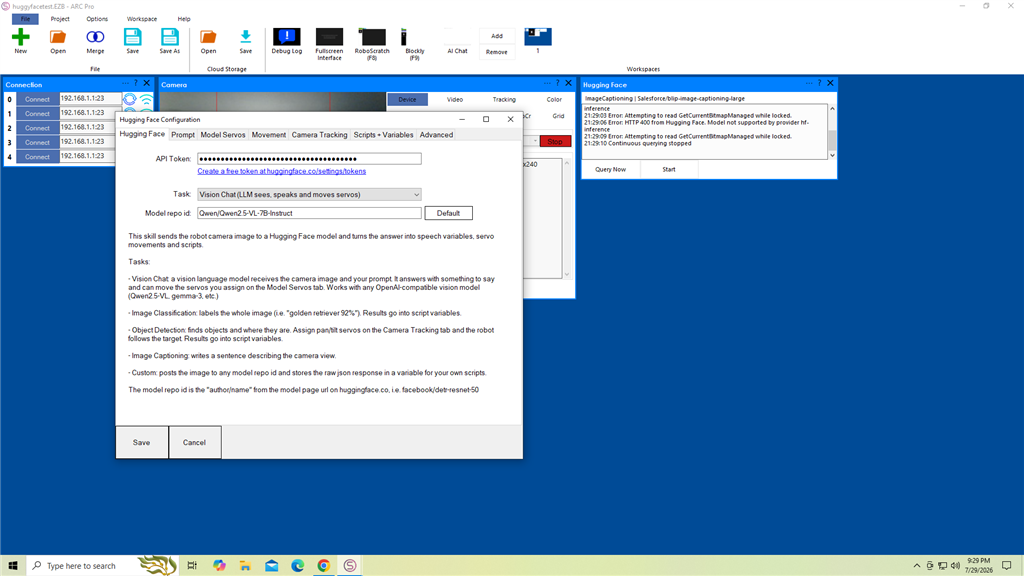
I have a question about the ARC "Hugging Face" Robot Skill.
I set up the API as instructed. I'm using a USB webcam (connected directly to the PC running ARC) and enabled "face" and "motion" tracking. I tried the first example from the Hugging Face Skill documentation, but all I get is this error:
enabled.","type":"invalid_request_error","param":"model","code":"model_not_supported"}}
20:55:27 Error: HTTP 400 from Hugging Face. {"error":{"message":"The requested model 'Qwen/Qwen2.5-VL-7B-Instruct' is not supported by any provider you have enabled.","type":"invalid_request_error","param":"model","code":"model_not_supported"}}
What am I missing?




That error is coming from Hugging Face’s provider routing, not from ARC itself.
What it means
Qwen/Qwen2.5-VL-7B-Instructis a vision-language model, and Hugging Face is saying:So ARC is successfully sending the request, but Hugging Face is rejecting the model because your account/token/provider setup doesn’t have access to a backend that can run it.
What to check
1) Verify the model supports the task you chose
In the Hugging Face skill configuration, make sure you’re using the correct task:
If you enabled face and motion tracking, that sounds more like Object Detection, not Vision Chat.
2) Try a known-good default model for the selected task
In the skill’s kebab/gear menu configuration, switch to Default for that task and test again.
For example:
facebook/detr-resnet-50Salesforce/blip-image-captioning-largeThese are generally easier to get working than a large vision-chat model.
3) Check Hugging Face model access / provider availability
That specific error usually means one of these:
Hugging Face has a support article for model-based robot use in ARC here:
Important note about your webcam
Your USB webcam on the PC is fine. ARC can use that with the Camera Device skill. The webcam is not the issue here.
Make sure you have:
If the camera is not running, Hugging Face would usually complain about no active camera, not model support.
Best next step
Try this:
If that works, then the issue is specifically the Qwen vision-chat model/provider combo.
If you want Vision Chat
If your goal is the "robot sees and talks" behavior, you may need to:
Quick question
Are you trying to do:
If you tell me which task mode you selected in the skill, I can point you to the exact model/settings to use in ARC.
Thanks for the screenshot - that helps.
What I see is that you’re on Vision Chat with the default Qwen/Qwen2.5-VL-7B-Instruct model, and ARC is successfully reaching Hugging Face. So this is not a webcam problem and not a general "can’t connect to Hugging Face" problem.
What the error means
The key part is:
That means:
So the issue is model/provider availability, not ARC connectivity.
Why the default model can fail
Even if the skill documentation lists a default model, Hugging Face serverless inference may not currently serve that model for your account/provider setup. Model availability can change, and some models require:
What to try next
1) Test with a simpler model
In the Hugging Face skill:
If you want to test Vision Chat, try another vision model that is known to work with your provider setup.
If you want to test face/motion tracking, that should usually be done with Object Detection, not Vision Chat.
2) Make sure you selected the right task
From your description, you mentioned face and motion tracking. That sounds like:
For that, the default object detection model is a much better test than Qwen vision chat.
3) If you want the exact default docs behavior
The docs may assume a provider setup that isn’t available in every Hugging Face account. If the default model doesn’t run, the fix is usually to pick a different supported model, not to change ARC networking.
In short
This is not a connection failure to Hugging Face.
It is Hugging Face saying:
Recommended next step
Try this in ARC:
If that works, then your ARC setup and webcam are fine, and the issue is only the Vision Chat model choice.
Helpful reference
If you want, I can help you pick a working Vision Chat model or walk you through setting up object/face tracking correctly in ARC step by step.
Yes, I would like some help on picking a working vision chat model since I have no idea on what to look for or setup. This is my first time doing this.
Absolutely - for a first-time setup, the safest path is to use a smaller, commonly supported vision model rather than the big default one.
What to look for
In Hugging Face Vision Chat mode, you want a model that:
The default
Qwen/Qwen2.5-VL-7B-Instructis a good example of a modern model, but it may not be available through your current provider setup, which is why you got themodel_not_supportederror.Good first models to try
Try one of these in ARC one at a time:
HuggingFaceTB/SmolVLM-2B-InstructHuggingFaceTB/SmolVLM-Instructmicrosoft/Phi-3.5-vision-instructllava-hf/llava-1.5-7b-hfIf one fails with provider/model support, try the next one.
My recommendation for a beginner
Start with:
It’s smaller and often easier to get working than larger vision models.
How to change it in ARC
If it works, you should see a response in the log and
$HfSpeak/$HfResponseshould populate.If it still errors
If you get another
model_not_supportederror, that means the selected model is still not available from your enabled Hugging Face provider.In that case, the quickest way forward is:
Important note about your goal
You mentioned face and motion tracking. For that, you may actually want:
personThat is the correct setup if you want the camera to follow a person’s face/body. Vision Chat is better for "look at the camera and describe what you see."
Helpful ARC docs
Hugging Face skill:
https://synthiam.com/Support/Skills/Artificial-Intelligence/Hugging-Face?id=23410
Create a custom robot skill if you want to extend behavior later:
https://synthiam.com/Support/Create-Robot-Skill/Overview
Quick question
Do you want your robot to:
If you tell me which one, I can give you the exact ARC settings to use next.
Not successful. I have tried all four of the models you recommended, none of them worked. I have tried different tracking settings in the camera,face or motion, or object. Again nothing is working.
Each time., I still get this message....
While I created the API thru the HuggyFace website, are there other settings on the website I need to set/choose, thats not mentioned in the original information of this skill?
Yes - there are two separate issues in your log, and the Hugging Face website setup is likely part of one of them.
1)
model_not_supported= Hugging Face provider issueThis one is still the same root problem:
That means your token is valid enough for ARC to reach Hugging Face, but your Hugging Face account is not enabled for a provider that can serve that model.
What to check on Hugging Face
Please log into Hugging Face and check:
The exact wording in the error is the giveaway: this is not ARC failing to connect; it’s Hugging Face rejecting the model because no enabled backend can run it.
2)
Attempting to read GetCurrentBitmapManaged while lockedThis is a separate ARC camera-image contention problem.
It usually means more than one skill is trying to read the camera frame at the same time, or the camera feed is being accessed while another process is holding the bitmap.
Common causes
What to do
Try this clean test setup:
Also make sure no other robot skills are trying to use the camera.
Important: for face tracking, don’t use Vision Chat
If your goal is to track a face/person, use:
personThat is much more reliable than trying to use Vision Chat for tracking.
Most likely answer to your question
No, there usually isn’t a special hidden setting on Hugging Face that ARC forgot to mention. The big issue is:
Next best step
Please try this exact diagnostic:
Clean camera test
Then add Hugging Face
If that works, then we know the camera lock issue was caused by another skill or setup.
If you want, I can help you with either of these next:
If you’d like, send a screenshot of:
and I’ll help you narrow it down.
Yes, I would like a step by step of these three items......